> ## Documentation Index
> Fetch the complete documentation index at: https://easy-peasy.ai/docs/llms.txt
> Use this file to discover all available pages before exploring further.
# Manage your subscription
> Upgrade or change your plan, update your card, download invoices, and cancel.
Everything about your plan is on [**Settings** > **Subscription**](https://easy-peasy.ai/settings/billing). You can also get there from the account menu under the logo.
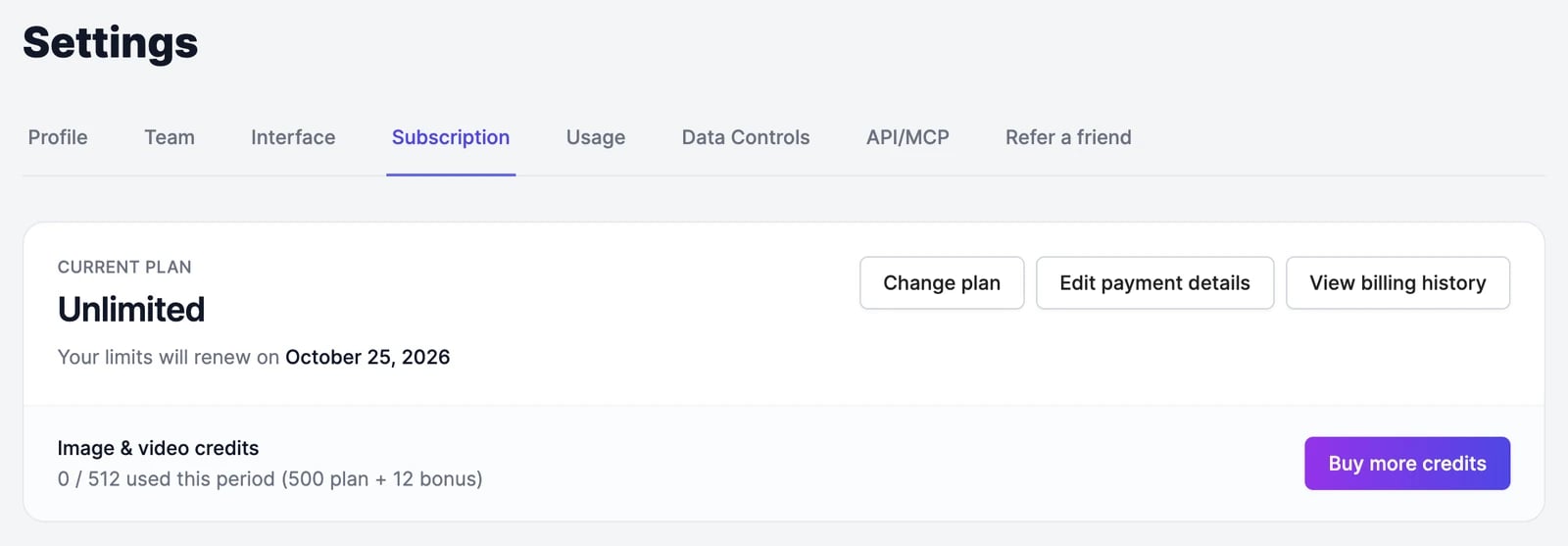 The card at the top shows your plan, its status, and the date your allowance renews. Payments are handled by Stripe, so the buttons open Stripe's secure billing page in the same window.
On a team, only the account owner can manage the subscription. Team members see a message asking them to talk to the owner.
## Upgrade or change your plan
Scroll to **Choose your plan** on the same page. Switch between **Monthly** and **Yearly** at the top; yearly billing costs less per month. Click **Show all plans** to see the larger plans.
Stripe shows what you'll pay before you confirm. When you upgrade, you pay only the difference for the rest of the current period, and your billing date doesn't change.
Your new allowance applies as soon as the payment goes through. Check it on [**Settings** > **Usage**](/docs/account/usage).
To move to a smaller plan, or between monthly and yearly billing, click **Change plan**. Stripe shows the new price and when it takes effect before you confirm.
## Update your payment method
Click **Edit payment details**, then add a card or change the default one on the Stripe page.
## Download invoices and receipts
Click **View billing history**. Stripe lists every invoice with a link to download it as a PDF.
## Free trials
If your plan started with a free trial, the card shows how many days are left and the date the trial ends. During a trial you get the plan's full allowance, except image & video credits, which are limited to 50.
To start paying early and unlock the full credit allowance, click **End trial and start plan now**. You're charged right away, a new billing period starts today, and you give up the trial days you had left.
## Cancel your plan
It's next to the other buttons on the plan card.
Read the notice and click **Yes, cancel my plan**, then finish on the Stripe page.
Your plan stays active until the end of the period you've paid for, and the card shows the date it ends. After that, your account moves to the Free plan. Changed your mind before then? Click **Don't cancel** on the same card.
Some older plans are no longer sold. If you're on one and cancel, you can't subscribe to it again later.
## If a payment fails
If your card is declined, we email you a link to pay the invoice. Until it's paid, your account works like the Free plan. Pay the invoice from that email to restore your plan right away, and update your card with **Edit payment details** so the next renewal goes through.
## Add-ons
* **Team seats.** Add people to your plan from [**Settings** > **Team**](https://easy-peasy.ai/settings/team) with **Purchase Seats**. Each seat gets the plan's full allowance.
* **Always-On Hosting.** Keeps a website or app that Marky built for you running around the clock. Turn it on for each app in its deployment settings.
* **Extra credits and words.** See [Buy more credits](/docs/account/buy-credits).
## Questions
No. Your plan allowance resets every month. Credits and words you buy separately do carry over until you use them. See [Plans and credits](/docs/account/plans-and-credits#when-your-allowance-resets).
No. Yearly plans get the same allowance every month, renewing on the same day each month.
Email [support@easy-peasy.ai](mailto:support@easy-peasy.ai) with your account email and we'll look at it.
The card at the top shows your plan, its status, and the date your allowance renews. Payments are handled by Stripe, so the buttons open Stripe's secure billing page in the same window.
On a team, only the account owner can manage the subscription. Team members see a message asking them to talk to the owner.
## Upgrade or change your plan
Scroll to **Choose your plan** on the same page. Switch between **Monthly** and **Yearly** at the top; yearly billing costs less per month. Click **Show all plans** to see the larger plans.
Stripe shows what you'll pay before you confirm. When you upgrade, you pay only the difference for the rest of the current period, and your billing date doesn't change.
Your new allowance applies as soon as the payment goes through. Check it on [**Settings** > **Usage**](/docs/account/usage).
To move to a smaller plan, or between monthly and yearly billing, click **Change plan**. Stripe shows the new price and when it takes effect before you confirm.
## Update your payment method
Click **Edit payment details**, then add a card or change the default one on the Stripe page.
## Download invoices and receipts
Click **View billing history**. Stripe lists every invoice with a link to download it as a PDF.
## Free trials
If your plan started with a free trial, the card shows how many days are left and the date the trial ends. During a trial you get the plan's full allowance, except image & video credits, which are limited to 50.
To start paying early and unlock the full credit allowance, click **End trial and start plan now**. You're charged right away, a new billing period starts today, and you give up the trial days you had left.
## Cancel your plan
It's next to the other buttons on the plan card.
Read the notice and click **Yes, cancel my plan**, then finish on the Stripe page.
Your plan stays active until the end of the period you've paid for, and the card shows the date it ends. After that, your account moves to the Free plan. Changed your mind before then? Click **Don't cancel** on the same card.
Some older plans are no longer sold. If you're on one and cancel, you can't subscribe to it again later.
## If a payment fails
If your card is declined, we email you a link to pay the invoice. Until it's paid, your account works like the Free plan. Pay the invoice from that email to restore your plan right away, and update your card with **Edit payment details** so the next renewal goes through.
## Add-ons
* **Team seats.** Add people to your plan from [**Settings** > **Team**](https://easy-peasy.ai/settings/team) with **Purchase Seats**. Each seat gets the plan's full allowance.
* **Always-On Hosting.** Keeps a website or app that Marky built for you running around the clock. Turn it on for each app in its deployment settings.
* **Extra credits and words.** See [Buy more credits](/docs/account/buy-credits).
## Questions
No. Your plan allowance resets every month. Credits and words you buy separately do carry over until you use them. See [Plans and credits](/docs/account/plans-and-credits#when-your-allowance-resets).
No. Yearly plans get the same allowance every month, renewing on the same day each month.
Email [support@easy-peasy.ai](mailto:support@easy-peasy.ai) with your account email and we'll look at it.