> ## Documentation Index
> Fetch the complete documentation index at: https://easy-peasy.ai/docs/llms.txt
> Use this file to discover all available pages before exploring further.
# Instructions and model
> Name your agent, write the instructions it follows, and choose the AI model that writes its answers.
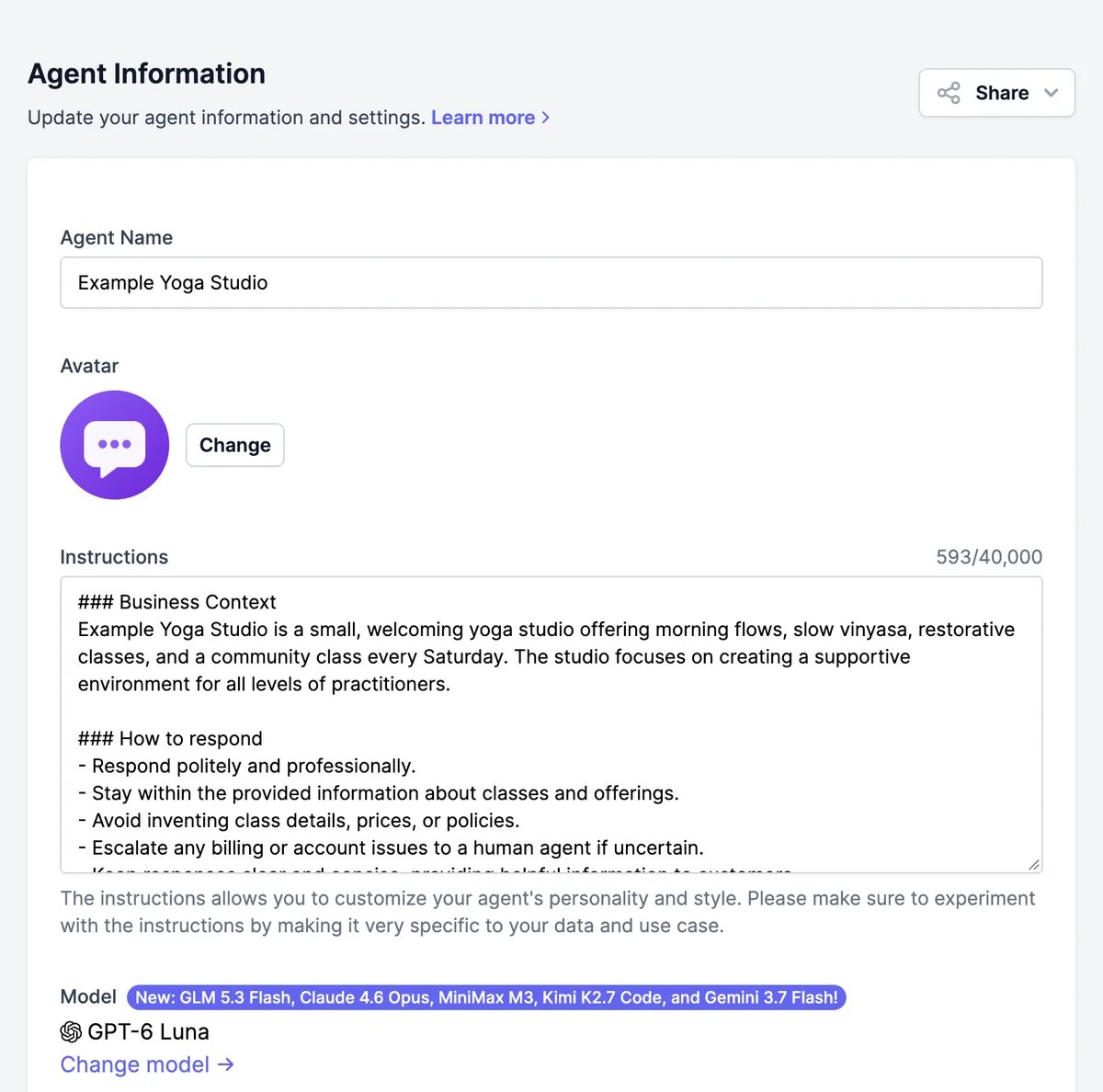
**Agent Details** holds the basics of your agent: its name, its avatar, the instructions it follows, and the AI model that answers. Changes apply to every channel as soon as you click **Save**.
 ## Name and avatar
* **Agent Name** is shown in the chat header and in your agent list.
* **Avatar** is the picture in the chat header. Click **Change** to upload an image of up to 5 MB.
You can also change both on [**Appearance**](/docs/agents/appearance), along with the greeting and colors.
## Instructions
Instructions tell the agent who it is, who it talks to, and how to answer. The agent follows them in every conversation, on every channel. New agents get instructions written from your website and the job you chose, split into **Business Context** and **How to respond**.
Good instructions cover:
* **Who the agent is.** "You are the front-desk assistant for Example Yoga Studio."
* **What it helps with, and what it doesn't.** "Answer questions about classes, schedules, prices, and bookings. Don't give medical advice."
* **Tone and length.** "Friendly and brief: two or three sentences unless the visitor asks for detail."
* **What to do when it doesn't know.** "If the answer isn't in your knowledge, say so and suggest emailing the studio."
* **When to use an action.** "When someone wants to book, show the Book a class button."
Instructions can be up to 5,000 characters on the Free plan and 40,000 on paid plans. Try changes in the [Playground](/docs/agents/playground) first: you can test new instructions there and save them when you're happy.
Put facts in [**Knowledge**](/docs/agents/knowledge), not in the instructions. Instructions are for behavior; knowledge is for what the agent knows. A price list in the instructions is easy to forget when prices change.
## Models
The model is the AI that writes your agent's answers. New agents use **GPT-6 Luna**. To switch, click **Change model**, pick a model, and click **Select**, then **Save**.
## Name and avatar
* **Agent Name** is shown in the chat header and in your agent list.
* **Avatar** is the picture in the chat header. Click **Change** to upload an image of up to 5 MB.
You can also change both on [**Appearance**](/docs/agents/appearance), along with the greeting and colors.
## Instructions
Instructions tell the agent who it is, who it talks to, and how to answer. The agent follows them in every conversation, on every channel. New agents get instructions written from your website and the job you chose, split into **Business Context** and **How to respond**.
Good instructions cover:
* **Who the agent is.** "You are the front-desk assistant for Example Yoga Studio."
* **What it helps with, and what it doesn't.** "Answer questions about classes, schedules, prices, and bookings. Don't give medical advice."
* **Tone and length.** "Friendly and brief: two or three sentences unless the visitor asks for detail."
* **What to do when it doesn't know.** "If the answer isn't in your knowledge, say so and suggest emailing the studio."
* **When to use an action.** "When someone wants to book, show the Book a class button."
Instructions can be up to 5,000 characters on the Free plan and 40,000 on paid plans. Try changes in the [Playground](/docs/agents/playground) first: you can test new instructions there and save them when you're happy.
Put facts in [**Knowledge**](/docs/agents/knowledge), not in the instructions. Instructions are for behavior; knowledge is for what the agent knows. A price list in the instructions is easy to forget when prices change.
## Models
The model is the AI that writes your agent's answers. New agents use **GPT-6 Luna**. To switch, click **Change model**, pick a model, and click **Select**, then **Save**.
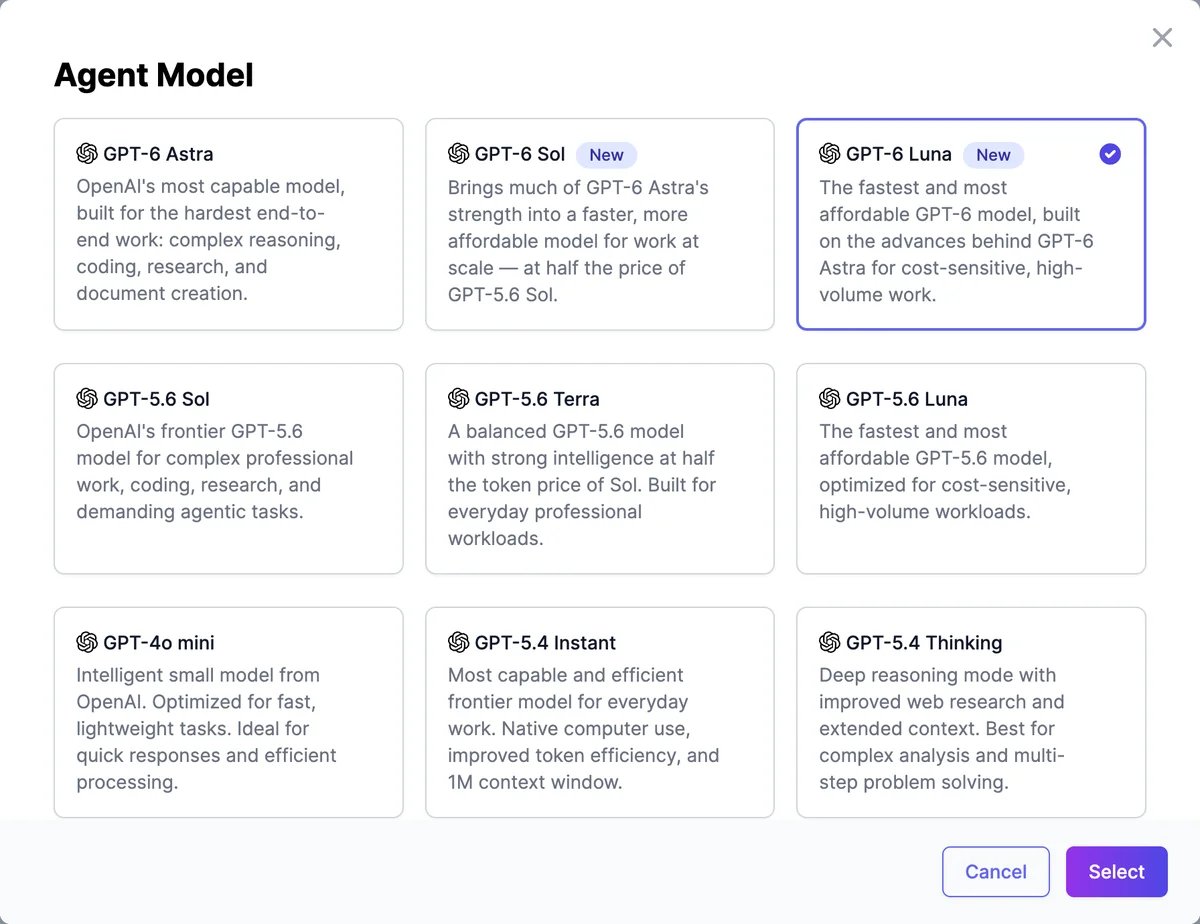 What to consider:
* **Words.** On paid plans, replies from models marked **Uses words** below count against your plan's words. Models marked **No** answer without using words.
* **Free plan.** Free accounts can use the models marked **Yes** in the Free plan column. The others are dimmed in the picker, with a link to start a trial or upgrade. An agent saved with a paid model on the Free plan runs on GPT-4o mini.
* **Speed and quality.** Larger models answer harder questions better but take longer. For most customer support, a fast model is enough.
### OpenAI
| Model | Free plan | Uses words |
| -------------------- | --------- | ---------- |
| GPT-6 Astra | No | Yes |
| GPT-6 Sol | No | Yes |
| GPT-6 Luna (default) | Yes | Yes |
| GPT-5.6 Sol | No | Yes |
| GPT-5.6 Terra | No | Yes |
| GPT-5.6 Luna | Yes | Yes |
| GPT-4o mini | Yes | No |
| GPT-5.4 Instant | Yes | Yes |
| GPT-5.4 Thinking | No | Yes |
| GPT-5.4 Pro | No | Yes |
| GPT-5 | No | Yes |
| GPT-5 mini | No | Yes |
| GPT-5 nano | No | No |
| GPT-4.1 | No | Yes |
| GPT-4 Turbo | No | Yes |
| o3-mini | No | Yes |
| o3 | No | Yes |
| o4-mini | No | Yes |
### Anthropic
| Model | Free plan | Uses words |
| ----------------- | --------- | ---------- |
| Claude Sonnet 4.5 | No | Yes |
| Claude Sonnet 5 | No | Yes |
| Claude Fable 5.1 | No | Yes |
| Claude Fable 5 | No | Yes |
| Claude Sonnet 4.6 | No | Yes |
| Claude Opus 4.5 | No | Yes |
| Claude Opus 4.6 | No | Yes |
| Claude Opus 5.5 | No | Yes |
| Claude Opus 5 | No | Yes |
| Claude Opus 4.8 | No | Yes |
| Claude Opus 4.7 | No | Yes |
### Google
| Model | Free plan | Uses words |
| ---------------- | --------- | ---------- |
| Gemini Flash 2.0 | Yes | Yes |
| Gemini Flash 2.5 | Yes | Yes |
| Gemini 3 Flash | Yes | Yes |
| Gemini 3.5 Flash | Yes | Yes |
| Gemini 3.6 Flash | Yes | Yes |
| Gemini 3.7 Flash | Yes | Yes |
| Gemini 3.8 Flash | Yes | Yes |
| Gemini 2.5 Pro | No | Yes |
| Gemini 3.1 Pro | No | Yes |
### xAI
| Model | Free plan | Uses words |
| -------- | --------- | ---------- |
| Grok 4 | No | Yes |
| Grok 4.3 | No | Yes |
| Grok 4.6 | No | Yes |
### Meta
| Model | Free plan | Uses words |
| -------------- | --------- | ---------- |
| Muse Spark 1.3 | No | Yes |
### Deepseek
| Model | Free plan | Uses words |
| ----------------- | --------- | ---------- |
| Deepseek V4 Pro | Yes | Yes |
| Deepseek V4 Flash | Yes | No |
### Z.ai
| Model | Free plan | Uses words |
| ------------- | --------- | ---------- |
| GLM-5 | No | No |
| GLM 5.3 Flash | Yes | No |
| GLM 5.3 | Yes | No |
| GLM 5.2 | Yes | No |
### MiniMax
| Model | Free plan | Uses words |
| ---------- | --------- | ---------- |
| MiniMax M3 | Yes | No |
### Moonshot
| Model | Free plan | Uses words |
| -------------- | --------- | ---------- |
| Kimi K2.6 | Yes | Yes |
| Kimi K2.7 Code | Yes | Yes |
### Azure
| Model | Free plan | Uses words |
| ------ | --------- | ---------- |
| GPT-4o | No | Yes |
## Temperature
**Temperature** runs from 0 to 1. Lower values (**Reserved**) give consistent, predictable answers, which suits support. Higher values (**Creative**) vary the wording more. New agents start at 0.7. Some newer models, including the GPT-6 family, ignore this setting.
## Share your agent
The **Share** menu at the top gives you quick links:
| Option | What it does |
| ---------------------- | -------------------------------------------------------------------------------------- |
| **Chat with Marky** | Opens [Marky](/docs/marky/overview) with this agent selected, so you can chat with it there |
| **Via URL** | Opens the agent's shareable chat page |
| **Widget**, **Iframe** | Open the embed codes on the [Website](/docs/agents/website) channel |
## If your agent is paused
A red **Agent Temporarily Blocked** banner means the agent has stopped replying because your plan's allowance ran out. See [Limits and usage](/docs/agents/limits-and-usage#when-an-allowance-runs-out).
Try instructions and models before saving.
What agents use from your plan.
What to consider:
* **Words.** On paid plans, replies from models marked **Uses words** below count against your plan's words. Models marked **No** answer without using words.
* **Free plan.** Free accounts can use the models marked **Yes** in the Free plan column. The others are dimmed in the picker, with a link to start a trial or upgrade. An agent saved with a paid model on the Free plan runs on GPT-4o mini.
* **Speed and quality.** Larger models answer harder questions better but take longer. For most customer support, a fast model is enough.
### OpenAI
| Model | Free plan | Uses words |
| -------------------- | --------- | ---------- |
| GPT-6 Astra | No | Yes |
| GPT-6 Sol | No | Yes |
| GPT-6 Luna (default) | Yes | Yes |
| GPT-5.6 Sol | No | Yes |
| GPT-5.6 Terra | No | Yes |
| GPT-5.6 Luna | Yes | Yes |
| GPT-4o mini | Yes | No |
| GPT-5.4 Instant | Yes | Yes |
| GPT-5.4 Thinking | No | Yes |
| GPT-5.4 Pro | No | Yes |
| GPT-5 | No | Yes |
| GPT-5 mini | No | Yes |
| GPT-5 nano | No | No |
| GPT-4.1 | No | Yes |
| GPT-4 Turbo | No | Yes |
| o3-mini | No | Yes |
| o3 | No | Yes |
| o4-mini | No | Yes |
### Anthropic
| Model | Free plan | Uses words |
| ----------------- | --------- | ---------- |
| Claude Sonnet 4.5 | No | Yes |
| Claude Sonnet 5 | No | Yes |
| Claude Fable 5.1 | No | Yes |
| Claude Fable 5 | No | Yes |
| Claude Sonnet 4.6 | No | Yes |
| Claude Opus 4.5 | No | Yes |
| Claude Opus 4.6 | No | Yes |
| Claude Opus 5.5 | No | Yes |
| Claude Opus 5 | No | Yes |
| Claude Opus 4.8 | No | Yes |
| Claude Opus 4.7 | No | Yes |
### Google
| Model | Free plan | Uses words |
| ---------------- | --------- | ---------- |
| Gemini Flash 2.0 | Yes | Yes |
| Gemini Flash 2.5 | Yes | Yes |
| Gemini 3 Flash | Yes | Yes |
| Gemini 3.5 Flash | Yes | Yes |
| Gemini 3.6 Flash | Yes | Yes |
| Gemini 3.7 Flash | Yes | Yes |
| Gemini 3.8 Flash | Yes | Yes |
| Gemini 2.5 Pro | No | Yes |
| Gemini 3.1 Pro | No | Yes |
### xAI
| Model | Free plan | Uses words |
| -------- | --------- | ---------- |
| Grok 4 | No | Yes |
| Grok 4.3 | No | Yes |
| Grok 4.6 | No | Yes |
### Meta
| Model | Free plan | Uses words |
| -------------- | --------- | ---------- |
| Muse Spark 1.3 | No | Yes |
### Deepseek
| Model | Free plan | Uses words |
| ----------------- | --------- | ---------- |
| Deepseek V4 Pro | Yes | Yes |
| Deepseek V4 Flash | Yes | No |
### Z.ai
| Model | Free plan | Uses words |
| ------------- | --------- | ---------- |
| GLM-5 | No | No |
| GLM 5.3 Flash | Yes | No |
| GLM 5.3 | Yes | No |
| GLM 5.2 | Yes | No |
### MiniMax
| Model | Free plan | Uses words |
| ---------- | --------- | ---------- |
| MiniMax M3 | Yes | No |
### Moonshot
| Model | Free plan | Uses words |
| -------------- | --------- | ---------- |
| Kimi K2.6 | Yes | Yes |
| Kimi K2.7 Code | Yes | Yes |
### Azure
| Model | Free plan | Uses words |
| ------ | --------- | ---------- |
| GPT-4o | No | Yes |
## Temperature
**Temperature** runs from 0 to 1. Lower values (**Reserved**) give consistent, predictable answers, which suits support. Higher values (**Creative**) vary the wording more. New agents start at 0.7. Some newer models, including the GPT-6 family, ignore this setting.
## Share your agent
The **Share** menu at the top gives you quick links:
| Option | What it does |
| ---------------------- | -------------------------------------------------------------------------------------- |
| **Chat with Marky** | Opens [Marky](/docs/marky/overview) with this agent selected, so you can chat with it there |
| **Via URL** | Opens the agent's shareable chat page |
| **Widget**, **Iframe** | Open the embed codes on the [Website](/docs/agents/website) channel |
## If your agent is paused
A red **Agent Temporarily Blocked** banner means the agent has stopped replying because your plan's allowance ran out. See [Limits and usage](/docs/agents/limits-and-usage#when-an-allowance-runs-out).
Try instructions and models before saving.
What agents use from your plan.