> ## Documentation Index
> Fetch the complete documentation index at: https://easy-peasy.ai/docs/llms.txt
> Use this file to discover all available pages before exploring further.
# Knowledge
> Add the websites, documents, text, Q&A, sitemaps, and YouTube videos your agent answers from, and keep them up to date.
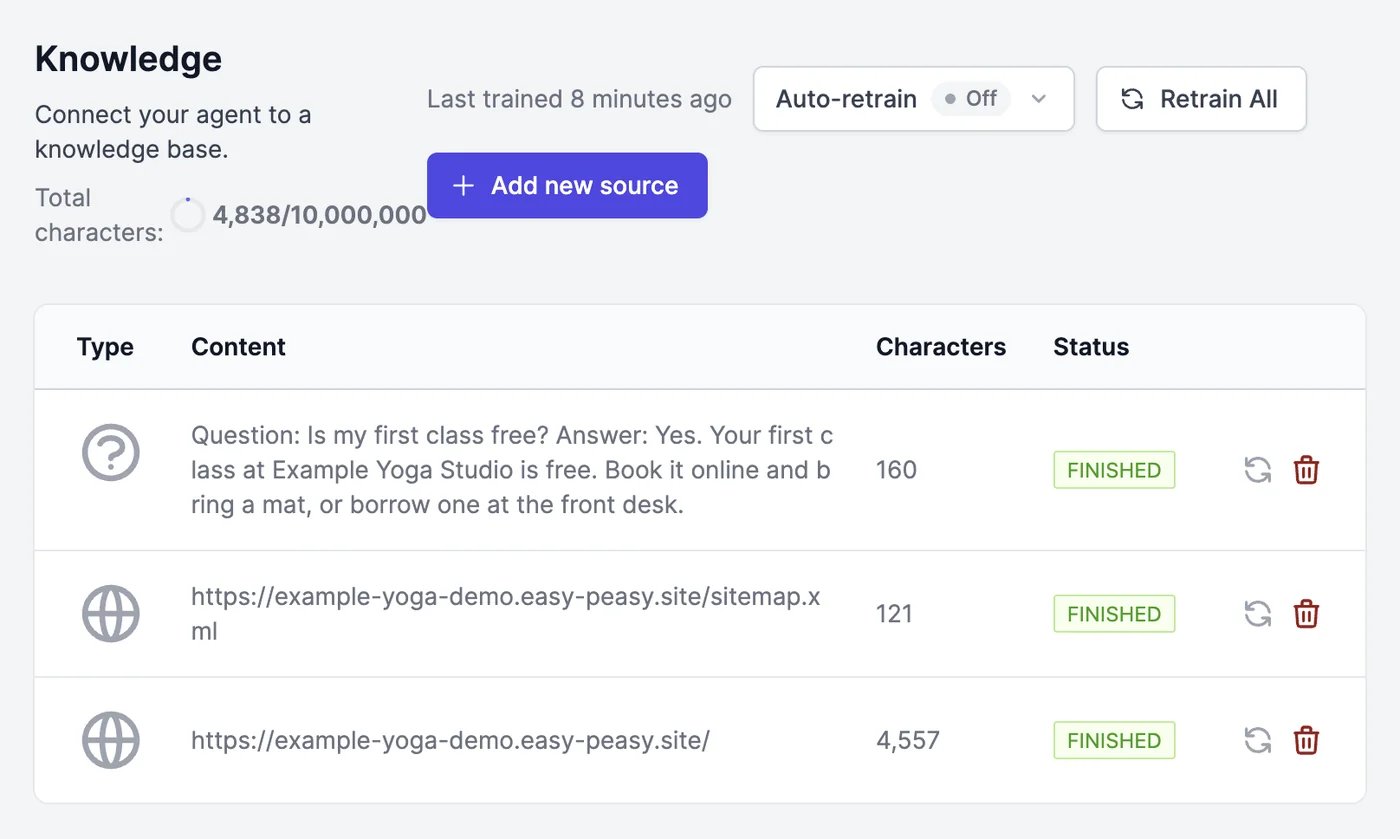
**Knowledge** is everything your agent knows about your business. When someone asks a question, the agent looks up the most relevant parts of its knowledge and answers from them. The better and more current this content is, the better the answers.
 ## Add a source
Open your agent, click **Knowledge**, and click **Add new source**.
## Add a source
Open your agent, click **Knowledge**, and click **Add new source**.
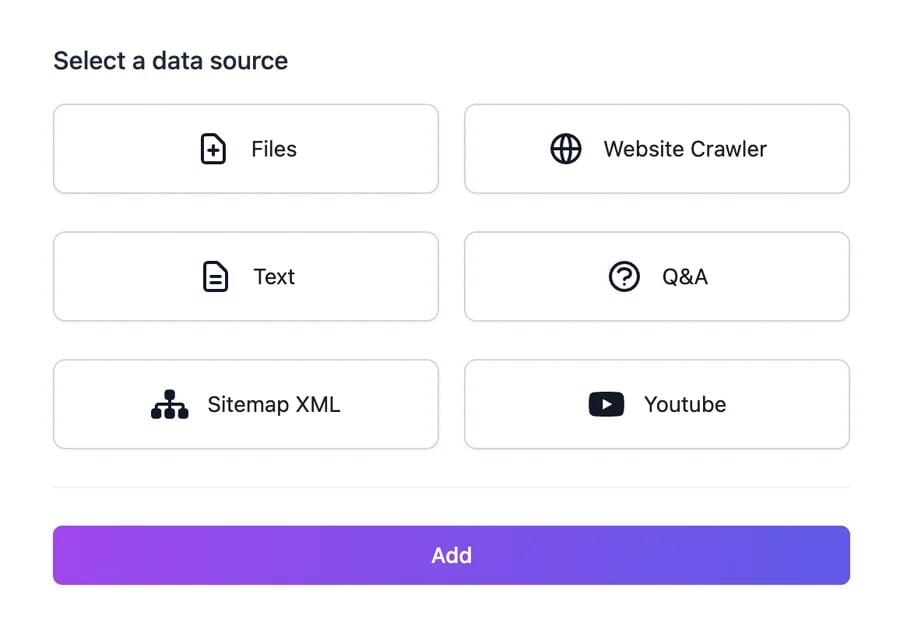 | Source | What to enter |
| ------------------- | ----------------------------------------------------------------------------------------------- |
| **Files** | PDF, DOCX, CSV, TXT, or EPUB files, up to 10 at a time |
| **Website Crawler** | A website URL, how deep to follow links, and how many pages to read (up to 100) |
| **Text** | Any text you type or paste |
| **Q\&A** | A question and the answer you want the agent to give |
| **Sitemap XML** | Your sitemap's URL. Up to 100 new pages are added each time |
| **Youtube** | A video's URL and its language code, such as `en` or `fr`. The agent learns from the transcript |
The source appears in the table as **PENDING**, then **PROCESSING**, and **FINISHED** when the agent can use it. The table refreshes on its own.
**Website Crawler** reads 5 pages unless you change **How many links to crawl**. Raise it to read a whole site, or add your **Sitemap XML** instead, which lists your pages directly.
## Sources and their status
Each row shows the source's type, its content or URL, how many characters it adds, and its status:
| Status | Meaning |
| -------------- | ------------------------------------------------------------------------------------------------ |
| **PENDING** | Waiting to be read |
| **PROCESSING** | Being read |
| **FINISHED** | Ready: the agent answers from it |
| **FAILED** | Couldn't be read, for example a page that blocks automated reading or a video with no transcript |
When a website crawl or a sitemap finishes, each page it found appears as its own row.
* The refresh icon reads a source again. Use it after a page changes, or to retry a failed source.
* The trash icon deletes a source and everything the agent learned from it.
* **Retry Pending** appears when sources are stuck in **PENDING**, and starts them again.
## Keep your knowledge current
Your agent doesn't notice when your website changes. To update it:
* **Retrain All** reads all your website pages again. Files, text, Q\&A, and videos stay as they are; to replace a document, delete it and upload the new version.
* **Auto-retrain** checks your website pages every week and relearns only the pages whose content changed. It's available on Unlimited 500 and higher plans.
**Last trained** shows when the agent last learned from its sources.
## Fix a wrong answer
When the agent gets something wrong in a real conversation, open it in [**Conversations**](/docs/agents/conversations#revise-an-answer) and click **Revise answer**. Your corrected answer is added to **Knowledge** as a Q\&A, so the agent gives it next time. You can also add a **Q\&A** here directly.
## Limits
**Total characters** shows how much of your plan's knowledge allowance this agent uses. Each agent has its own allowance, from 1 million characters on the Free plan up to 250 million. On the Free plan, an agent can also have up to 250 sources. See [Limits and usage](/docs/agents/limits-and-usage).
## How the agent uses its knowledge
Your content is split into short passages. For each message, the agent searches for the passages closest to the question and the conversation so far, and answers from them. That means:
* **Clear, specific pages work best.** A page that answers "How much is a class pass?" in one sentence beats a long page that mentions prices in passing.
* **Q\&A pairs give exact answers.** Use them for the questions you get most, and for anything the agent keeps getting wrong.
* **Conflicting content causes conflicting answers.** Remove outdated pages and documents.
By default, the agent answers only from its knowledge and says when it doesn't know. You can change this in [**Settings**](/docs/agents/settings#answer-only-from-knowledge).
Click the refresh icon to try again. If a web page keeps failing, the site may block automated reading: copy the page's text into a **Text** source, or upload it as a PDF. A YouTube video fails when it has no transcript in the language code you entered.
Make sure the source is **FINISHED**. Scanned PDFs without selectable text can't be read; upload a text version. Then try asking the same question with different words, and add a **Q\&A** for the answer you expect.
Delete those rows. Next time, add a **Sitemap XML** or pick pages in the website step of a new agent, which lets you uncheck pages.
Ask questions and see which sources were used.
Tell the agent how to answer.
| Source | What to enter |
| ------------------- | ----------------------------------------------------------------------------------------------- |
| **Files** | PDF, DOCX, CSV, TXT, or EPUB files, up to 10 at a time |
| **Website Crawler** | A website URL, how deep to follow links, and how many pages to read (up to 100) |
| **Text** | Any text you type or paste |
| **Q\&A** | A question and the answer you want the agent to give |
| **Sitemap XML** | Your sitemap's URL. Up to 100 new pages are added each time |
| **Youtube** | A video's URL and its language code, such as `en` or `fr`. The agent learns from the transcript |
The source appears in the table as **PENDING**, then **PROCESSING**, and **FINISHED** when the agent can use it. The table refreshes on its own.
**Website Crawler** reads 5 pages unless you change **How many links to crawl**. Raise it to read a whole site, or add your **Sitemap XML** instead, which lists your pages directly.
## Sources and their status
Each row shows the source's type, its content or URL, how many characters it adds, and its status:
| Status | Meaning |
| -------------- | ------------------------------------------------------------------------------------------------ |
| **PENDING** | Waiting to be read |
| **PROCESSING** | Being read |
| **FINISHED** | Ready: the agent answers from it |
| **FAILED** | Couldn't be read, for example a page that blocks automated reading or a video with no transcript |
When a website crawl or a sitemap finishes, each page it found appears as its own row.
* The refresh icon reads a source again. Use it after a page changes, or to retry a failed source.
* The trash icon deletes a source and everything the agent learned from it.
* **Retry Pending** appears when sources are stuck in **PENDING**, and starts them again.
## Keep your knowledge current
Your agent doesn't notice when your website changes. To update it:
* **Retrain All** reads all your website pages again. Files, text, Q\&A, and videos stay as they are; to replace a document, delete it and upload the new version.
* **Auto-retrain** checks your website pages every week and relearns only the pages whose content changed. It's available on Unlimited 500 and higher plans.
**Last trained** shows when the agent last learned from its sources.
## Fix a wrong answer
When the agent gets something wrong in a real conversation, open it in [**Conversations**](/docs/agents/conversations#revise-an-answer) and click **Revise answer**. Your corrected answer is added to **Knowledge** as a Q\&A, so the agent gives it next time. You can also add a **Q\&A** here directly.
## Limits
**Total characters** shows how much of your plan's knowledge allowance this agent uses. Each agent has its own allowance, from 1 million characters on the Free plan up to 250 million. On the Free plan, an agent can also have up to 250 sources. See [Limits and usage](/docs/agents/limits-and-usage).
## How the agent uses its knowledge
Your content is split into short passages. For each message, the agent searches for the passages closest to the question and the conversation so far, and answers from them. That means:
* **Clear, specific pages work best.** A page that answers "How much is a class pass?" in one sentence beats a long page that mentions prices in passing.
* **Q\&A pairs give exact answers.** Use them for the questions you get most, and for anything the agent keeps getting wrong.
* **Conflicting content causes conflicting answers.** Remove outdated pages and documents.
By default, the agent answers only from its knowledge and says when it doesn't know. You can change this in [**Settings**](/docs/agents/settings#answer-only-from-knowledge).
Click the refresh icon to try again. If a web page keeps failing, the site may block automated reading: copy the page's text into a **Text** source, or upload it as a PDF. A YouTube video fails when it has no transcript in the language code you entered.
Make sure the source is **FINISHED**. Scanned PDFs without selectable text can't be read; upload a text version. Then try asking the same question with different words, and add a **Q\&A** for the answer you expect.
Delete those rows. Next time, add a **Sitemap XML** or pick pages in the website step of a new agent, which lets you uncheck pages.
Ask questions and see which sources were used.
Tell the agent how to answer.