> ## Documentation Index
> Fetch the complete documentation index at: https://easy-peasy.ai/docs/llms.txt
> Use this file to discover all available pages before exploring further.
# Voice calls
> Let visitors talk to your agent out loud from the website chat, with the voice, language, and call limits you choose.
With voice calls, visitors tap a call button in the chat and talk to your agent. The agent listens, answers in the voice you pick, and uses the same knowledge and actions as in text chat. Visitors can still type during a call, for names, emails, or links.
For a phone number people can dial, see [Phone calls](/docs/agents/phone-calls).
Website visitors can call your agent on the Unlimited 200 and higher plans, Teams 200 and Teams 300, and Enterprise. On other plans, including Free, you can try voice calls in the Playground: 10 minutes every 30 days across all your agents, up to 3 minutes per call.
## Turn on voice calls
Open your agent and click **Voice**. You can also use the **Voice** tab in the [Playground](/docs/agents/playground#set-up-voice-calls), which saves automatically.
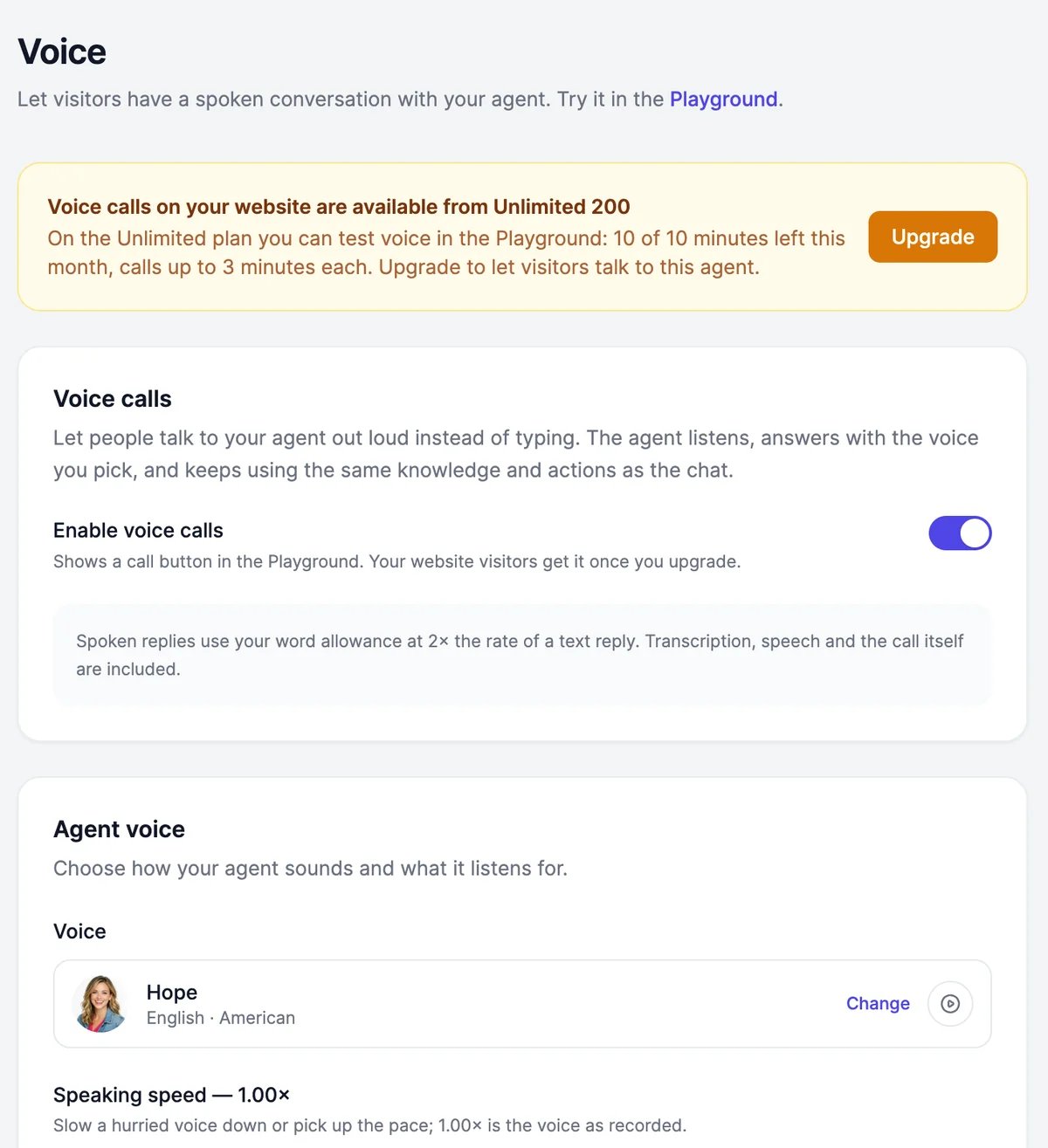 A call button appears in the chat. In the chat, it turns into the send button as soon as you type.
Under **Agent voice**, click **Change**, play a few voices, and click **Select**.
A call button appears in the chat. In the chat, it turns into the send button as soon as you type.
Under **Agent voice**, click **Change**, play a few voices, and click **Select**.
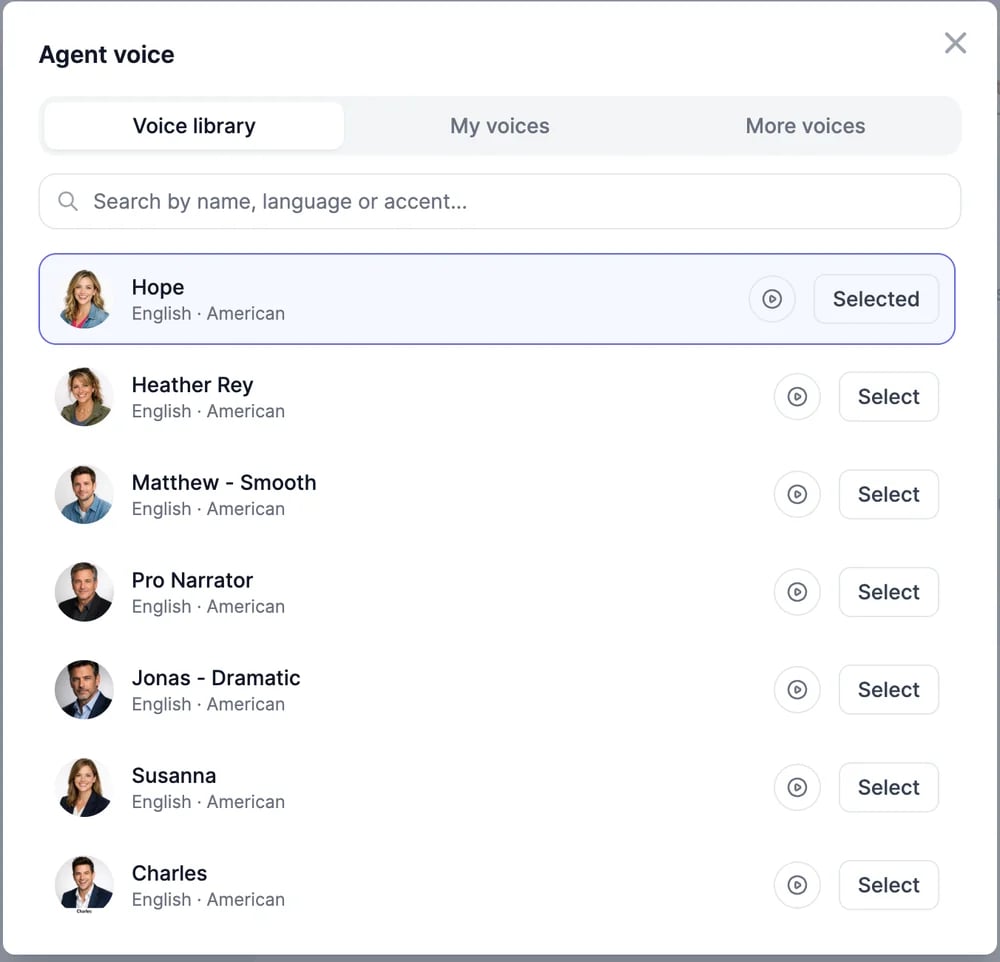 | Tab | Voices |
| ----------------- | ------------------------------------------------------------------------------------------------------------------------------------- |
| **Voice library** | About 1,900 voices in many languages and accents |
| **My voices** | Voices you cloned with an Instant clone in [text to speech](/docs/audio/voices#instant-clone). Professional clones can't be used for calls |
| **More voices** | Other voice families, with natural accents in several languages |
Test a call in the Playground. Reload any open preview of your website chat to see the call button there.
## Settings
| Setting | What it does |
| ---------------------------------------- | ---------------------------------------------------------------------------------------------------------------------------------------------------------- |
| **Allow text input during calls** | Keeps the message box usable during a call |
| **Allow interruptions** | Lets callers talk over the agent to cut it off |
| **Voice model** | The model used on calls. **Same as chat** uses the agent's model; the others are fast models, because every second the model thinks is a second of silence |
| **Sync with chat instructions** | Uses the agent's instructions on calls. Turn it off to write separate **Voice instructions**, for example "Keep answers to two sentences" |
| **Spoken language** | The language callers speak. **Multilingual** detects it; choosing the language makes recognition more accurate |
| **Silence before the agent answers** | How long a pause means the caller has finished. Shorter feels snappier; longer tolerates pauses |
| **Noise sensitivity** | How easily background noise counts as speech |
| **Speaking speed** | Slower or faster than the voice as recorded, for voices that support it |
| **Greeting** | What the agent says first. Empty reuses the chat's greeting |
| **Error message** | What the agent says when it doesn't catch something |
| **End the call after silence (seconds)** | Ends the call after this much silence. `0` keeps the line open until the caller hangs up |
| **Maximum call length (minutes)** | The longest a call can last, from 1 to 60 minutes |
| **Calls per visitor per day** | How many calls one visitor can make each day. It doesn't apply in the Playground |
## What calls cost
Spoken replies use your plan's words at twice the rate of a text reply, on every model, including models that don't use words in text chat. Listening, the voice, and the call itself are included.
Calls appear in [**Conversations**](/docs/agents/conversations) under **Web**, with **Voice call** as the source.
Check that **Enable voice calls** is on and saved, then reload the page with the chat. On plans below Unlimited 200, the call button appears only in the Playground.
Calls need microphone access. Allow it in the browser's site settings and try again. If you embed the chat with an iframe, keep `allow="microphone"` on it.
Pick a faster **Voice model**, shorten the **Voice instructions**, and lower **Silence before the agent answers**.
Give your agent a phone number with Twilio.
Voice input for typed messages is under Chat features.
| Tab | Voices |
| ----------------- | ------------------------------------------------------------------------------------------------------------------------------------- |
| **Voice library** | About 1,900 voices in many languages and accents |
| **My voices** | Voices you cloned with an Instant clone in [text to speech](/docs/audio/voices#instant-clone). Professional clones can't be used for calls |
| **More voices** | Other voice families, with natural accents in several languages |
Test a call in the Playground. Reload any open preview of your website chat to see the call button there.
## Settings
| Setting | What it does |
| ---------------------------------------- | ---------------------------------------------------------------------------------------------------------------------------------------------------------- |
| **Allow text input during calls** | Keeps the message box usable during a call |
| **Allow interruptions** | Lets callers talk over the agent to cut it off |
| **Voice model** | The model used on calls. **Same as chat** uses the agent's model; the others are fast models, because every second the model thinks is a second of silence |
| **Sync with chat instructions** | Uses the agent's instructions on calls. Turn it off to write separate **Voice instructions**, for example "Keep answers to two sentences" |
| **Spoken language** | The language callers speak. **Multilingual** detects it; choosing the language makes recognition more accurate |
| **Silence before the agent answers** | How long a pause means the caller has finished. Shorter feels snappier; longer tolerates pauses |
| **Noise sensitivity** | How easily background noise counts as speech |
| **Speaking speed** | Slower or faster than the voice as recorded, for voices that support it |
| **Greeting** | What the agent says first. Empty reuses the chat's greeting |
| **Error message** | What the agent says when it doesn't catch something |
| **End the call after silence (seconds)** | Ends the call after this much silence. `0` keeps the line open until the caller hangs up |
| **Maximum call length (minutes)** | The longest a call can last, from 1 to 60 minutes |
| **Calls per visitor per day** | How many calls one visitor can make each day. It doesn't apply in the Playground |
## What calls cost
Spoken replies use your plan's words at twice the rate of a text reply, on every model, including models that don't use words in text chat. Listening, the voice, and the call itself are included.
Calls appear in [**Conversations**](/docs/agents/conversations) under **Web**, with **Voice call** as the source.
Check that **Enable voice calls** is on and saved, then reload the page with the chat. On plans below Unlimited 200, the call button appears only in the Playground.
Calls need microphone access. Allow it in the browser's site settings and try again. If you embed the chat with an iframe, keep `allow="microphone"` on it.
Pick a faster **Voice model**, shorten the **Voice instructions**, and lower **Silence before the agent answers**.
Give your agent a phone number with Twilio.
Voice input for typed messages is under Chat features.