> ## Documentation Index
> Fetch the complete documentation index at: https://easy-peasy.ai/docs/llms.txt
> Use this file to discover all available pages before exploring further.
# Find your way around
> What's on the Home screen, in the sidebar, in History, and in Settings.
The dashboard is where you'll spend most of your time. Here's what each part does.
 ## Home
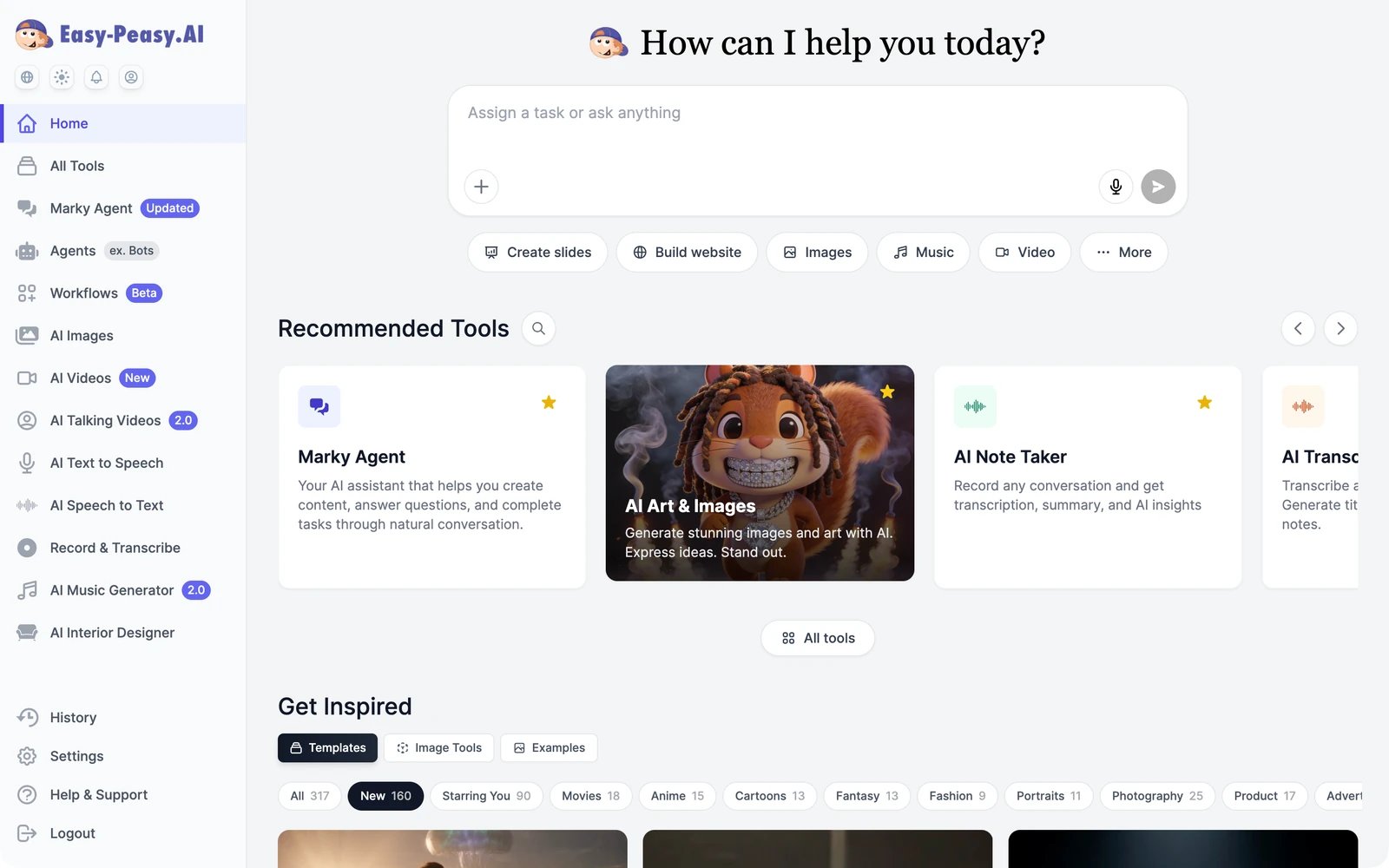
The Home screen has three parts:
* **The prompt box.** Anything you type here goes to [Marky Agent](/docs/marky/overview), which opens a chat with the result. The buttons below it (**Create slides**, **Build website**, **Images**, **Music**, **Video**, **More**) start those jobs directly.
* **Recommended Tools.** Popular tools, one click away. Use the arrows to browse, or the magnifier to search every tool.
* **Get Inspired.** Starting points for your own work. **Templates** are ready-made image and video templates you can reuse with your own photos or text, filtered by category. **Image Tools** are one-click image jobs such as **Replace Background**, **Style Transfer**, and **Headshot Generator**. **Examples** shows images other people chose to share publicly.
## The sidebar
## Home
The Home screen has three parts:
* **The prompt box.** Anything you type here goes to [Marky Agent](/docs/marky/overview), which opens a chat with the result. The buttons below it (**Create slides**, **Build website**, **Images**, **Music**, **Video**, **More**) start those jobs directly.
* **Recommended Tools.** Popular tools, one click away. Use the arrows to browse, or the magnifier to search every tool.
* **Get Inspired.** Starting points for your own work. **Templates** are ready-made image and video templates you can reuse with your own photos or text, filtered by category. **Image Tools** are one-click image jobs such as **Replace Background**, **Style Transfer**, and **Headshot Generator**. **Examples** shows images other people chose to share publicly.
## The sidebar
 **Home** and **All Tools** are always at the top. Below them are your favourite tools. New accounts start with the main products (Marky Agent, Agents, Workflows, AI Images, AI Videos, and more) already there.
* **To add a tool to the sidebar**, click the star on its card in **All Tools** or on the Home screen.
* **To remove one**, hover over it in the sidebar and click its star.
**History**, **Settings**, **Help & Support**, and **Logout** are always at the bottom.
## The icons under the logo
| Icon | What it does |
| ------ | -------------------------------------------------------- |
| Globe | Changes the dashboard language |
| Sun | Switches between light, dark, and system theme |
| Bell | Opens **What's New**, the list of recent product updates |
| Person | Opens your account menu |
**Home** and **All Tools** are always at the top. Below them are your favourite tools. New accounts start with the main products (Marky Agent, Agents, Workflows, AI Images, AI Videos, and more) already there.
* **To add a tool to the sidebar**, click the star on its card in **All Tools** or on the Home screen.
* **To remove one**, hover over it in the sidebar and click its star.
**History**, **Settings**, **Help & Support**, and **Logout** are always at the bottom.
## The icons under the logo
| Icon | What it does |
| ------ | -------------------------------------------------------- |
| Globe | Changes the dashboard language |
| Sun | Switches between light, dark, and system theme |
| Bell | Opens **What's New**, the list of recent product updates |
| Person | Opens your account menu |
 ## History
**History** keeps everything you create. It's split into tabs: **Text** (tool results and Marky conversations), **Favorites**, **Images**, **Videos**, **AI Text-to-Speech**, **AI Audio Generator**, **Sound Effects**, **Music**, and **Trash**. Use the search box to find something by its text.
Deleted text results go to **Trash** first, so you can restore them. Deleted images and videos can't be restored. See [History and trash](/docs/get-started/history).
## Settings
| Tab | What's there |
| ------------------ | ----------------------------------------------------------------------------------------------------------------------------------------------- |
| **Profile** | Your name, email address, and password. You can also delete your account here. See [Profile and preferences](/docs/account/profile). |
| **Team** | Seats, invitations, and each member's usage. See [Teams](/docs/account/team). |
| **Interface** | Dashboard language and theme. |
| **Subscription** | Your plan, payment details, billing history, and extra credits. See [Manage your subscription](/docs/account/subscription). |
| **Usage** | How much of this period's words and credits you've used. See [Check your usage](/docs/account/usage). |
| **Data Controls** | Import your ChatGPT conversations, and manage the websites, apps, and domains Marky built for you. See [Data controls](/docs/account/data-controls). |
| **API/MCP** | API keys and the MCP server connection. See [Developers](/docs/developers/overview). |
| **Refer a friend** | Your referral link and bonuses. See [Refer a friend](/docs/account/referrals). |
## Getting help
**Help & Support** in the sidebar has answers to common questions, a live chat, and our email address, [support@easy-peasy.ai](mailto:support@easy-peasy.ai).
## History
**History** keeps everything you create. It's split into tabs: **Text** (tool results and Marky conversations), **Favorites**, **Images**, **Videos**, **AI Text-to-Speech**, **AI Audio Generator**, **Sound Effects**, **Music**, and **Trash**. Use the search box to find something by its text.
Deleted text results go to **Trash** first, so you can restore them. Deleted images and videos can't be restored. See [History and trash](/docs/get-started/history).
## Settings
| Tab | What's there |
| ------------------ | ----------------------------------------------------------------------------------------------------------------------------------------------- |
| **Profile** | Your name, email address, and password. You can also delete your account here. See [Profile and preferences](/docs/account/profile). |
| **Team** | Seats, invitations, and each member's usage. See [Teams](/docs/account/team). |
| **Interface** | Dashboard language and theme. |
| **Subscription** | Your plan, payment details, billing history, and extra credits. See [Manage your subscription](/docs/account/subscription). |
| **Usage** | How much of this period's words and credits you've used. See [Check your usage](/docs/account/usage). |
| **Data Controls** | Import your ChatGPT conversations, and manage the websites, apps, and domains Marky built for you. See [Data controls](/docs/account/data-controls). |
| **API/MCP** | API keys and the MCP server connection. See [Developers](/docs/developers/overview). |
| **Refer a friend** | Your referral link and bonuses. See [Refer a friend](/docs/account/referrals). |
## Getting help
**Help & Support** in the sidebar has answers to common questions, a live chat, and our email address, [support@easy-peasy.ai](mailto:support@easy-peasy.ai).