> ## Documentation Index
> Fetch the complete documentation index at: https://easy-peasy.ai/docs/llms.txt
> Use this file to discover all available pages before exploring further.
# Marky Agent
> Marky is Easy-Peasy.AI's AI agent: it answers questions, researches the web, and does real work such as slide decks, websites, images, and scheduled reports.
Marky is an AI agent you talk to like a colleague. Ask a question and it answers. Give it a task and it gets the work done: it searches the web, reads your files, writes and runs code, uses your connected apps, and hands you finished results such as a slide deck, a website, a spreadsheet, or an image.
Open **Marky Agent** from the dashboard sidebar, or go to [easy-peasy.ai/chat](https://easy-peasy.ai/chat).
 ## What Marky can do
Ask anything, attach files, and follow Marky's work step by step.
Get a finished deck from a topic or a document, as PowerPoint or PDF.
Describe a site or app, preview it, and publish it at your own address.
Make pictures, songs, videos, and voiceovers without leaving the chat.
Web search with sources, academic papers, and in-depth research reports.
Let Marky use websites for you, in the cloud or in your own Chrome.
Connect Gmail, Google Calendar, Notion, GitHub, Stripe, and more.
Have Marky do a job every day or week and send you the result.
## How Marky works
When you give Marky a task, it works in steps and shows each one in the chat: a web search, a command it runs, a file it writes. For longer jobs, it writes a short plan first, and a **Task progress** bar above the message box shows how far along it is.
Marky has its own computer in the cloud for each chat. It uses it to open websites, run code, and create files, and you can watch it work in the **Marky's Computer** panel. Files you attach are copied there too.
Marky keeps working even if you close the tab or switch to another chat. Come back later, and the result is waiting.
## Pick a mode, or just ask
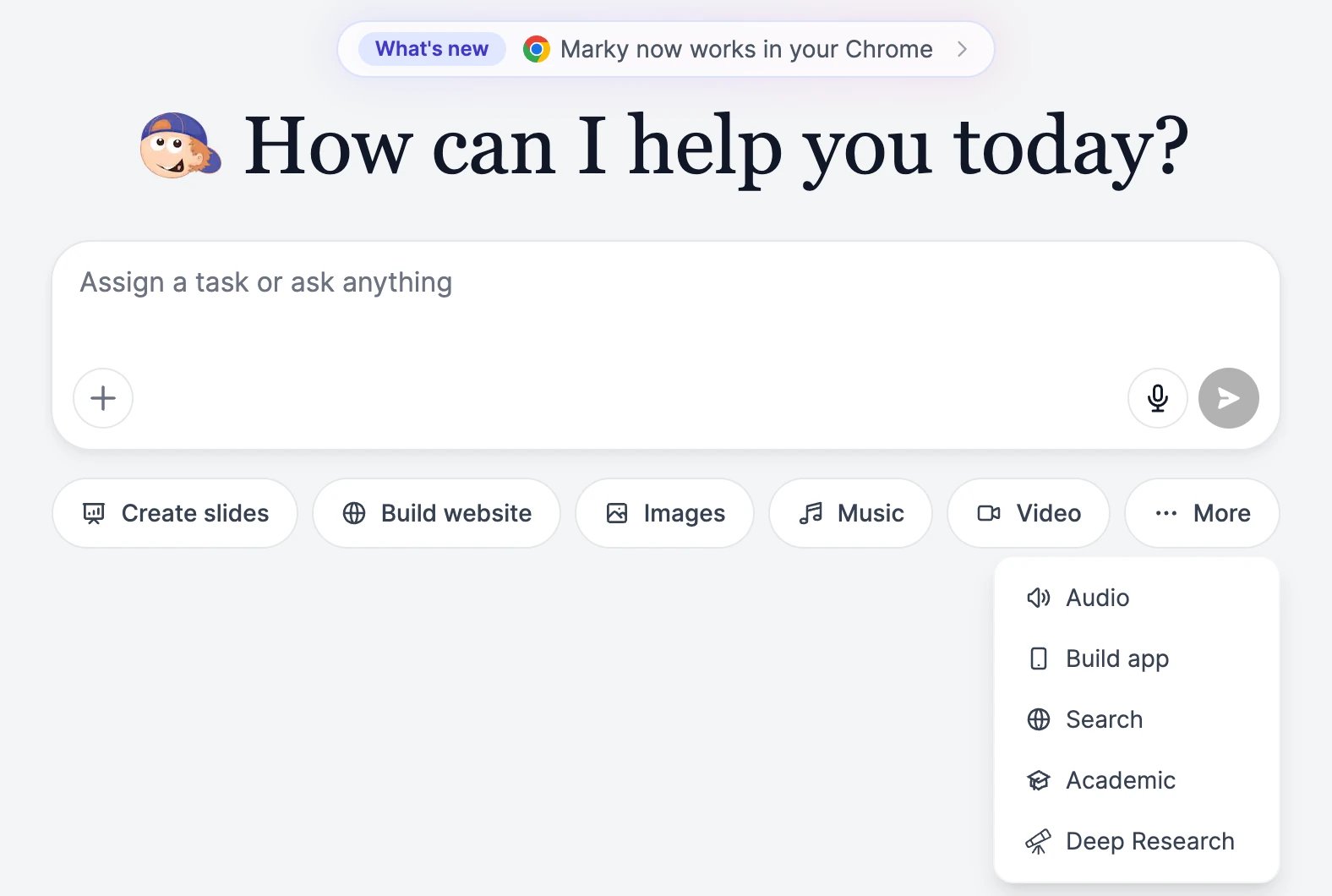
The buttons under the message box of a new chat set Marky up for a kind of task:
| Mode | What it's for |
| ------------------------------------------------------ | --------------------------------------------------------------------------------------------------------------- |
| **Create slides** | A presentation. Adds slide templates and deck options. See [Create slides](/docs/marky/slides). |
| **Build website** | A website or web app with a live preview. See [Build websites and apps](/docs/marky/websites). |
| **Images**, **Music**, **Video** | Example prompts for each. **Images** also shows the image model. See [Images, music, and video](/docs/marky/media). |
| **More** > **Audio** | Voiceovers and speech. |
| **More** > **Build app** | A mobile app you can preview on your phone. |
| **More** > **Search**, **Academic**, **Deep Research** | Answers from the web, from research papers, or from a multi-step research run. See [Research](/docs/marky/research). |
You don't need a mode. Marky picks the right tools from what you ask, so "make me a 5-slide deck about our Q3 results" works in a plain chat too.
## Make Marky your own
* [Choose a model](/docs/marky/models) for each chat, from fast and cheap to the most capable.
* Add [skills and prompts](/docs/marky/skills) for jobs you repeat, and a [brand voice](/docs/marky/prompts-and-brand-voice) for your writing style.
* Turn on [memory](/docs/marky/memory) so Marky remembers facts about you and your business across chats, or import your ChatGPT history.
## What it costs
Marky uses **words** from your plan for its replies and its work, at a rate that depends on the model. Images, slides, and videos it makes use image & video credits, and music and speech use text-to-speech characters. See [Models and words](/docs/marky/models) and [Plans and credits](/docs/account/plans-and-credits).
## What Marky can do
Ask anything, attach files, and follow Marky's work step by step.
Get a finished deck from a topic or a document, as PowerPoint or PDF.
Describe a site or app, preview it, and publish it at your own address.
Make pictures, songs, videos, and voiceovers without leaving the chat.
Web search with sources, academic papers, and in-depth research reports.
Let Marky use websites for you, in the cloud or in your own Chrome.
Connect Gmail, Google Calendar, Notion, GitHub, Stripe, and more.
Have Marky do a job every day or week and send you the result.
## How Marky works
When you give Marky a task, it works in steps and shows each one in the chat: a web search, a command it runs, a file it writes. For longer jobs, it writes a short plan first, and a **Task progress** bar above the message box shows how far along it is.
Marky has its own computer in the cloud for each chat. It uses it to open websites, run code, and create files, and you can watch it work in the **Marky's Computer** panel. Files you attach are copied there too.
Marky keeps working even if you close the tab or switch to another chat. Come back later, and the result is waiting.
## Pick a mode, or just ask
The buttons under the message box of a new chat set Marky up for a kind of task:
| Mode | What it's for |
| ------------------------------------------------------ | --------------------------------------------------------------------------------------------------------------- |
| **Create slides** | A presentation. Adds slide templates and deck options. See [Create slides](/docs/marky/slides). |
| **Build website** | A website or web app with a live preview. See [Build websites and apps](/docs/marky/websites). |
| **Images**, **Music**, **Video** | Example prompts for each. **Images** also shows the image model. See [Images, music, and video](/docs/marky/media). |
| **More** > **Audio** | Voiceovers and speech. |
| **More** > **Build app** | A mobile app you can preview on your phone. |
| **More** > **Search**, **Academic**, **Deep Research** | Answers from the web, from research papers, or from a multi-step research run. See [Research](/docs/marky/research). |
You don't need a mode. Marky picks the right tools from what you ask, so "make me a 5-slide deck about our Q3 results" works in a plain chat too.
## Make Marky your own
* [Choose a model](/docs/marky/models) for each chat, from fast and cheap to the most capable.
* Add [skills and prompts](/docs/marky/skills) for jobs you repeat, and a [brand voice](/docs/marky/prompts-and-brand-voice) for your writing style.
* Turn on [memory](/docs/marky/memory) so Marky remembers facts about you and your business across chats, or import your ChatGPT history.
## What it costs
Marky uses **words** from your plan for its replies and its work, at a rate that depends on the model. Images, slides, and videos it makes use image & video credits, and music and speech use text-to-speech characters. See [Models and words](/docs/marky/models) and [Plans and credits](/docs/account/plans-and-credits).