> ## Documentation Index
> Fetch the complete documentation index at: https://easy-peasy.ai/docs/llms.txt
> Use this file to discover all available pages before exploring further.
# Models and words
> Which AI model to choose in a tool, and how many words from your plan each one uses.
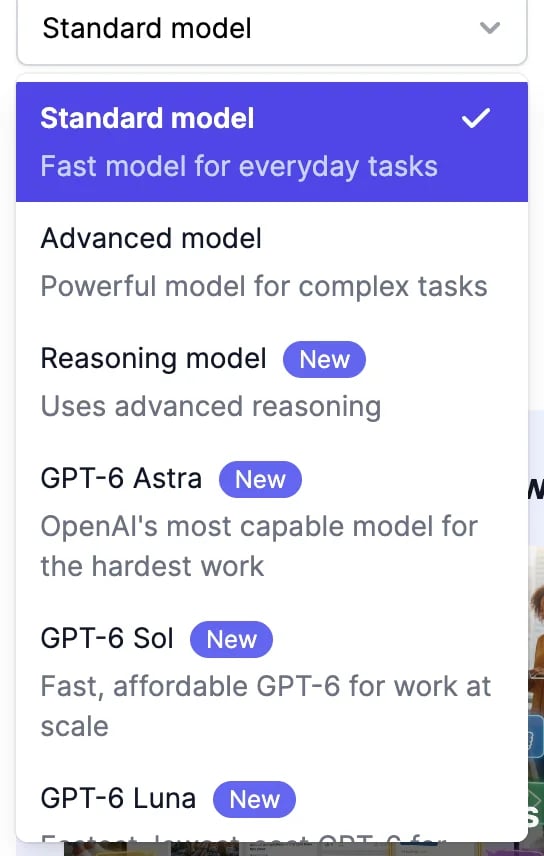
Every tool has an **AI Model** menu. The model you pick is remembered for all tools.
 ## Which model to pick
* **Standard model** is the default: fast and good for most everyday writing, such as posts, emails, and descriptions.
* **Advanced model** writes more carefully. Try it for longer or more demanding work, such as reports and proposals.
* **Reasoning model** thinks before it writes. Use it for maths, logic, planning, and step-by-step answers.
* **GPT-6**, **GPT-5.6**, **GPT-5.5**, and **GPT-5 mini** are OpenAI's models, and **Claude Fable**, **Claude Opus**, and **Claude Sonnet** are Anthropic's, for when you prefer a particular model. The Claude options aren't available in a few older tools.
The Claude options marked **Reasoning** think before they write, like the Reasoning model. That thinking counts as writing, so they use more words.
## How many words a result uses
A result uses the words it contains, multiplied by the model's rate.
| Model | Rate on Unlimited and Teams plans |
| ----------------------------------------------------------------------------------------- | --------------------------------- |
| **Standard model**, **Reasoning model** | Free |
| **Advanced model**, GPT-5.6 Sol, GPT-5.5, Claude Opus 5.5, Claude Opus 5, Claude Opus 4.8 | 1x |
| GPT-6 Astra, Claude Fable 5.1, Claude Fable 5 | 2x |
| GPT-6 Sol, GPT-5.6 Terra, Claude Sonnet 5, Claude Sonnet 4.6 | 0.5x |
| GPT-5 mini | 0.25x |
| GPT-6 Luna, GPT-5.6 Luna | 0.2x |
On the Free, Basic, and Starter plans, every model counts at 1x, and GPT-6 Astra and Claude Fable at 2x. On the clinical note tools, the **Advanced model** is free on Unlimited and Teams plans, like Standard.
A few things add to the count:
* **Claude models and GPT-6 Astra** also count what they read, such as long inputs and uploaded documents, after the first 1,000 tokens (about 750 words).
* **Reading an uploaded file** adds 150 words per result.
* **More results** use more words: each one counts on its own.
The **History** tab on a tool shows how many words each result used.
## When you run out of words
When your plan's words are used up, tools stop and offer to upgrade. On the Unlimited and Teams plans, the **Standard** and **Reasoning** models keep working. See [Plans and credits](/docs/account/plans-and-credits) and [buy more words](/docs/account/buy-credits).
## On the Free plan
Only the **Standard model** is available. The others show **Upgrade to unlock**.
Fill in the form and work with the results.
See how many words you've used.
## Which model to pick
* **Standard model** is the default: fast and good for most everyday writing, such as posts, emails, and descriptions.
* **Advanced model** writes more carefully. Try it for longer or more demanding work, such as reports and proposals.
* **Reasoning model** thinks before it writes. Use it for maths, logic, planning, and step-by-step answers.
* **GPT-6**, **GPT-5.6**, **GPT-5.5**, and **GPT-5 mini** are OpenAI's models, and **Claude Fable**, **Claude Opus**, and **Claude Sonnet** are Anthropic's, for when you prefer a particular model. The Claude options aren't available in a few older tools.
The Claude options marked **Reasoning** think before they write, like the Reasoning model. That thinking counts as writing, so they use more words.
## How many words a result uses
A result uses the words it contains, multiplied by the model's rate.
| Model | Rate on Unlimited and Teams plans |
| ----------------------------------------------------------------------------------------- | --------------------------------- |
| **Standard model**, **Reasoning model** | Free |
| **Advanced model**, GPT-5.6 Sol, GPT-5.5, Claude Opus 5.5, Claude Opus 5, Claude Opus 4.8 | 1x |
| GPT-6 Astra, Claude Fable 5.1, Claude Fable 5 | 2x |
| GPT-6 Sol, GPT-5.6 Terra, Claude Sonnet 5, Claude Sonnet 4.6 | 0.5x |
| GPT-5 mini | 0.25x |
| GPT-6 Luna, GPT-5.6 Luna | 0.2x |
On the Free, Basic, and Starter plans, every model counts at 1x, and GPT-6 Astra and Claude Fable at 2x. On the clinical note tools, the **Advanced model** is free on Unlimited and Teams plans, like Standard.
A few things add to the count:
* **Claude models and GPT-6 Astra** also count what they read, such as long inputs and uploaded documents, after the first 1,000 tokens (about 750 words).
* **Reading an uploaded file** adds 150 words per result.
* **More results** use more words: each one counts on its own.
The **History** tab on a tool shows how many words each result used.
## When you run out of words
When your plan's words are used up, tools stop and offer to upgrade. On the Unlimited and Teams plans, the **Standard** and **Reasoning** models keep working. See [Plans and credits](/docs/account/plans-and-credits) and [buy more words](/docs/account/buy-credits).
## On the Free plan
Only the **Standard model** is available. The others show **Upgrade to unlock**.
Fill in the form and work with the results.
See how many words you've used.