> ## Documentation Index
> Fetch the complete documentation index at: https://easy-peasy.ai/docs/llms.txt
> Use this file to discover all available pages before exploring further.
# AI Videos
> Generate videos from text or images, extend and edit them, make talking videos, and build a full edited video from one sentence.
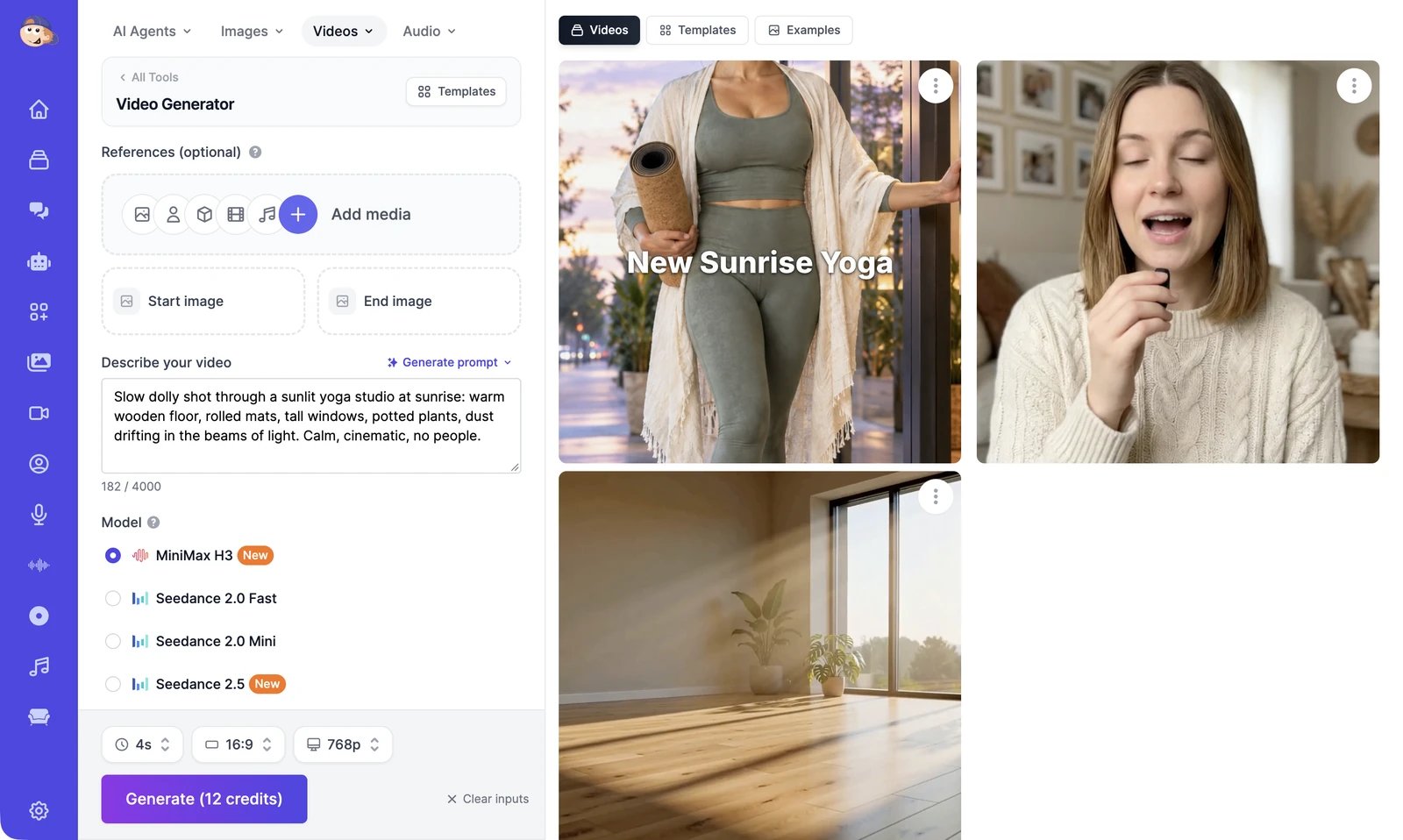 Open **AI Videos** in the sidebar, or choose a tool from the **Videos** menu at the top of any tool page. The Video Generator has two halves:
* **On the left**, you describe the video, add a start image or references if you want them, pick a model, and click **Generate**.
* **On the right**, you see your results and ideas to start from.
| Tab on the right | What's in it |
| ---------------- | ----------------------------------------------------------------------------- |
| **Videos** | Your latest videos. Everything older is in **History** > **Videos**. |
| **Templates** | Ready-made videos you can remake, many of them with you in the starring role. |
| **Examples** | Videos other people chose to share publicly, for inspiration. |
## What you can do
Describe a scene or animate an image, then pick a model, length, and quality.
Keep a person, product, or look the same, and guide the motion or the sound.
Start from a ready-made video and put your own photo in it.
Continue a clip from its last frame, and trim it first if you need to.
Remove, replace, or restyle things in a video by describing the change.
Make a video sharper, up to 4K.
Copy the movement from one video onto a character in a photo.
Make a photo, an AI actor, or a video speak your script.
Turn one sentence into a finished video with voiceover, music, and captions.
Arrange clips, captions, and music on a timeline, then export an MP4.
Download, share, rate, and find everything you've made.
Every video model, what it can start from, and what it costs.
## The Videos menu
The **Videos** menu at the top of the page opens every video tool:
| Menu item | What it opens |
| ------------------------------------------------------------------------ | ----------------------------------------------------------------------------------------- |
| **Video Agent** | The [Video Agent](/docs/videos/video-agent), which plans, voices, and assembles a whole video. |
| **Video Generator** | The main page, described in [Generate a video](/docs/videos/generate). |
| **Motion Control** | [Motion Control](/docs/videos/motion-control). |
| **Extend Video**, **Edit Video**, **Upscale Video** | The [extend](/docs/videos/extend), [edit](/docs/videos/edit), and [upscale](/docs/videos/upscale) tools. |
| **Talking Videos** | [Talking videos](/docs/videos/talking-videos). |
| **Video Editor** | The [Video Editor](/docs/videos/video-editor). |
| **Seedance 2.5**, **MiniMax H3**, **WAN 3.0**, **Gemini Omni Flash 1.1** | The Video Generator with that model selected. |
## Credits
Videos use image & video credits, the same pool as images. Most models charge per second of video, and the price also depends on the resolution: a 4-second MiniMax H3 video at 768p costs 12 credits. The **Generate** button shows the total before you start. See [Video models and credits](/docs/videos/models) for every model's price, and [Plans and credits](/docs/account/plans-and-credits) for how credits work.
On the Free plan, only a few models are available at short lengths and low resolutions, and extending, editing, upscaling, and Motion Control need a paid plan.
Open **AI Videos** in the sidebar, or choose a tool from the **Videos** menu at the top of any tool page. The Video Generator has two halves:
* **On the left**, you describe the video, add a start image or references if you want them, pick a model, and click **Generate**.
* **On the right**, you see your results and ideas to start from.
| Tab on the right | What's in it |
| ---------------- | ----------------------------------------------------------------------------- |
| **Videos** | Your latest videos. Everything older is in **History** > **Videos**. |
| **Templates** | Ready-made videos you can remake, many of them with you in the starring role. |
| **Examples** | Videos other people chose to share publicly, for inspiration. |
## What you can do
Describe a scene or animate an image, then pick a model, length, and quality.
Keep a person, product, or look the same, and guide the motion or the sound.
Start from a ready-made video and put your own photo in it.
Continue a clip from its last frame, and trim it first if you need to.
Remove, replace, or restyle things in a video by describing the change.
Make a video sharper, up to 4K.
Copy the movement from one video onto a character in a photo.
Make a photo, an AI actor, or a video speak your script.
Turn one sentence into a finished video with voiceover, music, and captions.
Arrange clips, captions, and music on a timeline, then export an MP4.
Download, share, rate, and find everything you've made.
Every video model, what it can start from, and what it costs.
## The Videos menu
The **Videos** menu at the top of the page opens every video tool:
| Menu item | What it opens |
| ------------------------------------------------------------------------ | ----------------------------------------------------------------------------------------- |
| **Video Agent** | The [Video Agent](/docs/videos/video-agent), which plans, voices, and assembles a whole video. |
| **Video Generator** | The main page, described in [Generate a video](/docs/videos/generate). |
| **Motion Control** | [Motion Control](/docs/videos/motion-control). |
| **Extend Video**, **Edit Video**, **Upscale Video** | The [extend](/docs/videos/extend), [edit](/docs/videos/edit), and [upscale](/docs/videos/upscale) tools. |
| **Talking Videos** | [Talking videos](/docs/videos/talking-videos). |
| **Video Editor** | The [Video Editor](/docs/videos/video-editor). |
| **Seedance 2.5**, **MiniMax H3**, **WAN 3.0**, **Gemini Omni Flash 1.1** | The Video Generator with that model selected. |
## Credits
Videos use image & video credits, the same pool as images. Most models charge per second of video, and the price also depends on the resolution: a 4-second MiniMax H3 video at 768p costs 12 credits. The **Generate** button shows the total before you start. See [Video models and credits](/docs/videos/models) for every model's price, and [Plans and credits](/docs/account/plans-and-credits) for how credits work.
On the Free plan, only a few models are available at short lengths and low resolutions, and extending, editing, upscaling, and Motion Control need a paid plan.