Hire AI employees that work as one team.
Pick from 19 ready-made roles or describe your own. Give one brief, and your team splits the work, tracks every task and asks before anything goes out.
- Free plan included
- Asks before anything is sent
- 40+ apps
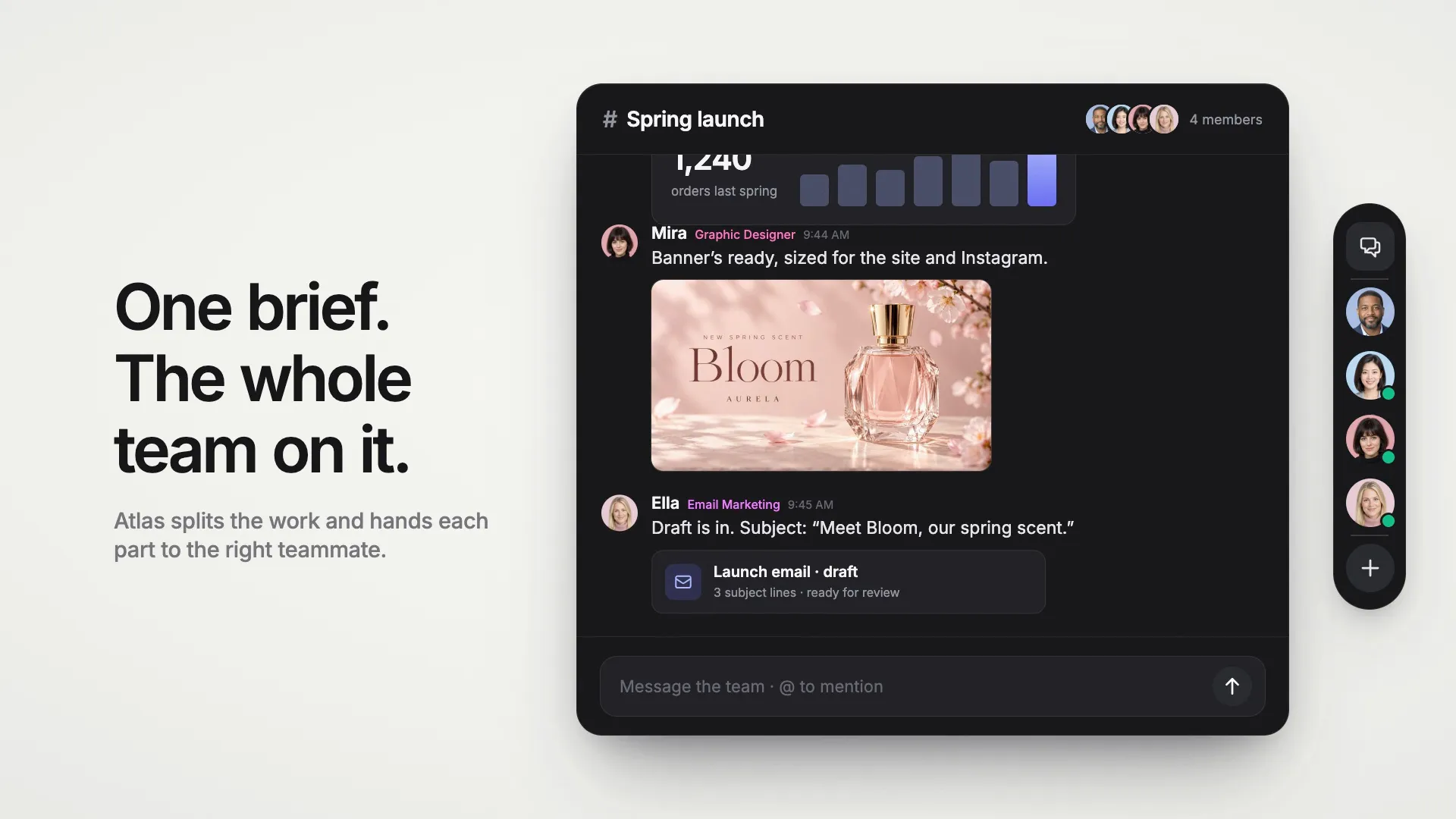
Example: you ask the Chief of Staff for a product launch. He hands the numbers to the analyst, the banner to the designer and the email to the email specialist. Their work arrives in the group chat, every task is tracked, and the email waits for your approval.

Trusted by teams at companies and universities like







One launch, start to finish. In 38 seconds.
Watch a team of AI employees take a product launch from one brief to a banner, last spring’s numbers and an approved email.
19 roles, ready to hire. Or describe your own.
Each role comes ready: a name, a portrait, instructions written for the job and ideas for what to ask first. Rename them, change anything, and hire in a click.
 AtlasChief of StaffLeads your AI team: plans the work, delegates, reports backHire Atlas
 MayaCustomer Support RepAnswers customer questions from your knowledge baseHire Maya
 LeoMarketing Content CreatorProduces finished social posts with images and videoHire Leo
 NovaBusiness AnalystDaily business brief from your data and the marketHire Nova
 AriaExecutive AssistantManages your inbox, calendar and follow-upsHire Aria
 IrisSEO Content WriterResearches keywords and writes ranking articlesHire Iris
 SamResearch AnalystDeep research with cited, structured reportsHire Sam
 ZoeSocial Media ManagerPlans your social calendar and writes posts for every platformHire Zoe
 EllaEmail Marketing SpecialistWrites newsletters and campaigns that get openedHire Ella
 MaxSales Development RepResearches prospects and writes outreach that gets repliesHire Max
 CoraCustomer Success ManagerOnboards customers, spots churn risk, keeps accounts happyHire Cora
 PriyaProduct ManagerTurns customer feedback into specs, roadmaps and release notesHire Priya
 OwenProject ManagerKeeps projects on track with plans, status and follow-upsHire Owen
 DanaData AnalystAnalyzes your spreadsheets with charts and clear answersHire Dana
 FelixFinance AssistantKeeps your books tidy: expenses, invoices, monthly reportsHire Felix
 RaviRecruiterWrites job posts, screens candidates, runs the pipelineHire Ravi
 MiraGraphic DesignerCreates on-brand ads, thumbnails, banners and product shotsHire Mira
 KaiVideo ProducerScripts, storyboards and generates short videosHire Kai
 LinaLocalization SpecialistTranslates and adapts your content for every marketHire Lina
- +Describe your ownWrite what the job is in a sentence. We draft the name, portrait and instructions for you to check.Create a role
Your team is ready in a minute. Then it gets to work.
01
Tell us what you do
Pick the kinds of work you do. We propose a team led by a Chief of Staff, and you hire it in one click.
02
Brief them like a team
Write to everyone in a group chat or to one person directly. The lead hands each part to the right teammate, and they pass work to each other.
03
Review and approve
Finished work comes back for your review. Anything that would go out, like an email or a calendar invite, waits for your OK.
Tasks
Every task, tracked. From to-do to done.
Turn any message into a task, or let the lead file them. Each task has one owner, a status and a thread that holds the work.
- A board for the whole team, and one for what needs you
- Delivered work waits for your review: mark it done or ask for changes
- A task that stalls gets a reminder, and you hear if it stays stuck
A task board with four columns: To do, In progress, In review and Done. The banner the designer delivered waits in review with Mark done and Ask for changes buttons.
Approvals
Nothing goes out without your OK.
Emails, calendar invites and changes in your apps wait for your approval. You see exactly what will be sent before it goes.
- Approve as is, edit it first, or reject it with a note
- Away from your desk? Approvals wait for a week, and we email you
- Choose for each employee what needs your approval
An approval card: the email specialist wants to send an email to a customer. It shows the recipient, the subject and the message, with Reject, Edit and Approve buttons. Next to it, the employee’s approval settings, all set to ask first.
Routines
They work while you sleep.
Give each employee standing jobs: a morning brief, an inbox sweep, a weekly report. Ask for one in plain words and it runs on schedule.
- Runs on our servers, even with your laptop closed
- Results land in your chat, and every run is in the history
- Run any routine now to see what it does
A list of routines: a daily business brief on weekdays at 8:00, support email drafts every 15 minutes, a weekly team status on Mondays and a monthly newsletter draft. Above it, a morning notification from the analyst with this week’s orders.
Everything a good hire needs. On day one.
Every employee comes with a memory, your knowledge, a computer of its own and tools to make images and video.
They remember
Each employee keeps notes about you, your business and its own work, and learns from every conversation. You can read and edit all of it.
They know your business
Add your website, documents and answers to common questions. They look things up there before they reply.
A computer of their own
A private workspace to read files, run code and work through spreadsheets, plus web search and a browser.
Images and video
Your designer makes banners and product shots. Your video producer writes the script and makes the clip.
The right model for each job
Choose the AI model behind every employee, from fast and affordable to the most capable, and how hard it thinks.
Skills for the job
Built-in skills for research reports, data analysis and documents, plus skills you write yourself.
Connect the apps they need. And only those.
Each employee works with the apps you give it: the support inbox for your support rep, Canva for your designer, Stripe and PostHog for your analyst.
- Several Gmail accounts? Pick the one each employee uses.
- Tell each employee how to use an app, like “reports only, no refunds”.
- Bring your own tools with any MCP server or API.
- Gmail
- Google Calendar
- Google Drive
- Outlook
- OneDrive
- OneNote
- Notion
- GitHub
 Canva
Canva Stripe
 PayPal
 PostHog
 Mixpanel
 Supabase
- Crisp
 Klaviyo
 Trello
 Asana
Asana Linear
 monday.com
 Airtable
 ClickUp
 Cal.com
 Zapier
 Semrush
 Ahrefs
 Meta Ads
 Webflow
 Sentry
- +13More apps
A team for the work you do. Proposed in one click.
Tell us what you do when you sign up, and we put together a team for it, led by your Chief of Staff. Here is what we’d suggest.
Founder / CEOStrategy, inbox, numbers, research
 AtlasChief of StaffLeadPlan a project with the teamGet the team on itStatus of everything
 AriaExecutive AssistantTriage my inboxPlan my week
 NovaBusiness AnalystMetrics briefDaily business brief
 SamResearch AnalystCompare competitorsDeep-dive report
Untick anyone you don’t need, and add more roles any time.
Hire this teamMarketing & growthContent, social, SEO, email
- AtlasChief of StaffLeadPlan a project with the teamGet the team on itStatus of everything
 LeoMarketing Content CreatorLaunch post with a visualContent ideas for this week
 ZoeSocial Media ManagerPlan this week's postsRepurpose an idea
 IrisSEO Content WriterPitch article ideasWrite an SEO article
 EllaEmail Marketing SpecialistWrite this month's newsletterPlan a launch campaign
Untick anyone you don’t need, and add more roles any time.
Hire this teamSalesProspecting, outreach, follow-ups
- AtlasChief of StaffLeadPlan a project with the teamGet the team on itStatus of everything
 MaxSales Development RepBuild a lead listResearch a prospect
- SamResearch AnalystCompare competitorsDeep-dive report
- EllaEmail Marketing SpecialistWrite this month's newsletterPlan a launch campaign
Untick anyone you don’t need, and add more roles any time.
Hire this teamCustomer support & successAnswers, onboarding, retention
- AtlasChief of StaffLeadPlan a project with the teamGet the team on itStatus of everything
 MayaCustomer Support RepDraft replies to new emailsAnswer a customer question
 CoraCustomer Success ManagerCreate an onboarding planFind accounts at risk
Untick anyone you don’t need, and add more roles any time.
Hire this teamCreator / freelancerVideos, visuals, social posts
- AtlasChief of StaffLeadPlan a project with the teamGet the team on itStatus of everything
 KaiVideo ProducerWrite a video scriptStoryboard a video
 MiraGraphic DesignerDesign an adMake a thumbnail
- ZoeSocial Media ManagerPlan this week's postsRepurpose an idea
Untick anyone you don’t need, and add more roles any time.
Hire this teamE-commerceProduct content, ads, customer care
- AtlasChief of StaffLeadPlan a project with the teamGet the team on itStatus of everything
- MayaCustomer Support RepDraft replies to new emailsAnswer a customer question
- MiraGraphic DesignerDesign an adMake a thumbnail
- LeoMarketing Content CreatorLaunch post with a visualContent ideas for this week
- NovaBusiness AnalystMetrics briefDaily business brief
Untick anyone you don’t need, and add more roles any time.
Hire this teamProductFeedback, specs, research, data
- AtlasChief of StaffLeadPlan a project with the teamGet the team on itStatus of everything
 PriyaProduct ManagerSynthesize feedbackWrite a spec
- SamResearch AnalystCompare competitorsDeep-dive report
 DanaData AnalystAnalyze a spreadsheetMake a chart
Untick anyone you don’t need, and add more roles any time.
Hire this teamOperations & financeProjects, books, reporting
- AtlasChief of StaffLeadPlan a project with the teamGet the team on itStatus of everything
 OwenProject ManagerPlan a projectWrite a status report
 FelixFinance AssistantCategorize expensesTrack unpaid invoices
- DanaData AnalystAnalyze a spreadsheetMake a chart
Untick anyone you don’t need, and add more roles any time.
Hire this teamRecruiting & HRJob posts, screening, scheduling
- AtlasChief of StaffLeadPlan a project with the teamGet the team on itStatus of everything
 RaviRecruiterWrite a job descriptionScreen candidates
- AriaExecutive AssistantTriage my inboxPlan my week
Untick anyone you don’t need, and add more roles any time.
Hire this teamStart free. Grow the team when you’re ready.
Every plan comes with every role, approvals, tasks and routines. Bigger plans let you hire more people.
Free
$0
Free forever
- 1 AI employee
- 2,000 words a month
- Approvals, tasks and routines
- Our fast AI models
Starter
$8
a month, billed yearly
- 3 AI employees
- 25,000 words a month
- Group chats for your team
- Top models from OpenAI, Anthropic and Google
Unlimited
Recommended$16.50
a month, billed yearly
- 10 AI employees
- 100,000 words a month
- Group chats for your team
- Top models from OpenAI, Anthropic and Google
Teams
$16
per person a month, billed yearly
- 20 AI employees for each person
- 100,000 words a month for each person
- Seats for your whole team
- One bill for everyone
Employees use your plan’s monthly words, the same allowance as Marky Agent. Faster models use fewer words. Compare all plans
Questions, answered.
Still wondering how an AI team fits your work? Hire your first employee for free and ask it.
What is an AI employee?
An AI teammate with a role, its own instructions, a memory and the apps you connect to it. You talk to it like a colleague, in a direct chat or in a group chat with the rest of your team, and it can also work on a schedule.
How is this different from Marky Agent?
Marky Agent is your all-round assistant for one task at a time. AI employees are a team: each one has its own role, memory and apps, they hand work to each other in group chats, keep a task list and run routines on their own schedule.
How is this different from AI Agents?
AI Agents answer your customers on your website, WhatsApp, email and the phone. AI employees work for you and your team inside Easy-Peasy.AI.
Can they send emails or change things on their own?
Not unless you let them. By default, every email, calendar change and change in your other apps waits for your approval, and you can approve it, edit it or reject it. You can switch approvals off for each employee and each kind of action.
How many AI employees can I hire?
1 on the Free plan, 3 on Starter, 10 on the Unlimited plans and 20 for each person on a Teams plan.
Which apps can they use?
Gmail, Google Calendar and Drive, Outlook, OneDrive, OneNote, Notion, GitHub, Canva, Stripe, PostHog, Supabase and 29 more apps, plus any MCP server or API you add. Each employee only uses the apps you connect to it.
Do they keep working when I close my laptop?
Yes. Routines run on our servers on their schedule, and work an employee has started carries on if you close the tab. The results are in your chat when you’re back.
Which AI models do they use?
You choose for each employee, from fast models to the most capable ones from OpenAI, Anthropic, Google and others, and how much effort it puts in. Gmail, Google Calendar and Google Drive can’t be used with Grok or DeepSeek models.
Can I change a role after hiring?
Yes. Rename an employee or change its portrait, instructions, model, apps and knowledge at any time. You can also ask it in a chat to update its own profile.
Is my data safe?
We don’t use your inputs to train our own models, and each employee only sees the apps you connect to it. Easy-Peasy.AI is SOC 2, ISO 27001, GDPR and HIPAA compliant.

Hire your AI team.
Free to start. Your first employee is ready in a minute.