Most AI videos still look like AI videos — too smooth, too cinematic, too perfect. But with the right prompt structure, today’s best models can produce footage that feels like a real home video someone dug out of a drawer. In this guide, we’ll break down a real 15-second video made with Seedance 2.0 in Easy-Peasy.AI’s AI Video Generator — including the complete prompt — and show you exactly how to write prompts that make AI videos look authentically, believably human.
The Video We’re Breaking Down
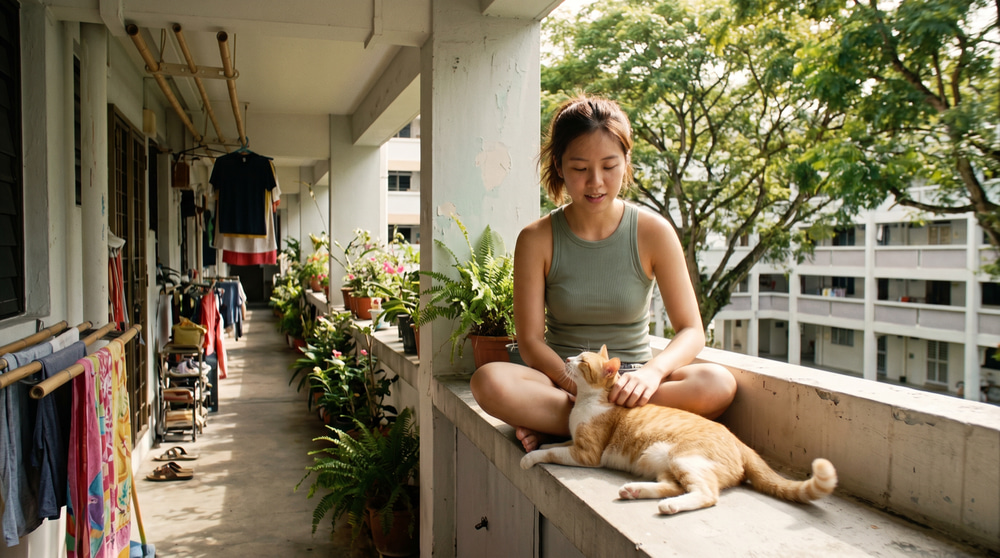
Here’s the finished result: a candid slice-of-life clip of a young woman going about her morning in a Singapore HDB housing estate — adjusting her hair, feeding a community cat, hanging laundry on bamboo poles, sipping kopi at the void deck. It looks like it was filmed by a friend on an early-2000s camcorder. Every frame of it is AI-generated.
You can watch it (and copy the full prompt) on its public video page. It was generated in one shot: 15 seconds, 720p, 16:9, with native audio — birds, wind, the cat, even a distant MRT announcement — for 180 credits.
Why Seedance 2.0 Is Great for Realistic Videos
Seedance 2.0 (by ByteDance) is currently one of the strongest models for grounded, documentary-style realism, and it has three abilities this video leans on heavily:
- Long, structured prompts — it reliably follows multi-paragraph prompts with timestamped scene directions, so you can choreograph a 15-second clip beat by beat.
- Multi-shot storytelling — it can cut between shots (ledge → corridor → cat → laundry → void deck) while keeping the same person, outfit, and lighting consistent.
- Native audio generation — ambient sound is generated with the video. Realistic sound design is half of what makes footage feel real.
It also takes stylistic direction unusually well — which is what makes the biggest trick in this prompt work.
The Secret: Ask for Imperfection
The single most effective technique in this prompt is that it doesn’t ask for a beautiful video. It asks for a flawed one:
“Early-2000s consumer DV camcorder aesthetic. Friend casually recording everyday moments. Heavy handheld shake, imperfect framing, frequent autofocus hunting, lens breathing, exposure pumping when moving between sun and shade, occasional motion blur, subtle rolling shutter, mild digital compression artifacts, faded colors, soft contrast, slight sensor noise. No stabilization. No cinematic camera moves. No modern color grading.”
Our brains associate perfection with CGI and imperfection with reality. Autofocus that hunts, exposure that pumps when the subject walks from sun into shade, a camera operator who reacts a beat too late — these are artifacts of a real human holding a real camera. When the AI reproduces them, your brain reads the footage as “real.”
The prompt even directs the imperfections moment by moment: “A neighbor walking past greets her off-camera. She turns, raises her hand, smiles warmly… The camera catches the moment slightly late, the neighbor already partially out of frame.” That’s not something a cinematic prompt would ever ask for — and it’s exactly why the result feels candid.
Anatomy of the Prompt
The full prompt is long (about 3,700 characters), but it follows a repeatable seven-part template you can steal for any realistic video:
1. Main Subject — Specific and Consistent
The prompt describes one person in concrete, everyday detail: “Young Singaporean Chinese woman, early 20s, natural everyday appearance, faded sage-green ribbed tank top, loose high-waisted sand-beige cotton shorts, brown leather slides, thin gold chain necklace, dark brown straight hair in a low loose bun with face-framing strands. Realistic skin texture, minimal makeup… Faint tan lines visible on shoulders.”
Two things to notice: the details are mundane on purpose (lip balm, tan lines, a loose bun — not “stunning model”), and it ends with an explicit instruction: “Maintain consistent identity, clothing, hairstyle, and appearance throughout the entire video.” That line is what keeps a multi-shot video from morphing the character between cuts.
2. Location — Grounded in Real-World Details
Instead of “an apartment building in Singapore,” the prompt names the specific textures of a mature HDB estate: open-air corridors with metal railings, neighbors’ potted plants, painted block numbers, bamboo pole drying racks, void deck benches, rain trees casting dappled shadows. Hyper-specific local details are what sell authenticity — generic locations produce generic videos.
It also excludes what would break the illusion: “No stores, advertisements, kopitiams, crowds, or commercial activity.” Negative constraints matter as much as positive ones.
3. Visual Style — Name the Genre
“Ultra-realistic documentary realism. Genuine candid behavior. Natural body language. Unscripted slice-of-life feeling.” Short, but it sets the model’s overall register before any scene direction begins.
4. Camera Style — The Imperfection Layer
The camcorder paragraph quoted above. If you only add one section to your own prompts, make it this one.
5. Timestamped Scene Beats
The prompt scripts the whole clip in two-to-three second beats, like a shot list:
“00:00–00:02 … She sits on a low concrete ledge beside the doorway, adjusting her hair bun with both hands raised…
00:04–00:06 She gently pets and feeds the community cat from a small plastic container. Autofocus repeatedly shifts between her face and the animal…
00:12–00:15 … Recording cuts abruptly to black mid-motion as if the camcorder was switched off.”
Each beat contains an action, a camera behavior, and one small environmental event (a mynah bird on the railing, clouds changing the exposure, a bus passing). That layering — person, camera, world — is what makes each shot feel alive. And ending mid-motion, as if someone hit the power button, is a wonderful finishing touch.
6. Audio — Ambient Only
“Natural ambient sound only — mynah birds and sparrows chirping, distant bus engine braking, faint MRT announcement echo… No music. No sound design. No narration.” Since Seedance 2.0 generates audio natively, describing the soundscape is just as important as describing the visuals. Music instantly signals “produced content” — banning it keeps the home-video feel.
7. Goal — One Summary Sentence
The prompt closes by telling the model what feeling to optimize for: “Authentic Singapore HDB heartland life captured like a forgotten home video from the early 2000s — candid, imperfect, realistic, warm, and deeply believable.”
Full Prompt:
Main subject: Young Singaporean Chinese woman, early 20s, natural everyday appearance, faded sage-green ribbed tank top, loose high-waisted sand-beige cotton shorts, brown leather slides, thin gold chain necklace, dark brown straight hair in a low loose bun with face-framing strands. Realistic skin texture, minimal makeup (defined brows, lip balm only), warm and approachable personality. Faint tan lines visible on shoulders. Maintain consistent identity, clothing, hairstyle, and appearance throughout the entire video.

Location: Authentic mature Singapore HDB estate during a calm late morning. Long open-air concrete corridors with metal railings, neighbors' potted plants and hanging ferns lining the walkway, painted block numbers on wall ends, bamboo pole drying racks outside kitchen windows, void deck concrete benches, covered link walkways, mature rain trees and angsana trees casting moving dappled shadows, distant playground visible below. Quiet residential atmosphere. No stores, advertisements, kopitiams, crowds, or commercial activity.

Visual Style: Ultra-realistic documentary realism. Genuine candid behavior. Natural body language. Unscripted slice-of-life feeling. Strong environmental authenticity. Rich real-world details and believable human motion.

Camera Style: Early-2000s consumer DV camcorder aesthetic. Friend casually recording everyday moments. Heavy handheld shake, imperfect framing, frequent autofocus hunting, lens breathing, exposure pumping when moving between sun and shade, occasional motion blur, subtle rolling shutter, mild digital compression artifacts, faded colors, soft contrast, slight sensor noise. No stabilization. No cinematic camera moves. No modern color grading.

00:00–00:02 Outside an HDB flat entrance along an open-air corridor. She sits on a low concrete ledge beside the doorway, adjusting her hair bun with both hands raised. A warm breeze moves loose strands across her face. She smiles naturally while the camera struggles to hold focus. Drying rack with bamboo poles visible behind her.

00:02–00:04 The camera follows her along the corridor past rows of potted plants, hanging pothos, and a neighbor's small herb garden. She notices a community cat approaching from around a corner and crouches down near the railing. Framing drifts off-center as the operator tries to keep up. Dappled sunlight filters through a rain tree canopy above the corridor.

00:04–00:06 She gently pets and feeds the community cat from a small plastic container. Autofocus repeatedly shifts between her face and the animal. Morning sunlight flickers through leaves overhead. The cat rubs against her slides.

00:06–00:08 At a corridor drying area outside the kitchen window. She slides wet laundry onto a bamboo pole and lifts it onto the metal drying rack, fabrics swaying in the breeze. Exposure changes as clouds briefly pass overhead. A mynah bird hops along the railing in the background.

00:08–00:10 At the void deck below, sitting on a concrete bench under a covered walkway with a ceramic mug of kopi. She sits comfortably watching the estate, occasionally brushing hair behind her ear. Loose handheld side angle with natural camera drift. A bicycle is parked against a nearby pillar.

00:10–00:12 Close side profile. A neighbor walking past greets her off-camera. She turns, raises her hand, smiles warmly, and casually says, "Hi." The camera catches the moment slightly late, the neighbor already partially out of frame.

00:12–00:15 Walking slowly down a tree-lined covered walkway between blocks, holding her mug. She notices the camera, gives a small genuine smile, then looks away and continues walking. A distant bus passes on the road beyond the trees. Recording cuts abruptly to black mid-motion as if the camcorder was switched off.

Audio: Natural ambient sound only — mynah birds and sparrows chirping, distant bus engine braking, faint MRT announcement echo from a nearby station, light wind through rain trees, leaves rustling, faint neighborhood chatter in a mix of English and Singlish, cat purring and meowing, slides on concrete, fabric flapping on bamboo poles, subtle HDB estate ambience. No music. No sound design. No narration.

Goal: Authentic Singapore HDB heartland life captured like a forgotten home video from the early 2000s — candid, imperfect, realistic, warm, and deeply believable.
How to Create Your Own Realistic AI Video (Step-by-Step)
Step 1: Open the Video Generator and Write Your Prompt
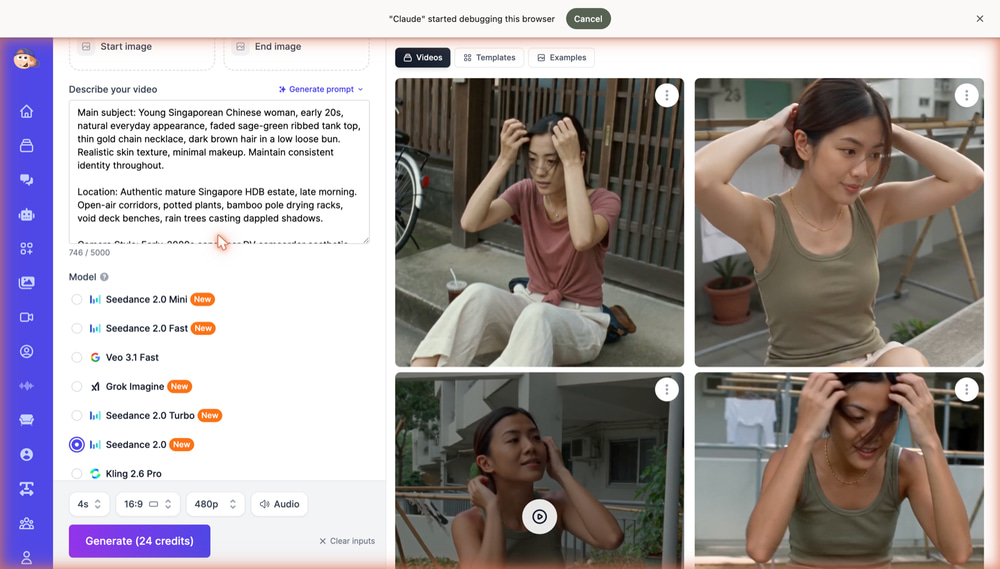
Go to the AI Video Generator and paste your prompt into the Describe your video field. Follow the seven-part template above: subject, location, visual style, camera style, timestamped beats, audio, goal. Prompts can be up to 5,000 characters — use that space.
Step 2: Select the Seedance 2.0 Model
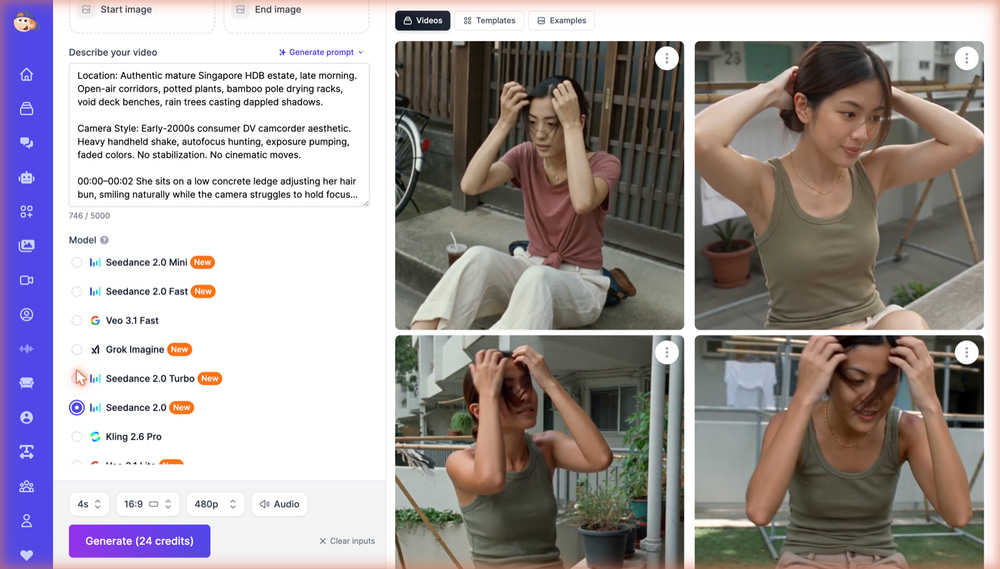
In the Model list, choose Seedance 2.0. The Mini, Fast, and Turbo variants are cheaper and great for testing drafts of your prompt, but the full model gives the best motion, detail, and prompt adherence for a final render.
Step 3: Set Duration, Resolution, and Audio
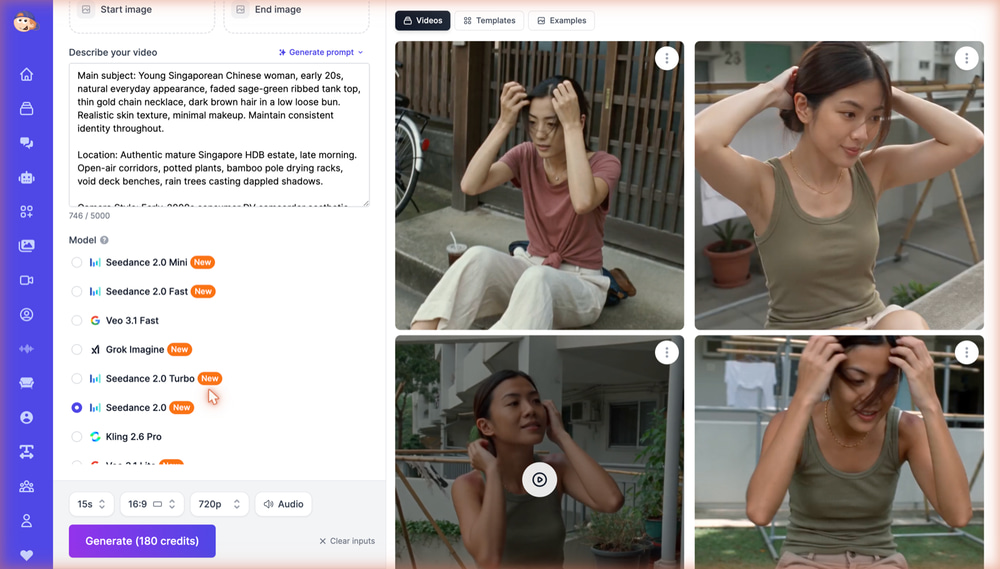
Using the controls at the bottom, set the duration to 15 seconds (matching your timestamped beats), the aspect ratio to 16:9, resolution to 720p, and keep Audio enabled so Seedance generates the ambient soundtrack. With these settings the render costs 180 credits — drop to 480p or a shorter duration for cheaper iterations.
Step 4: Generate and Iterate
Click Generate and wait a few minutes. Review the result critically: is the character consistent across cuts? Does the camera feel handheld? If something is off, tighten the relevant prompt section and run it again — small wording changes (like adding “autofocus hunting”) make visible differences.
Tips for Getting the Best Results
Write Mundane, Not Epic
Realism lives in boring details: hanging laundry, feeding a cat, brushing hair behind an ear. If your scene sounds like a movie trailer, it will look like one — and AI-generated movie trailers read as fake. AI-generated Tuesday mornings read as real.
Give Every Beat a Camera Behavior
Don’t just say what happens — say how the camera fails to capture it perfectly: “framing drifts off-center as the operator tries to keep up,” “the camera catches the moment slightly late.”
Add Background Life
One small independent event per beat — a bird hopping on a railing, a bicycle against a pillar, a neighbor passing — makes the world feel like it exists beyond the frame.
Use Negative Constraints
Explicitly ban the things that break the illusion: “No stabilization. No cinematic camera moves. No modern color grading. No music.” Models default to polish; you have to opt out of it.
Draft Cheap, Render Once
Test your prompt at 4–5 seconds on Seedance 2.0 Mini or Fast for a fraction of the credits. Once the look is right, do the full 15-second 720p render on Seedance 2.0.
Frequently Asked Questions
Which AI model is best for realistic videos?
Seedance 2.0 is one of the best for candid, documentary-style realism with consistent characters across multiple shots and native ambient audio. Easy-Peasy.AI’s Video Generator also offers Veo 3.1, Kling 2.6 Pro, Grok Imagine, and more, so you can compare models on the same prompt.
How long can the videos be?
With Seedance 2.0 you can generate clips up to 15 seconds in a single run, and choreograph the whole clip with timestamped beats (e.g. 00:04–00:06) inside your prompt.
Does the AI generate sound too?
Yes. Seedance 2.0 generates audio natively — keep the Audio toggle on and describe the soundscape in your prompt, down to details like birdsong, distant traffic, or a cat purring.
How much does a video like this cost?
The 15-second, 720p example in this post cost 180 credits. Shorter durations, lower resolutions, or the Mini/Fast/Turbo variants cost significantly less — a 4-second 480p draft on Seedance 2.0 Mini is just 8 credits.
Can I use my generated videos commercially?
Yes — videos you generate on any paid Easy-Peasy.AI plan come with commercial usage rights. See the terms of use for details.
Start Creating Realistic AI Videos Today
The gap between “obviously AI” and “is this real?” isn’t the model — it’s the prompt. Describe an ordinary person, in a specific place, filmed by an imperfect camera, with nothing but ambient sound, and Seedance 2.0 will meet you there. Open the AI Video Generator, borrow the seven-part template above, and make something people will swear was filmed twenty years ago.