How to Write Therapy Progress Notes with AI (SOAP, DAP & BIRP Examples)

Ask any therapist what they like least about their work, and the answer is rarely the clients — it’s the documentation. Progress notes pile up between sessions, spill into evenings, and follow you home on weekends. AI can now take most of that weight: you provide the clinical substance, and the AI drafts a complete, properly structured note in seconds. In this guide, we’ll show you exactly how to write therapy progress notes with the AI Progress Note Generator — including real SOAP, DAP, and BIRP note examples generated by the tool, a record-the-session workflow that produces notes without any typing, and straight answers on HIPAA compliance and accuracy.
Everything below was produced with the actual tools using a synthetic sample case — no real client data, no mockups.
What Are Therapy Progress Notes?
Progress notes are the official clinical record of each session: what the client reported, what you observed, what interventions you delivered, how the client responded, and what happens next. They live in the medical record, support continuity of care, and are what insurance reviewers and auditors read when they evaluate medical necessity.
They are not the same as psychotherapy notes (sometimes called process notes) — your private observations and hypotheses, which are kept separate from the record and receive extra protection under HIPAA. This guide is about progress notes: the structured, shareable documentation every payer and agency requires.
SOAP vs. DAP vs. BIRP vs. GIRP vs. PIE: Which Format Should You Use?
Most practices standardize on one of a handful of formats. They all capture the same clinical reality — they just organize it differently:
| Format | Sections | Best for |
|---|---|---|
| SOAP | Subjective, Objective, Assessment, Plan | The most widely recognized format; medical settings, integrated care, and payers that expect a clear subjective/objective split |
| DAP | Data, Assessment, Plan | Therapists who prefer combining reported and observed information into one Data section; faster to write |
| BIRP | Behavior, Intervention, Response, Plan | Agencies and community mental health; makes your interventions and the client’s response explicit — exactly what auditors look for |
| GIRP | Goal, Intervention, Response, Plan | Goal-driven treatment where each note ties directly back to the treatment plan |
| PIE | Problem, Intervention, Evaluation | Problem-focused documentation, common in social work and case management |
Here’s the practical advantage of using AI for this: you don’t have to choose once and forever. The Progress Note Generator has a Format dropdown with all five options — the same session input produces a SOAP, DAP, BIRP, GIRP, or PIE note. If you switch agencies, panels, or payers, your workflow doesn’t change.
How to Generate a Progress Note with AI (Step by Step)
Open the Psychotherapy Progress Note Generator. The form asks for exactly what you’d jot down between sessions:
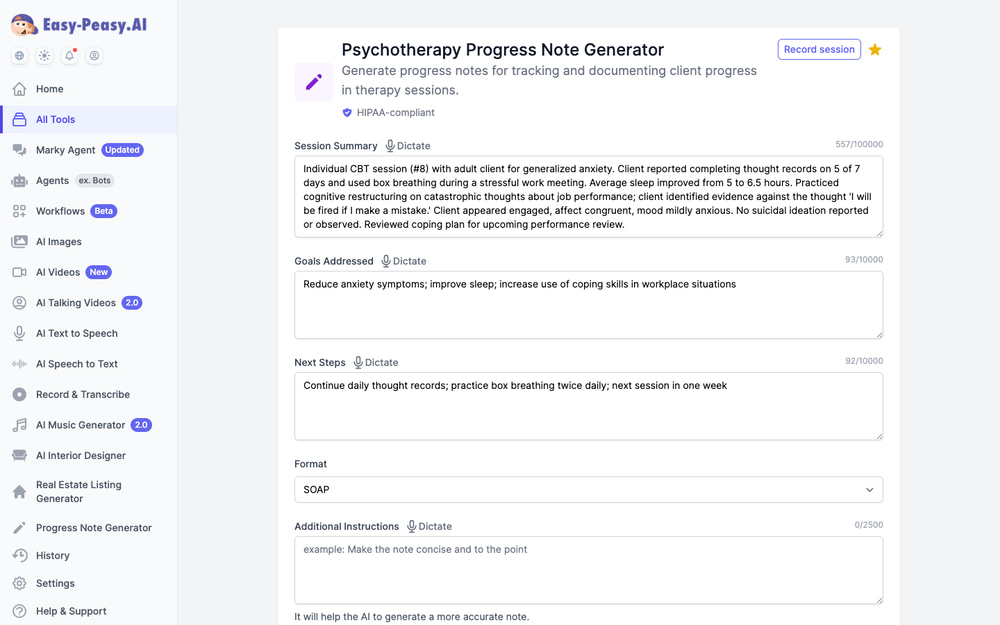
Step 1: Enter your session summary
Shorthand is fine — that’s the point. For the examples in this article we used this synthetic case:
“Individual CBT session (#8) with adult client for generalized anxiety. Client reported completing thought records on 5 of 7 days and used box breathing during a stressful work meeting. Average sleep improved from 5 to 6.5 hours. Practiced cognitive restructuring on catastrophic thoughts about job performance. Client appeared engaged, affect congruent, mood mildly anxious. No suicidal ideation reported or observed. Reviewed coping plan for upcoming performance review.”
The field accepts up to 100,000 characters, so you can also paste a full session transcript. And every field has a Dictate button — talk through the session in two minutes instead of typing.
Step 2: Add goals and next steps
Two short fields: which treatment goals the session addressed, and what was assigned or scheduled. A phrase or two each is enough.
Step 3: Pick your format and generate
Choose SOAP, DAP, BIRP, GIRP, PIE — or None for a clean narrative note — and click Generate. The draft appears in seconds, ready for your review, edits, and sign-off.
SOAP Note Example (Generated by AI)
Here is the actual output from the sample input above, with Format set to SOAP — unedited:
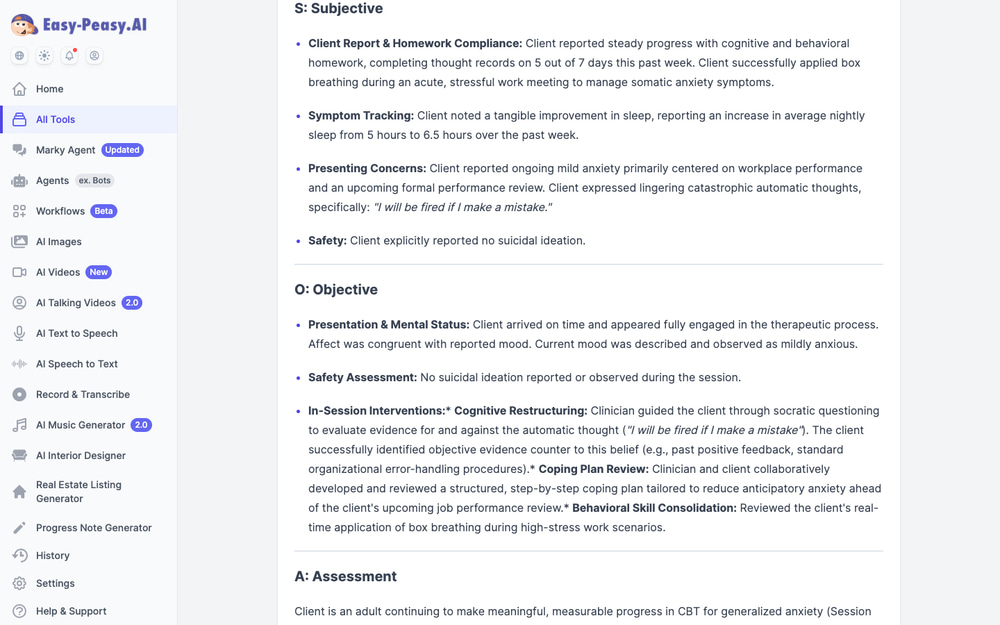
S — Subjective: Client reported steady progress with cognitive and behavioral homework, completing thought records on 5 out of 7 days this past week. Client successfully applied box breathing during an acute, stressful work meeting to manage somatic anxiety symptoms. Client noted a tangible improvement in sleep, reporting an increase in average nightly sleep from 5 hours to 6.5 hours. Client expressed lingering catastrophic automatic thoughts, specifically: “I will be fired if I make a mistake.” Client explicitly reported no suicidal ideation.
O — Objective: Client arrived on time and appeared fully engaged in the therapeutic process. Affect was congruent with reported mood. Current mood was described and observed as mildly anxious. No suicidal ideation reported or observed during the session. In-session interventions: cognitive restructuring via Socratic questioning to evaluate evidence for and against the automatic thought; collaborative review of a structured coping plan ahead of the client’s upcoming performance review.
A — Assessment: Client is an adult continuing to make meaningful, measurable progress in CBT for generalized anxiety (Session 8). The client demonstrates high intervention fidelity, as evidenced by consistent homework completion (5/7 days) and the effective in-vivo application of box breathing during an acute workplace stressor. While anticipatory stress regarding formal evaluations remains a key maintaining factor for residual mild anxiety, the client’s proactive engagement in developing a targeted coping plan indicates strengthening resilience.
P — Plan: Client to complete daily thought records prioritizing automatic thoughts triggered by work tasks; practice box breathing twice daily plus PRN during acute stress; apply the finalized coping plan during the performance review. Continue individual CBT weekly; next session scheduled in 1 week to debrief the performance review and consolidate cognitive restructuring techniques.
Notice what the AI did — and didn’t do. It wrote a real Assessment with clinical reasoning (connecting the sleep improvement to reduced hyperarousal, naming intervention fidelity), but every fact traces back to the input. It didn’t invent scores, session lengths, or diagnoses that weren’t provided.
DAP Note Example (Same Session)
Switching the Format dropdown to DAP and regenerating from the identical input produced this DAP note (condensed):
D — Data: Client presented for session #8 of individual CBT targeting generalized anxiety. Mood mildly anxious with congruent affect; fully engaged. Client explicitly denied suicidal or homicidal ideation. Strong homework adherence: thought records 5 of 7 days; successfully utilized box breathing in a real-time stress environment during a workplace meeting; average sleep increased from 5.0 to 6.5 hours per night. In-session interventions: cognitive restructuring of the automatic thought “I will be fired if I make a mistake,” and collaborative development of a coping plan for an upcoming performance review.
A — Assessment: Client is making tangible progress in managing generalized anxiety through consistent engagement with the CBT model. Real-time application of box breathing during an acute workplace stressor demonstrates increasing self-efficacy and generalization of coping skills outside the session. The increase in sleep duration indicates reduced physiological hyperarousal. Progress noted toward treatment goals of reducing anxiety, increasing sleep, and expanding adaptive coping in high-stress work scenarios.
P — Plan: Continue daily thought records prioritizing performance-related automatic thoughts; box breathing twice daily and as needed; execute the coping plan during the performance review. Next session in 1 week: debrief the review, evaluate the coping plan’s effectiveness, and continue the CBT protocol.
BIRP Note Example (Same Session)
And the same input as a BIRP note — the format agencies and auditors tend to prefer because it makes the intervention and response explicit (condensed):
B — Behavior: Client presented for an individual CBT session focusing on generalized anxiety and work-related stress. Alert, fully engaged, and cooperative; mildly anxious mood with congruent affect. Completed thought records 5 of 7 days; deployed box breathing in real time during a stressful workplace meeting; sleep increased from 5 to 6.5 hours. No suicidal ideation, homicidal ideation, or self-harm reported or observed.
I — Intervention: Clinician delivered evidence-based CBT interventions: cognitive restructuring with Socratic questioning targeting the catastrophic belief “I will be fired if I make a mistake” (identifying catastrophizing and all-or-nothing thinking); refined a behavioral coping plan for the upcoming performance review; reinforced continued daily practice of somatic regulation.
R — Response: Client responded well, demonstrating growing cognitive flexibility and self-efficacy. During restructuring, the client generated concrete, realistic evidence challenging catastrophic assumptions (historical positive feedback, standard organizational protocols), with a visible reduction in anxiety and an increased sense of agency regarding the upcoming review.
P — Plan: Daily thought records monitoring occupational anxiety; box breathing twice daily plus PRN; execute the coping plan during the review. Continue weekly individual CBT; session #9 scheduled in 1 week.
One input, three payer-ready formats. That’s the core of the workflow — the clinical thinking is yours; the formatting is free.
Record the Session, Get the Notes Automatically
There’s an even faster path that skips typing entirely. Every clinical note tool has a Record session button in the top corner, which opens the AI Note Taker with the recording type set to Therapy Session:
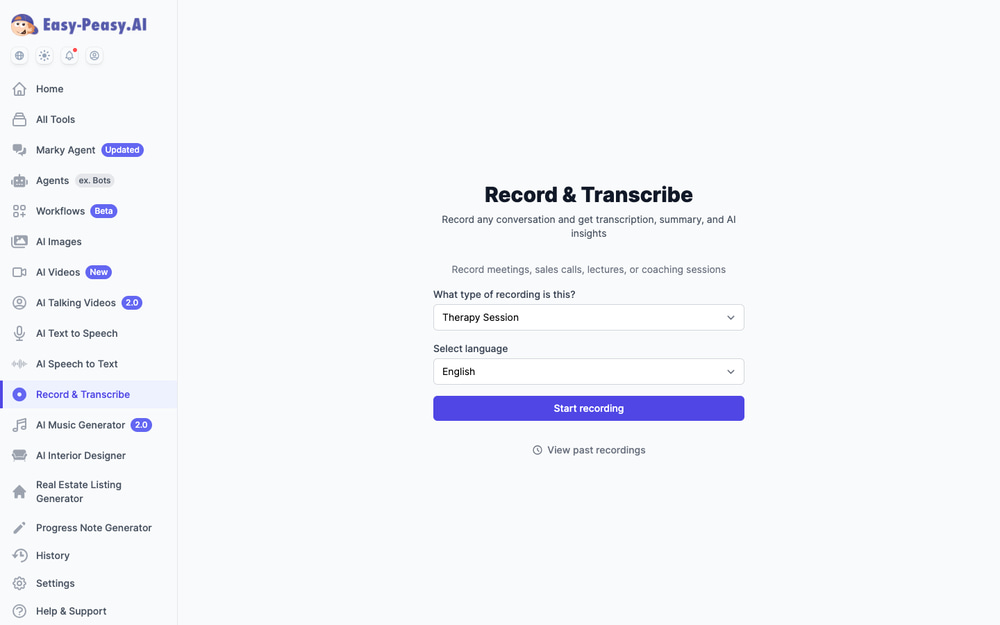
Record the session (with your client’s consent), and when you stop, the platform transcribes the audio and automatically generates a Progress Note, a SOAP note, and a DAP note from the transcript — all three, without you typing a word. Therapy recordings deliberately skip the marketing-style outputs (titles, social posts, keywords) that other recording types produce; you get the transcript and the clinical notes, nothing else.
Prefer a middle path? Use the Dictate button on the Session Summary field to speak your recap in a minute or two, or paste an existing transcript from your telehealth platform — the field accepts up to 100,000 characters.
Is It HIPAA-Compliant? (Yes — With a Signable BAA)
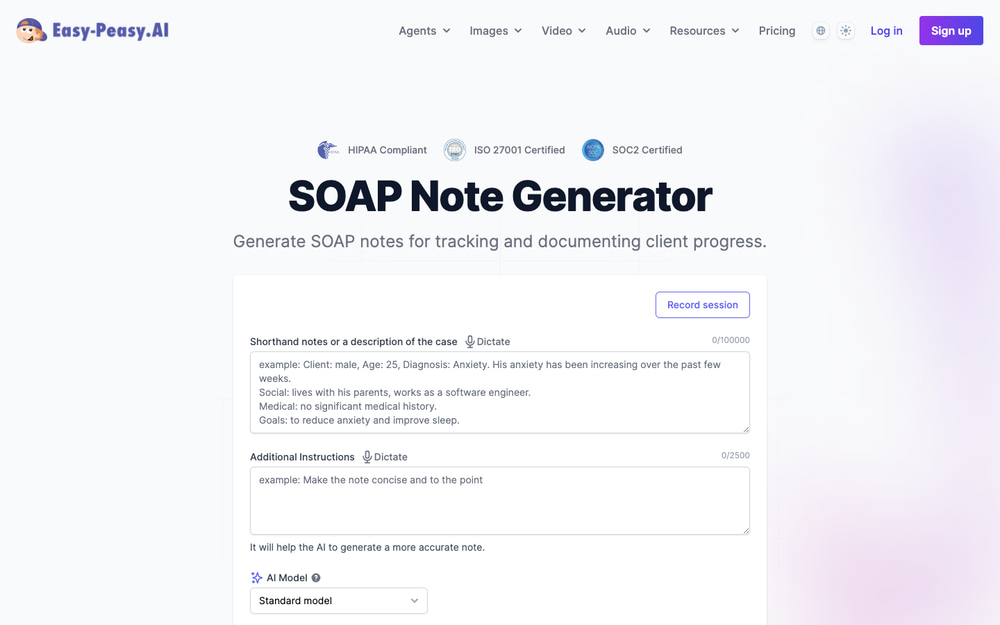
This is the first question every clinician asks, so let’s answer it properly. Easy-Peasy.AI is HIPAA-compliant for clinical documentation, alongside SOC 2 and ISO 27001 certification — the badges are displayed right on the clinical tool pages:
More importantly, you don’t need to email anyone to get a Business Associate Agreement. The BAA is self-serve: review, sign, and download it directly in your account settings, and your account is marked as a HIPAA account from that point on:
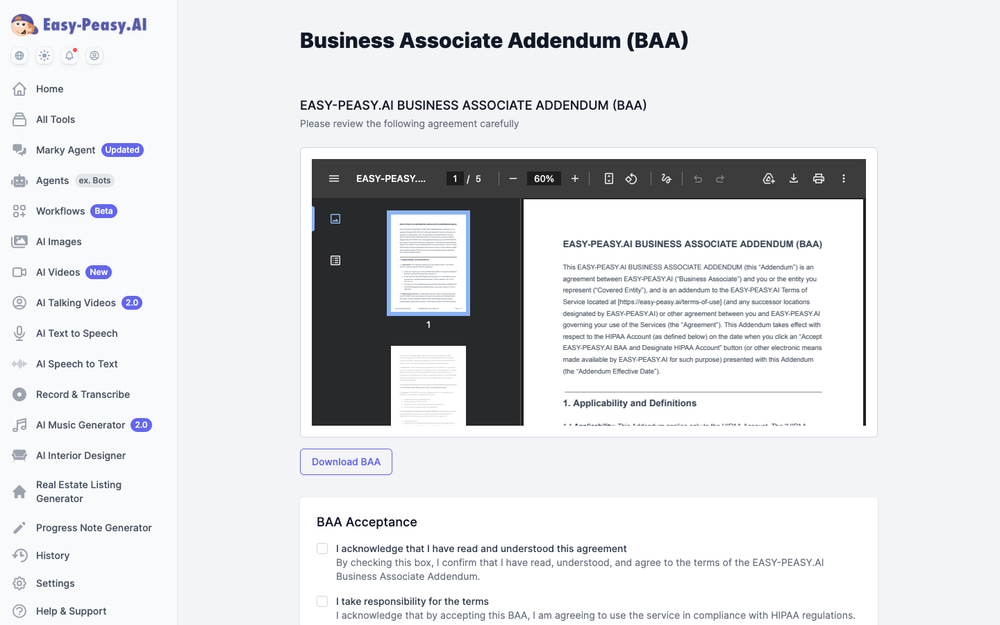
Practical guidance: sign the BAA before entering any PHI, and follow your usual minimum-necessary practice — the notes work perfectly well with initials or “the client” instead of full identifiers.
Why You Can Trust the Output: Accuracy by Design
A progress note that invents details isn’t a time-saver — it’s a liability. This is where the clinical tools differ most from pasting your notes into a general-purpose chatbot:
- Hard safety limits on risk language. The AI will never state that a client denied or endorsed suicidal ideation, homicidal ideation, or self-harm unless you explicitly documented it. A blank risk field stays blank — it does not get “filled in.”
- No invented measurements. Vital signs, test scores, assessment instruments, percentages, and timeframes only appear if you provided them. We formally evaluated multiple AI models on exactly this behavior and chose the one that stayed faithful to the input — models that fabricated specifics like invented symptom-reduction percentages were rejected.
- Web search is disabled on clinical tools. Other Easy-Peasy tools can browse the web; the clinical tools deliberately can’t, because external “facts” have no place in a clinical record.
- The clinician stays in charge. Every note is a draft for a licensed professional to review, verify, and finalize. The clinical accuracy and judgment are yours — the AI handles structure and completeness.
The Full Clinical Documentation Toolkit
Progress notes are the everyday workhorse, but the platform covers the whole documentation lifecycle — from intake to discharge:
| Stage | Tool | What it does |
|---|---|---|
| First session | Therapy Intake Generator | Structured intake notes from your first-session observations, with styles from Comprehensive to Insurance-ready and Trauma-informed |
| Treatment planning | Treatment Plan Generator | Complete plans with measurable goals, interventions, and a Medical Necessity selector that speaks payer language |
| Every session | Progress Note Generator | SOAP / DAP / BIRP / GIRP / PIE notes from a summary, dictation, or transcript |
| Dedicated formats | SOAP, DAP, BIRP, ABA Notes | Single-format tools that turn shorthand case notes into a finished note — ABA notes for behavior analysts included |
| Reviews & payers | Clinical Summary Update | Progress reports, treatment team updates, insurance authorization requests, referral summaries, and discharge planning — pick the format from a dropdown |
| Long documents | Content Summarizer | Summarize long transcripts, records, or intake packets (up to 200,000 characters) |
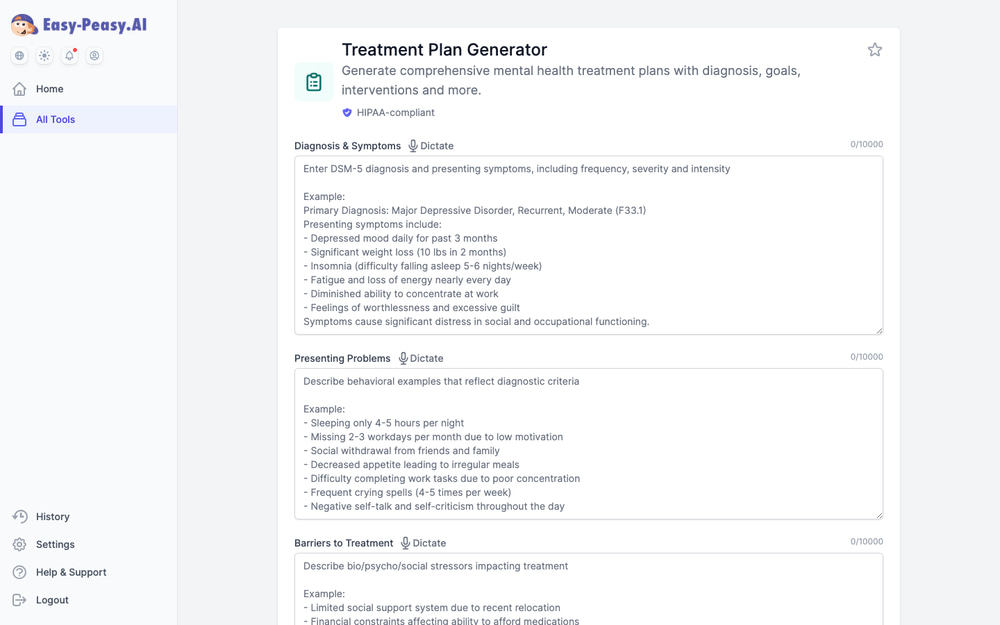
Two more that private-practice owners appreciate: the Therapy Practice Name Generator if you’re launching or rebranding, and the Legalese Translator for making sense of insurance contracts and vendor agreements without a lawyer on retainer.
Tips for Better AI Progress Notes
- Give the AI facts, not adjectives. “Thought records 5 of 7 days, sleep 5 → 6.5 hours” produces a far stronger note than “client is doing better.” Specifics in, specifics out.
- Always document risk status explicitly. Because the AI won’t infer it, write “no SI reported or observed” (or the clinical reality) in your summary every time — exactly as you would in a handwritten note.
- Use Additional Instructions for house style. “Keep it under 300 words,” “use paragraph form, no bullets,” or “include the CPT-relevant session duration I provided” — the note adapts.
- Dictate between sessions. Two minutes of talking right after a session beats twenty minutes of typing at 9 p.m. — and the details are fresher.
- Batch your formats. If your payer wants BIRP but your own records use SOAP, generate both from the same input in under a minute.
Frequently Asked Questions
Is it HIPAA-compliant to use AI for therapy notes?
It is when the platform protects PHI under HIPAA and signs a Business Associate Agreement — both of which Easy-Peasy.AI provides, with a self-serve BAA you can review, sign, and download in your account settings. Using a consumer chatbot without a BAA for client information is not compliant; that’s the distinction that matters.
Will the AI make up clinical details?
The clinical tools are specifically engineered not to. Risk statements (SI/HI/self-harm) are never generated unless you documented them, invented scores and measurements are blocked, and web search is disabled. The model behind the clinical tools was chosen through a formal evaluation for exactly this faithfulness.
What note formats are supported?
SOAP, DAP, BIRP, GIRP, and PIE through the Progress Note Generator’s Format dropdown, plus a free-form narrative option. There are also dedicated SOAP, DAP, BIRP, and ABA note tools, and the Clinical Summary Update covers progress reports, insurance authorization requests, referral summaries, and discharge planning.
Can I dictate instead of typing?
Yes — every clinical field has a Dictate button, and the AI Note Taker can record an entire session (with client consent) and automatically produce a Progress Note, SOAP note, and DAP note from the transcript.
Who is responsible for the final note?
You are. Every output is a draft for a licensed clinician to review, verify, and finalize before it enters the record. The AI handles structure, completeness, and professional language; the clinical judgment stays with you.
Is the Progress Note Generator free?
Yes — the Progress Note, SOAP, DAP, BIRP, and ABA note generators are all free to use, and a free account includes welcome credits. Paid plans add higher volumes, premium models, and tools like the Therapy Intake Generator. See pricing for details.
Who uses these tools?
Therapists, counselors, psychologists, social workers, psychiatric nurses, case managers, ABA therapists and behavior analysts, plus physical and occupational therapists and nurse practitioners using the SOAP format. Group practices also use them to standardize note quality across clinicians.
Finish Your Notes Before Your Next Client Arrives
The pattern we hear from clinicians is always the same: documentation used to be the evening’s second shift, and now it fits in the gap between sessions. Start with the free Progress Note Generator — type or dictate one real session summary (minus identifiers, until you’ve signed the BAA), pick your format, and compare the draft to what you’d have written at 9 p.m. Then sign the BAA in settings and make it part of the workflow.