How to Make a Documentary with AI: Step-by-Step for Beginners

Learning how to make a documentary used to mean months of planning, expensive camera gear and long nights in an editing suite, and independent films often take years to finish. Today, you can research, script, narrate and edit a short documentary in a single afternoon. This guide walks you through the classic steps every documentary follows, then shows you how to do each one with Easy-Peasy.AI’s Video Agent. To prove it works, we turned one paragraph into a real 60-second mini documentary about Pompeii.
Watch: A 60-Second Documentary Made Entirely with AI
Here is the finished mini documentary the Video Agent produced from one short paragraph. The agent wrote the script, generated every scene, recorded the narration, synced the captions and mixed in the music track we picked:
The prompt that created it was just this:
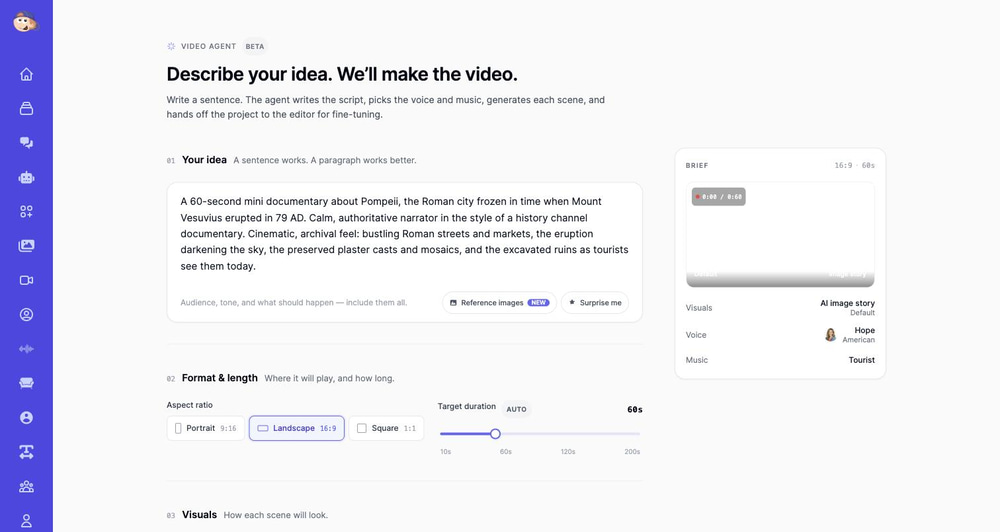
A 60-second mini documentary about Pompeii, the Roman city frozen in time when Mount Vesuvius erupted in 79 AD. Calm, authoritative narrator in the style of a history channel documentary. Cinematic, archival feel: bustling Roman streets and markets, the eruption darkening the sky, the preserved plaster casts and mosaics, and the excavated ruins as tourists see them today.
How to Make a Documentary: The Classic Process
Most independent documentary films take about five to six years to make, according to an MSNBC Films executive interviewed by NBCU Academy, which also advises beginners to start with shorter films. A short documentary follows the same six steps on a smaller scale:
- Pick a subject and a question. “Pompeii” is a topic. “How did a busy Roman city disappear in a day?” is a story.
- Research. Read books, articles and archives, and keep a list of your sources.
- Write a treatment. A one-page summary of the story, characters, tone and footage, used to plan and pitch the film.
- Plan the scenes and write the script. A storyboard helps you see the film first (see our guide on how to create a storyboard with AI).
- Film or gather your material. Interviews, b-roll (supporting shots), archival photos and video, and natural sound.
- Edit and share. Add narration, music and captions, then export for YouTube, a class screening or a film festival.
For short films, AI can now help with research and handle steps 4 to 6. Structure still matters, so let’s start there.
How to Structure a Documentary
Most documentaries use a three-act structure, the same backbone feature films use:
- Act 1, the setup: introduce the subject and the question the film will answer.
- Act 2, the journey: show the evidence, the conflict and the turning points. This is usually the longest part.
- Act 3, the resolution: answer the question or show what changed.
Some filmmakers call this problem, journey and resolution. Our Pompeii film follows it: a thriving city, the eruption, then the ruins visitors walk through today.
The Building Blocks Inside Each Act
- An opening hook: a striking image, fact or question in the first few seconds.
- Narration: a voiceover that guides the viewer and links the scenes.
- Interviews or archival material: voices and records that make the story credible.
- B-roll: footage that shows what the narrator describes.
- An ending that lands: a final fact, a return to the opening image, or a question.
How to Write a Documentary Script
Many documentaries start with an outline and only lock the script in the edit. For a narrated short, write for the ear: short sentences, one idea per line, plus a note of what the viewer sees. The classic layout has two columns, with visuals on the left and narration on the right.
The Video Agent writes this kind of script for you and fits it to your target length. You can still rewrite any line later in the editor.
The Five Elements of a Documentary
There is no single official list. In media studies, the best-known version comes from scholar John Corner: observation, interview, dramatization, mise-en-scène (what is placed in the frame) and exposition (the argument the film makes).
For your own film, check these five practical ingredients. If one is weak, the whole film feels thin:
- Subject and story: a clear question your film answers.
- Characters: people, animals or places the audience can follow.
- Structure: a beginning, middle and end.
- Visuals: interviews, b-roll, archival material or AI-generated scenes.
- Narration and sound: voiceover, music and natural sound that set the mood.
Can You Really Make a Documentary with AI?
Yes, with an honest caveat. AI won’t replace a two-hour investigative feature built on original interviews and archival research. What it does brilliantly is the short-form documentary: the one to three minute history explainers, nature spotlights, true-story recaps and educational deep-dives that dominate YouTube and TikTok right now.
A short documentary needs a researched story, a script, visuals, narration and an edit that ties them together. Modern AI handles each one:
- Research and script: an AI writer researches your topic and structures a narrated story with a hook, a middle and an ending
- Visuals: AI generates cinematic scenes, animates them with camera motion, or pulls real stock footage
- Narration: text-to-speech voices now sound like professional documentary narrators
- Captions: word-synced subtitles are transcribed automatically
- Editing: scenes, voiceover, music and transitions are assembled on a timeline you can fine-tune
Why Make Documentaries with AI?
The traditional route (camera crew, location shoots, editing software) is out of reach for most creators. The AI route opens documentary-making to:
- YouTube creators building history, science, true crime or geography channels (documentary-style videos are the backbone of faceless channels)
- Teachers and students who need engaging explainers for class projects without a film budget
- Marketers and nonprofits telling brand origin stories or cause-driven mini docs
- Aspiring filmmakers who want to prototype a story and test whether it lands before investing in a full production
With the Video Agent, one sentence goes in and a finished documentary comes out, usually within minutes.
How to Make a Documentary with AI (Step-by-Step)
Here’s the exact process we used for the Pompeii film above. It takes four steps.
Step 1: Describe Your Documentary Idea
Open the Video Agent and describe your documentary in the Your idea box. A sentence works; a short paragraph works better. Include three things:
- The subject: “Pompeii, the Roman city frozen in time when Mount Vesuvius erupted in 79 AD”
- The tone: “calm, authoritative narrator in the style of a history channel documentary”
- The visual beats: the scenes you imagine, such as bustling streets, the eruption and the ruins today
The script writer doesn’t just paraphrase your prompt. It can search the web to check dates, names and events, and if you paste a link to a source, it reads that page first. That matters a lot for documentary work.
Step 2: Choose the Format and Length
Under Format & length, pick Landscape 16:9 for YouTube (or Portrait 9:16 for Shorts, TikTok and Reels, or Square 1:1) and set the target duration. We set 60 seconds. The slider runs from 10 to 200 seconds, or you can switch on Auto and let the agent pick the length the story needs.
Step 3: Pick Your Visual Style
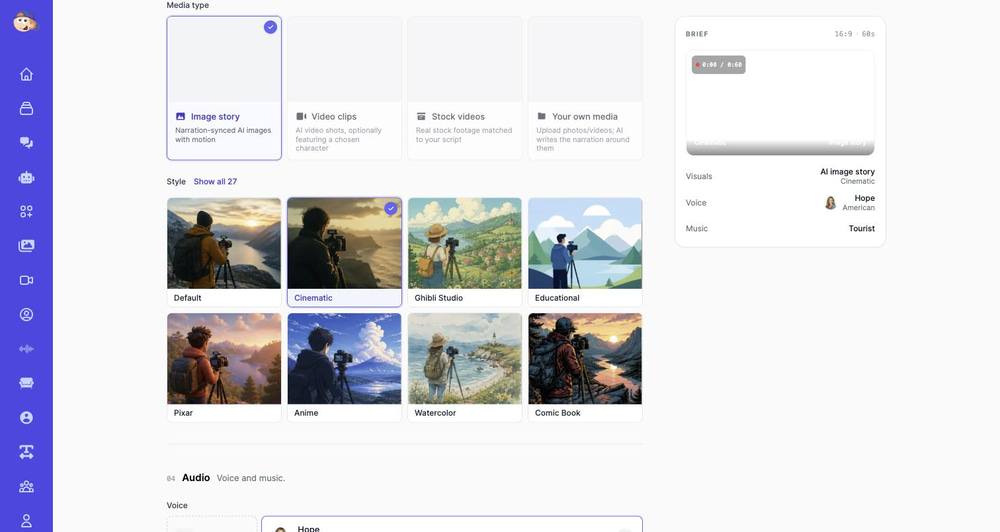
Under Visuals, choose how each scene is made. For documentaries you have three great options:
- Image story: AI-generated scenes with cinematic camera motion (the classic Ken Burns documentary look). This is what we used for Pompeii, and it’s ideal for historical subjects where no real footage exists.
- Stock videos: real stock footage matched to your script, perfect for travel, nature and modern-day topics.
- Video clips: fully AI-generated video shots with motion, powered by models like Seedance 2.0, Kling 3.0 and MiniMax H3 (paid plans).
A fourth option, Your own media, builds the film from your own photos and clips (more on that below).
Then pick a style preset. We chose Cinematic: it adds dramatic lighting, shallow depth of field and 35mm film grain to every scene, which instantly reads as “prestige documentary.” Other presets range from Educational diagrams to black-and-white Film Noir.
Step 4: Choose a Narrator Voice and Music
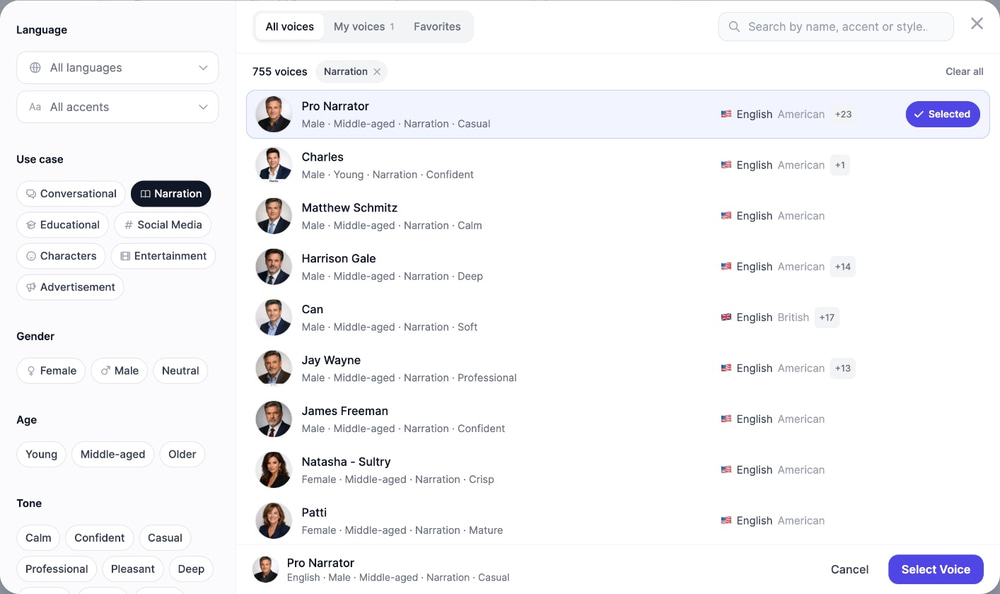
Narration makes or breaks a documentary. Under Audio, click Change on the voice card to open the voice library, then filter by the Narration use case. We picked “Pro Narrator,” an older, experienced voice with a friendly, believable tone.
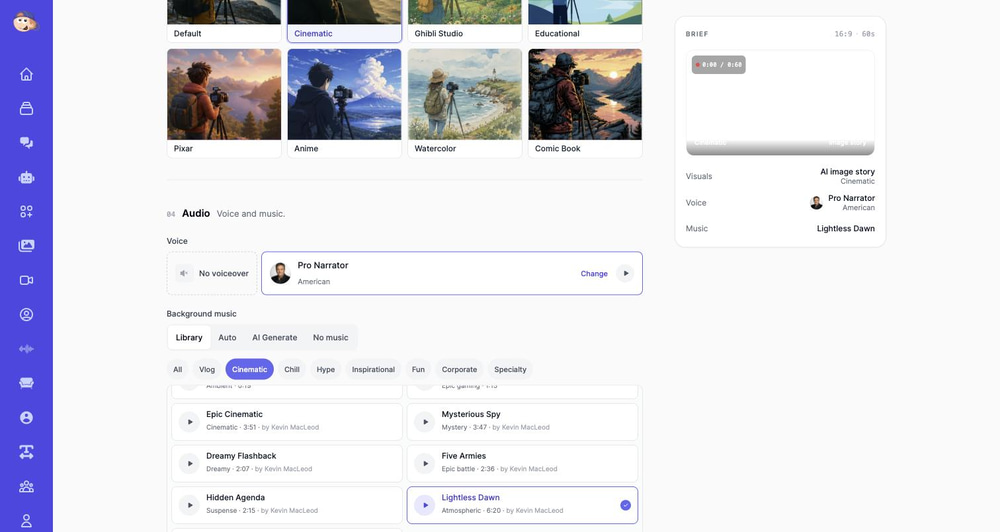
For background music, the library’s Cinematic category has documentary-ready beds. We used “Lightless Dawn,” a moody atmospheric track. On paid plans you can also let the agent choose music for you (Auto) or compose a custom instrumental score (AI Generate).
Finally, click Generate video. The agent writes the script, generates each scene, records the narration and syncs the captions, then hands you an editable project. It keeps generating in the background, so you can leave the page.
Image Story vs. Video Clips: Same Prompt, Two Looks
To show the difference, we ran the exact same Pompeii prompt a second time, changing only the media type from Image story to Video clips. This version generates every scene as a true AI video shot with real motion: drifting smoke, moving crowds, a living city.
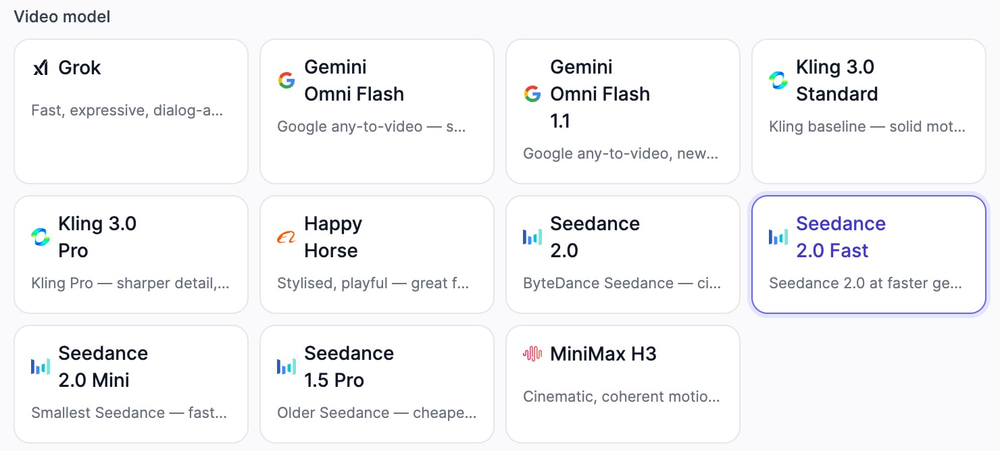
When you pick Video clips, a Video model picker appears. Each model has its own per-second price, shown in the app before you generate, so you can trade cost against quality, from affordable options like Seedance 2.0 Fast (the default) to premium models like Kling 3.0 Pro:
Which should you choose for a documentary?
- Image story: the Ken Burns archival look, quicker and much cheaper than Video clips. Best for history topics and photo-essay storytelling.
- Video clips: every scene moves, and you pay per second of footage at the rate shown on the model card. Best when motion sells the story: crowds, weather, nature, action.
- Stock videos: real footage matched to your script, so most scenes need no AI generation. Best for modern-day subjects where authentic footage exists.
What Happens Behind the Scenes
For the technically curious, here’s the pipeline your one-paragraph brief goes through:
- Script direction: a reasoning AI model researches your topic (it can search the web), writes narration beats with timings, and plans every scene: shot intent, camera motion, lighting and mood
- Cinematography pass: a second pass turns each scene description into a detailed visual prompt
- Scene generation: each shot is generated with your chosen image model and style, with a recurring-character reference so people stay consistent across scenes
- Narration and captions: the script is voiced with lifelike text-to-speech, then transcribed for word-synced captions
- Assembly: scenes, voiceover, music, captions, camera moves and transitions are placed on a multi-track timeline
Polish Your Documentary in the Editor
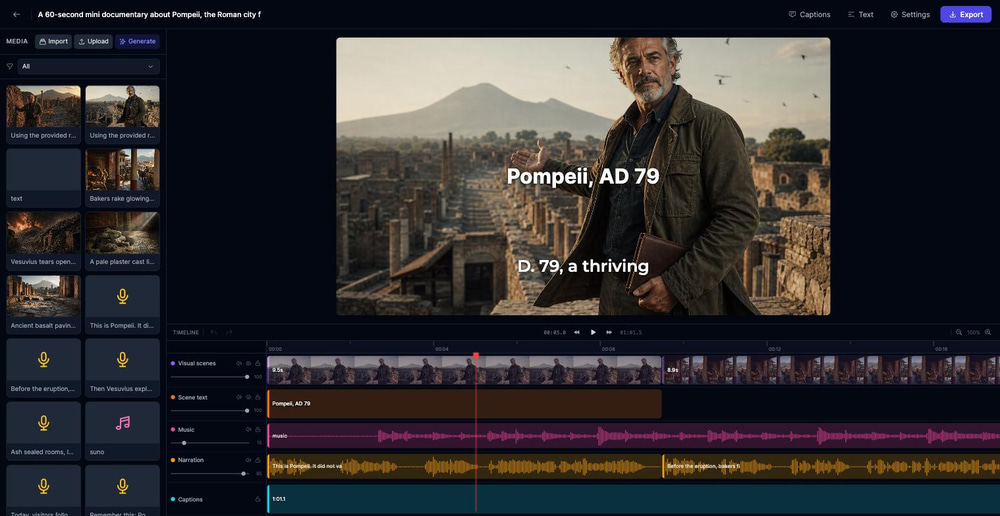
Your finished project opens in the AI video editor, with every scene, caption and audio clip on its own track. For documentary work, these tools matter most:
- Regenerate any scene: if one shot doesn’t land, rewrite its prompt and regenerate just that image or clip
- Edit the narration: change any line of the script and regenerate the voiceover; the captions re-sync automatically
- Caption styles: switch between six caption presets. Minimal (subtle white text) fits the documentary look best
- Text: add a title card, a date or a sources card with the Text button
When you’re happy, click Export, choose 1080p (Full HD) or 4K (Ultra HD), and download the finished video.
How to Make a Documentary from Photos
Old family photos or a box of archive prints can carry a whole documentary. The classic technique is the Ken Burns effect: slow pans and zooms over still photos while a narrator tells the story. The Video Agent builds this kind of film with the Your own media option:
- Under Visuals, choose Your own media.
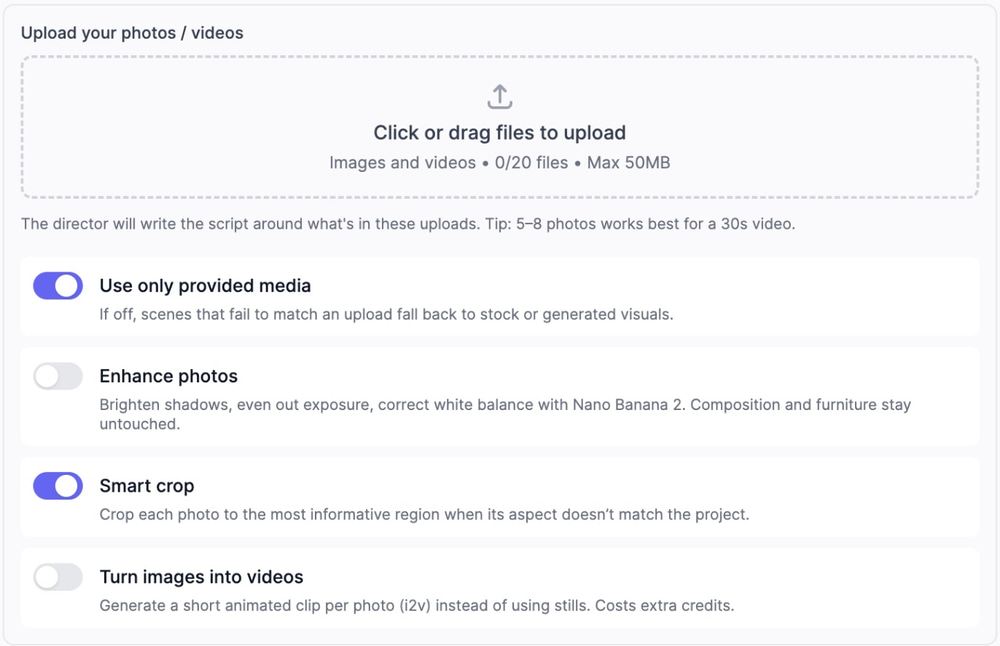
- Upload up to 20 photos or short clips (up to 50 MB each). The in-app tip says 5 to 8 photos work best for a 30-second video.
- In the idea box, add the facts the photos can’t show: names, dates, places and what happened.
- Pick your options: Use only provided media (on by default), Enhance photos to fix exposure and white balance (uses credits), Smart crop to fit each photo to your format, and Turn images into videos to animate each photo (paid plans).
- Choose a voice and music, then click Generate video.
The agent looks at each upload, usually gives each one its own scene, and writes narration that matches what’s in the frame. Every still gets a camera move. For a calmer, classic look, click a photo on the editor timeline and set its Motion to Ken Burns.
Making a Documentary for a School Project
A short documentary is a popular school assignment because it mixes research, writing and presenting. Here’s a simple plan that works with the Video Agent:
- Narrow the topic. “The Great Fire of London” works better than “British history.”
- Put your facts and sources in the prompt. Add names, dates and places, and paste a link to your best source. The agent reads it before writing.
- Keep it short. One to two minutes is plenty. Pick Landscape 16:9 for a projector.
- Choose a clear style. Educational makes clean infographic scenes with diagrams, while Cinematic suits history topics.
- Check every fact and add credits. AI can make mistakes, so fix any wrong line in the editor and add a sources card with the Text button.
For a language class, open Advanced and set the language for the narration and captions. Check your teacher’s rules on AI tools, and say in your credits that you used AI. For more classroom formats, see our guide on how to make explainer videos with AI.
How Much Does It Cost to Make a Documentary?
There is no standard price. A phone-shot student film edited in free software can cost almost nothing, while a feature with a crew, travel, archival licenses and original music needs a real budget. The biggest costs are usually people’s time, equipment, travel, licensing, editing and legal clearances.
AI removes most of those costs for short films. On Easy-Peasy.AI, you pay in credits from your plan:
- AI scene images and video clips use credits. With Video clips, each model card shows its per-second rate before you generate.
- Narration counts toward your plan’s audio allowance, library music costs no extra credits, and exporting uses a small number of credits.
- Stock videos and your own photos need little or no AI image generation, so they cost the least.
Can You Make a Documentary for Free?
Yes, within limits. The Free plan includes two Video Agent projects a month with Image story, Stock videos or Your own media (photos stay as stills), as long as you have free credits left that month. Music comes from the built-in library.
Video clips, AI-generated music and Turn images into videos need a paid plan. Free-plan videos are for non-commercial use, which covers a school project but not a film you plan to sell.
Legal Basics: Can You Make a Documentary About Someone?
This is general information, not legal advice, and laws differ by country. In many places, you can make a documentary about real people and public events without their permission, especially public figures and newsworthy stories. Problems usually come from how you tell the story and what material you use:
- Use facts you can source. A false statement that harms someone’s reputation can be defamation.
- Get release forms from private people you film or interview, and permission before filming on private property.
- Clear archival material and music. Old footage, photos and songs are often still under copyright. Some Video Agent library tracks list a composer; credit them in your video.
- Label AI recreations. Never make realistic AI footage of a real person doing or saying something they didn’t. Add an on-screen note such as “AI reconstruction,” and use YouTube’s label for realistic altered or synthetic content.
- Talk to a lawyer before distribution. Festivals, distributors and broadcasters usually ask for proof that you hold the rights to everything in the film.
5 Documentary Ideas You Can Make Today
Stuck on what to make first? These formats work brilliantly as one to three minute AI documentaries:
- Lost places: Pompeii, Machu Picchu, the Library of Alexandria (Image story and the Cinematic style)
- How everyday things are made: coffee, denim, chocolate (Stock videos for real factory footage)
- Nature spotlights: deep-sea creatures, bird migration, desert survival (Stock videos or Video clips)
- Unsolved mysteries and true stories: shipwrecks, heists, disappearances (Image story with a tense library track like “Hidden Agenda” or “Investigations”)
- Local history: your town’s founding story, a landmark’s hidden past (upload your own archive photos and let the AI write narration around them)
Tips for a More Convincing AI Documentary
Write the Arc into Your Prompt
Documentaries are stories, not slideshows. Give your prompt a beginning, middle and end. In our Pompeii prompt we listed the beats in order: bustling streets, the eruption, the plaster casts and the ruins today. You can also say how it should end, for example “end on a reflective note.”
Ground It in Facts
Name real dates, places and people in your prompt (“79 AD,” “Mount Vesuvius”). The script writer can search the web and reads any link you paste, so specific anchors produce accurate narration instead of generic filler.
Use Reference Images for Real Subjects
Making a documentary about a real product, building or place? Click Reference images in the prompt box and attach up to six photos, and the AI will ground every scene in what things actually look like. This works with Image story and Video clips.
Match the Voice to the Genre
A true-crime doc wants a low, deliberate narrator; a nature piece wants warmth and wonder. Preview a few Narration voices before generating. It’s the single biggest quality lever.
Keep Captions Minimal
Bouncy word-highlight captions feel like TikTok, not a documentary. Under Advanced, pick the Minimal caption style (or switch captions off for a pure cinematic feel) to keep the film looking professional.
Frequently Asked Questions
How long does it take to make a documentary with AI?
A 60-second documentary usually generates in a few minutes. Our Pompeii film took about seven, and the Video clips version took longer. A traditional independent documentary can take years.
How long can my AI documentary be?
Up to 200 seconds (about 3.5 minutes) per project. For a longer film, make and export each chapter as its own project, then use Import in the editor to join them on one timeline.
Can I use my own footage and photos?
Yes. Choose Your own media and upload up to 20 photos or clips, and the AI writes the narration around them. On paid plans it can also turn your stills into short video clips.
How do you structure a documentary?
Most documentaries use three acts: a setup that introduces the subject and the question, a journey through the evidence, and a resolution. Open with a hook and end on a line or image that stays with the viewer.
What are the five elements of a documentary?
Media studies courses often teach John Corner’s five elements: observation, interview, dramatization, mise-en-scène and exposition. A practical version for your own film is story, characters, structure, visuals, and narration and sound.
How much does it cost to create a documentary?
Anywhere from almost nothing for a phone-shot student film to a large budget for a feature with a crew and licensed archive footage. With AI, you skip the crew and pay in credits for the scenes you generate and the export.
Can you legally make a documentary about someone?
Usually yes, especially about public figures and newsworthy events, as long as what you say is true and sourced. Get releases from private people you film, clear the rights to footage and music, and ask a media lawyer before you distribute.
Can I sell my documentary to Netflix?
Not directly. Netflix doesn’t accept unsolicited submissions, so films reach it through agents, producers, distributors or industry contacts, often after a festival run. AI-made films also face extra questions about accuracy and rights, so keep your sources, releases and licenses organized.
Do AI documentaries work for faceless YouTube channels?
Extremely well. History, geography and true-story documentaries are among the most popular faceless channel niches. Generate in 16:9, keep one narrator voice across episodes, and label realistic AI scenes when you upload.
Can I use my AI documentary commercially?
On a paid plan, you keep full commercial rights to the videos you generate, narration included, even after your subscription ends. Free-plan videos are for non-commercial use, and library tracks that show a composer’s name need a credit. See our terms of use for details.
Do I need any editing skills?
No. The Video Agent delivers a finished, edited film, and plenty of creators export the first cut as-is.
Want more AI video workflows? See our guides on making Vox-style explainer videos with AI and creating real estate videos with AI. Both use the same Video Agent workflow with different storytelling styles.
Start Your First Documentary Today
The hardest part of documentary filmmaking was never the storytelling. It was the production. Now that AI handles the cameras, the narrator and the edit suite, all you need is a story worth telling.
Open the Video Agent, describe the documentary you’ve always wanted to watch, and have the first cut in your hands before your coffee goes cold. You can try it on the Free plan with two projects a month.