Web apps and phone apps
Web apps run in any browser. Phone apps are built with Expo and open on your phone from a QR code while Marky works.
Dành cho nhà sáng lập, đội ngũ và dự án cá nhân
Mô tả ứng dụng cần làm gì và ai sẽ dùng. Marky xây dựng các màn hình, cơ sở dữ liệu, đăng nhập và mã phía máy chủ, kiểm thử trong bản xem trước trực tiếp và xuất bản khi bạn phê duyệt.
Trả lời trực tiếp
Trình tạo ứng dụng bằng AI biến một đoạn mô tả đơn giản thành ứng dụng chạy được, không chỉ là bản mockup. Marky viết một dự án thật, dùng React và TypeScript cho ứng dụng web hoặc Expo cho ứng dụng di động, rồi thêm cơ sở dữ liệu Postgres, đăng nhập và mã phía máy chủ khi ứng dụng cần. Bạn dùng thử trong bản xem trước trực tiếp, yêu cầu chỉnh sửa trong chat, rồi xuất bản hoặc đẩy mã lên GitHub.
Xây dựng theo công việc thực tế
These are functional product layers tied to the workflow—not decorative sections copied from a template.
Web apps run in any browser. Phone apps are built with Expo and open on your phone from a QR code while Marky works.
Registration, Google sign-in and screens only members can open, built around how your app is used.
Marky designs the tables, stores the app's data in Postgres and changes the schema as the app grows.
Business rules, private API keys and webhooks stay on the server. Marky connects payments, email or maps when you add their keys.
Add chat, image, voice or transcription features through the Easy-Peasy.AI API when the idea needs them.
Every change shows up in a live preview. Save versions, roll back, publish to your own address and push the code to GitHub.
Mô hình dữ liệu đề xuất
Ví dụ prompt
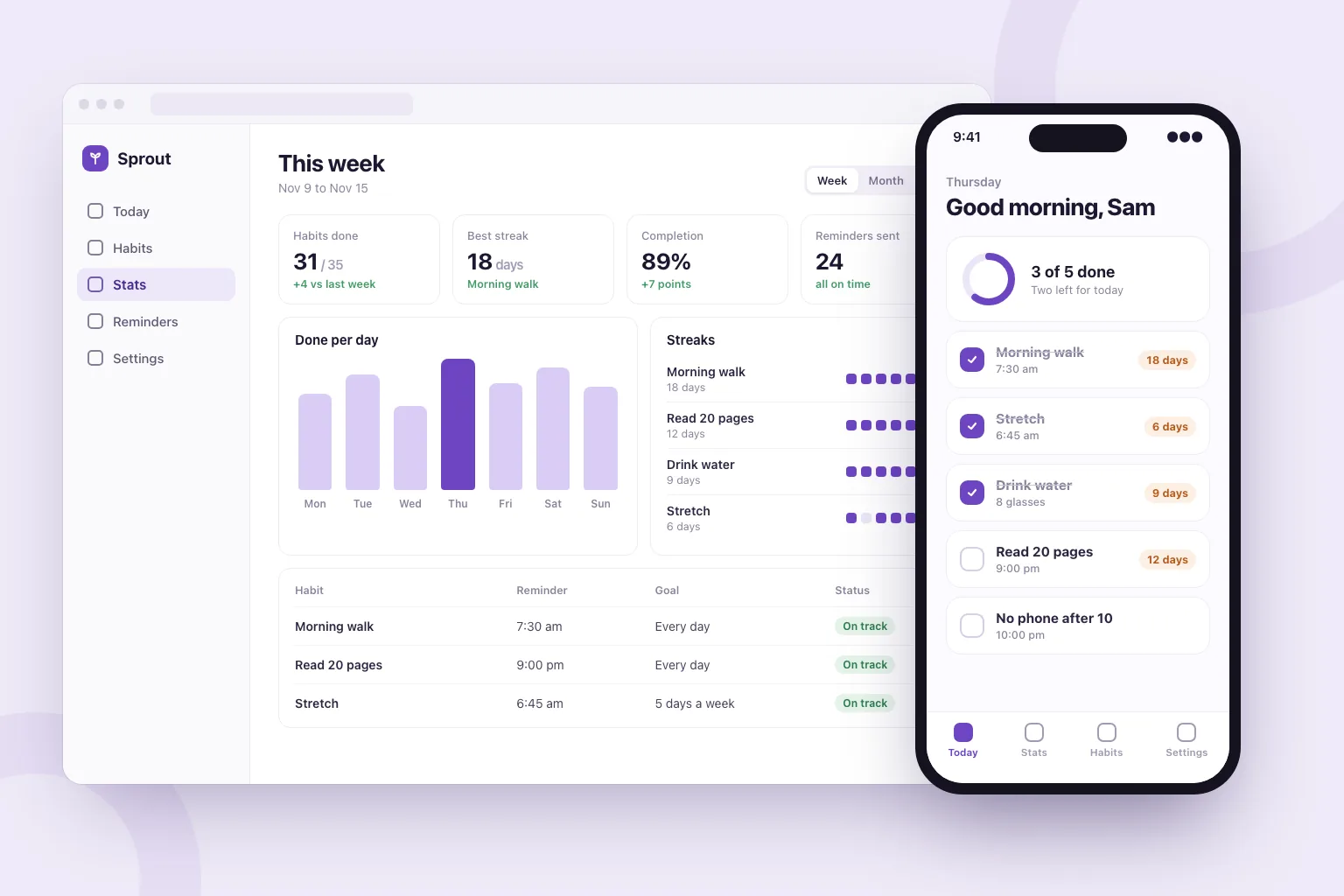
“Build a habit tracker web app. People sign in with Google, add daily habits, tick them off and see their streaks. Add a weekly stats page, reminder settings and a home screen with today's habits. Store everything in a database and make it work well on phones.”Dùng làm điểm khởi đầu
Trình tự xây dựng thực tế
Say who uses it, the main thing they do and what they should see first.
Marky lists the features it plans to build. Edit, add or remove lines before it starts.
Click through the app in the preview, or scan the QR code to open a phone app on your phone, and ask for changes in plain words.
Publish it to its own address, connect a domain or GitHub, and keep adding features in the same chat.
Stack production dùng chung
Một frontend chỉnh sửa được, không phải định dạng trang độc quyền.
Dữ liệu được lưu trữ lâu dài và logic phía máy chủ được bảo vệ.
Xác thực và thông tin xác thực được bảo vệ cho các tích hợp.
Tính năng xuất bản tích hợp sẵn nhắm đến Cloudflare, và các trang được render phía máy chủ để công cụ tìm kiếm và công cụ AI có thể đọc được. Dịch vụ AWS có thể được tích hợp qua thông tin xác thực được bảo vệ, và mã nguồn trên GitHub có thể được lập trình viên điều chỉnh để triển khai trên AWS.
Câu hỏi cụ thể
Yes. In Build app mode Marky makes the app with Expo (React Native), with a database and server code when it needs them. You open it on your phone by scanning a QR code: in the browser, or in the Expo Go app for the full native feel.
Not from Marky. You can publish the app at its own web address and push its code to GitHub. Getting it into the stores takes an Apple or Google developer account and an Expo build, which a developer can make from that code.
Yes, in the sense that you describe what you want and the AI writes the code. Marky also sets up the database, sign-in and hosting, checks its work in a browser, and lets you keep the code.
No. You describe the app and ask for changes in plain words. The code is a standard React and TypeScript project, so a developer can pick it up later if you want.
You can start on the Free plan, which has a small monthly allowance. An app is a long job (screens, a database, sign-in and testing), so finishing most apps takes a paid plan. Paid plans also add the strongest models and commercial use.
Tiếp tục khám phá
Xây dựng phiên bản hoạt động đầu tiên