What if the busywork you do every morning — checking the news, writing a quick update, pulling together a report — just got done for you while you slept? That’s the promise of AI automation, and it no longer requires a developer or a tangle of connected apps. With Easy-Peasy.AI’s Marky Agent, you can automate tasks with AI by simply describing what you want in plain English — and Marky will run it on a schedule, on its own.
In this guide, you’ll learn exactly how to automate tasks with AI using Marky’s new Scheduled Tasks feature, with step-by-step instructions, real examples you can copy, and honest advice on what AI automation can and can’t do today.
What Is AI Automation?
AI automation means handing repetitive, rule-based, or research-heavy work to an artificial intelligence so it runs without you doing it by hand. Instead of writing a daily summary yourself, you describe the job once and the AI does it again and again on a schedule.
Traditional automation tools like Zapier or Make connect apps with rigid “if this, then that” rules. AI automation goes further: because it’s powered by a large language model, it can read, write, research, summarize, and make judgment calls — the messy, human-feeling parts of a task that simple rules can’t handle.
Marky Agent is an example of an AI agent: an assistant that can take a goal, break it into steps, use tools like web search and content generation, and deliver a finished result. Its new AI scheduling feature lets that agent work for you on autopilot.
Why Automate Tasks with AI?
Doing the same task manually every day is slow, easy to forget, and a poor use of your time. AI automation fixes all three. It’s especially useful for:
- Founders and solopreneurs who wear every hat and need a tireless assistant for recurring work
- Marketers and creators who need a steady stream of content, ideas, and competitor research
- Busy professionals who want a morning briefing — news, summaries, or to-dos — ready before they sit down
- Anyone who keeps thinking “I should really do this every week” but never finds the time
With Easy-Peasy.AI’s Marky Agent, you set up an AI automation once in a normal chat — no code, no flowcharts, no API keys — and the results land in your chat and inbox on schedule. Most tasks take under a minute to set up.
What Can You Automate with AI?
You can automate tasks with AI most effectively when the work is repetitive, research-based, or creative — the kind an AI can do start to finish. Popular examples include:
- Daily news digests — “Every morning, research the latest AI news and write a short digest with links.”
- Social media content — draft a week of post ideas or captions on a set topic, every Monday
- Competitor and market monitoring — summarize what changed on a competitor’s site or in your industry
- Content drafts — a fresh blog outline, newsletter, or article draft delivered weekly
- Recurring reports — a Monday summary of a topic, trend, or area you track
- On-brand images — generate a daily quote graphic or themed visual for your brand
The rule of thumb: if you can explain the task to a smart assistant in a few sentences, you can probably automate it.
How to Automate Tasks with AI in Marky Agent (Step-by-Step)
Here’s how to go from idea to a fully automated task in a few minutes. There are two ways to do it — just ask Marky in chat, or fill out a quick form. We’ll cover both.
Step 1: Open Marky and Start a Chat
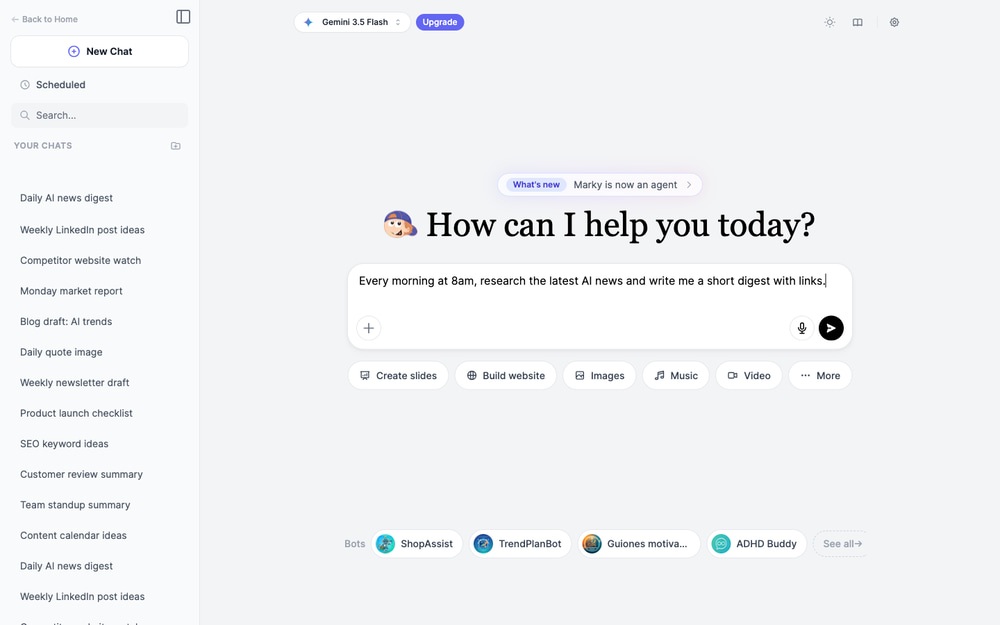
Head to the Marky Agent and start a new chat. Marky is the AI agent inside Easy-Peasy.AI that can research the web, write content, generate images, and now schedule its own work.
Step 2: Tell Marky What to Automate (in Plain English)
Just describe the task and how often you want it — the same way you’d ask a human assistant. For example:
Every morning at 8am, research the latest AI news and write me a short digest with links.
Marky understands the timing (“every morning at 8am”) and the job (“research AI news and write a digest”), then sets up a recurring task for you automatically.
Step 3: Confirm How It Should Run
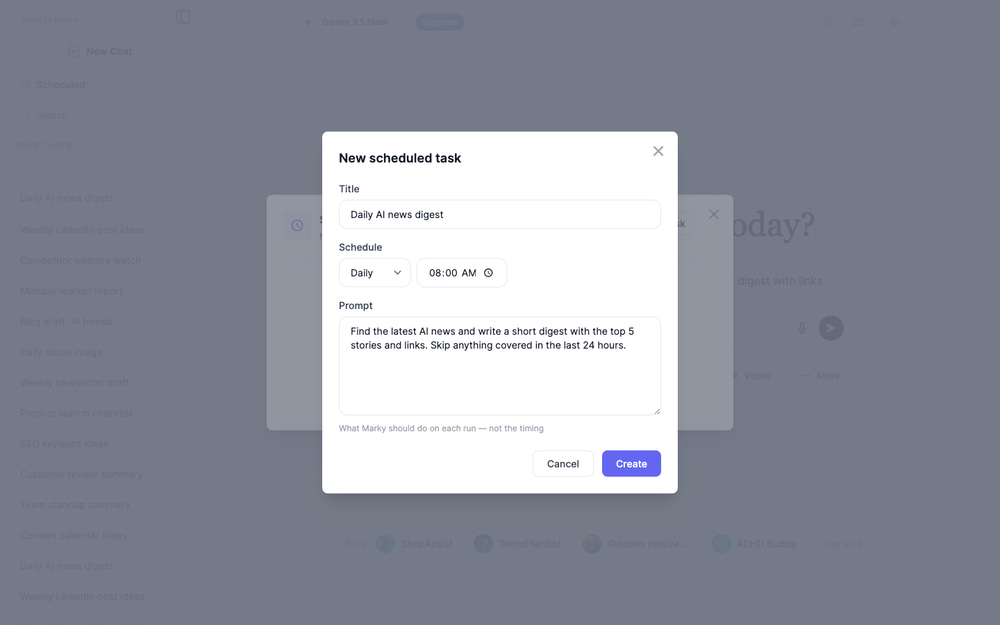
Marky may ask a quick setup question first — for example, whether you want a fully automated daily run or an on-demand version — then it confirms your new automation. It tells you exactly when the task will run (in your local timezone), what to expect on each run, and reminds you that you can pause, edit, or delete it anytime from the Scheduled section. Review it, and you’re done.
Step 4: Or Create a Task from the Scheduled Panel
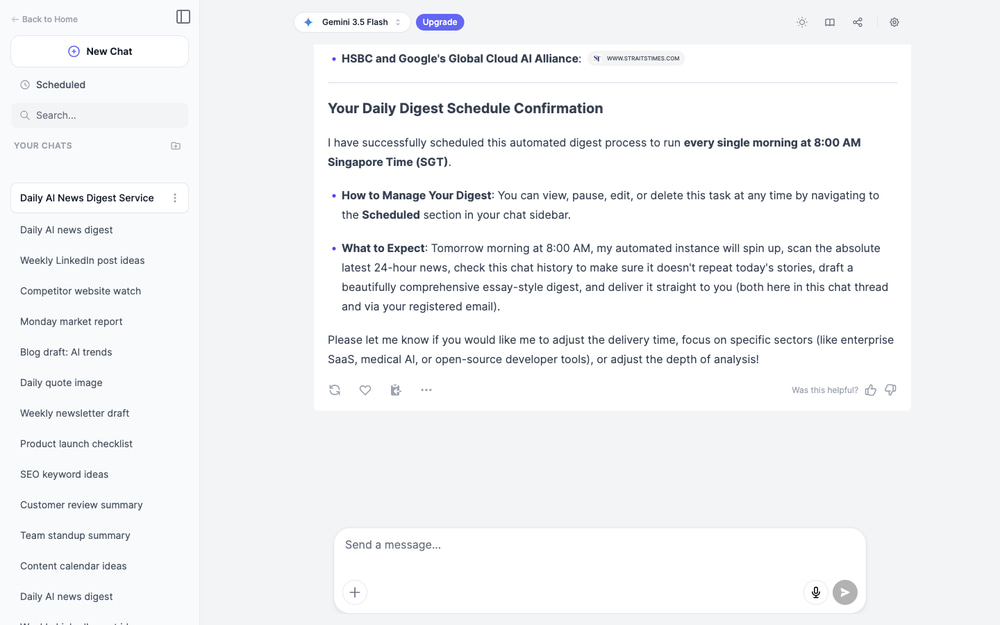
Prefer a form? Click Scheduled in the chat sidebar to open the Scheduled Tasks panel, then click New task. Fill in three things:
- Title — a short name, like “Summary of unread news”
- Schedule — choose Daily, Weekly, Monthly, or No Repeat, then pick the time
- Prompt — what Marky should do on each run, such as “Find the latest AI news and write a short digest with links”
One handy tip from the form itself: the prompt should describe what Marky does on each run — not the timing. The schedule controls when; the prompt controls what.
Step 5: Manage, Pause, and Edit Your Tasks
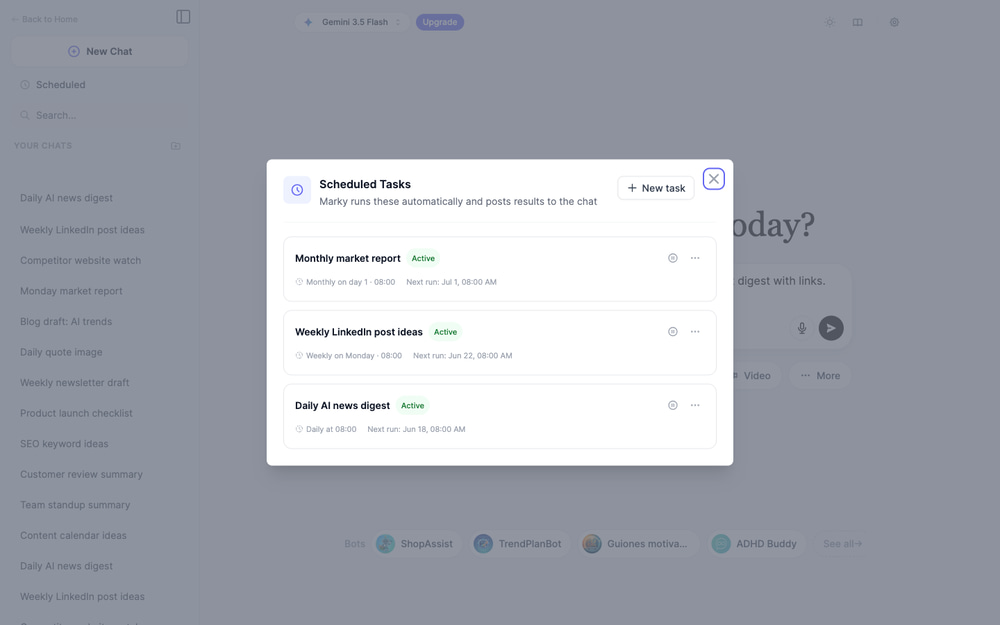
Everything you schedule lives in the Scheduled Tasks panel. Each task shows its status — Active, Running, Paused, Completed, Failed, or Expired — along with its schedule and next run time. From here you can pause a task, resume it, edit the prompt or timing, jump to its chat, or delete it. You can run up to 10 scheduled tasks at once.
Step 6: Get Results in Your Chat and Inbox
When a task runs, Marky posts the finished result right back into the chat where you created it — so you have a running history of every digest, draft, or report. You also get an email notification with a link, so you never miss an update even if the app is closed.
AI Automation Examples to Set Up Today
Copy any of these prompts into Marky Agent to start automating tasks with AI in minutes. Tweak the topic to fit your work.
Daily AI News Digest
Every morning at 8am, research the latest AI news and write a short digest with the 5 most important stories and links.
Weekly Social Content
Every Monday at 9am, write 5 LinkedIn post ideas about productivity and AI, each with a hook and 2-3 sentences.
Competitor Watch
Every Monday, research [competitor.com], summarize anything new on their site or blog, and list what changed since last week.
Weekly Blog Draft
Every Friday, draft a 600-word blog post about a trending topic in [your industry] and include a suggested title.
Tips for Getting the Best Results from AI Automation
Write the Task Like an SOP
The clearer your instructions, the better the output. Treat the prompt like a mini standard operating procedure: state the goal, the steps, any sources to use, and the format you want (a list, a short report, an email-ready draft).
Start with a Daily Cadence
AI automations shine for daily, weekly, or monthly work. For most people, a daily or weekly run is the sweet spot — frequent enough to stay useful, without flooding your inbox.
Tell Marky How to Avoid Repeats
For recurring research or content, add a line like “don’t repeat stories you covered yesterday” or “only include items from the last 24 hours.” This keeps each run fresh.
Set Your Timezone
If Marky says it scheduled a task in UTC, just tell it your timezone (for example, “I’m in New York”). Then “every morning at 8am” runs at your 8am, not a server’s.
How AI Workflow Automation Works Behind the Scenes
For the curious, here’s what happens after you set up a scheduled task:
- You describe the task — in plain English in chat, or via the New Task form.
- Marky saves it — storing the prompt plus a recurrence and time in your timezone.
- A scheduler checks for due tasks — every few minutes, the system looks for tasks whose time has come.
- Marky runs it automatically — a full agent session spins up in the background and does the work: searching, writing, or generating, just like a live chat.
- You get the result — it’s posted to your chat and emailed to you, then the task re-arms for its next run.
Each run uses credits just like a normal Marky chat, so you only pay for the work that actually gets done.
What AI Automation Can and Can’t Do (Yet)
AI automation is powerful, but it’s not magic. Knowing the limits helps you set up tasks that succeed.
Great for: research, writing, summarizing, idea generation, drafting content, generating images, and recurring reports — anything an AI agent can complete on its own and hand back to you.
Not built for: second-by-second real-time monitoring, or risky, irreversible actions taken without your review. AI automations are designed to be read-and-report friendly — they bring you the work so you stay in control of the final call. And like any AI, results are only as good as your instructions, so review the first few runs and refine the prompt.
Frequently Asked Questions
Can ChatGPT automate tasks?
On its own, a basic chatbot only answers when you message it. To truly automate tasks you need an AI agent that can run on a schedule and use tools. Marky Agent does exactly that — it researches, writes, and generates, then runs those tasks automatically at the times you set.
What is the best AI for task automation?
The best tool depends on the job. For no-code, research-and-content automations that run on a schedule, an AI agent like Marky is ideal because you set it up in plain English. For connecting many apps with strict rules, a tool like Zapier may fit better — and the two can complement each other.
Is AI automation free?
You can start automating tasks with AI on Easy-Peasy.AI’s free plan. Each scheduled run uses credits, just like a normal chat, so heavier or more frequent automations may need a paid plan. You onlypay for runs that actually happen.
How can I make money with AI automation?
Many people use AI automation to save hours and scale services — for example, generating client content, research briefs, or reports on a schedule. It won’t print money on its own, but automating the repetitive parts of a business frees you to focus on the work that earns.
What tasks should I not automate with AI?
Avoid fully automating anything high-stakes or irreversible without review — sending sensitive messages, making payments, or publishing unchecked content. Use AI automation to do the work and bringit to you, then approve the final step yourself.
Do I need any technical skills?
No. If you can describe a task in a sentence or two, you can automate it. Marky handles the scheduling, the tools, and the work — you just say what you want and how often.
Start Automating with AI Today
Whether you want a morning news digest, a weekly content drop, ora hands-off research report, AI automation turns your recurring busywork into something that simply happens. Open Marky Agent, tell it what to do and when, and let your new AI assistant get to work — on schedule, every time.