For years, putting AI on your WhatsApp number meant one thing: connect the number to the WhatsApp Business Platform and point it at a chatbot. That changed in 2026. Meta now ships Meta Business Agent — its own AI agent, built straight into the WhatsApp Business app — and for plenty of businesses it is genuinely good enough.
So the question is no longer “how do I put AI on WhatsApp?” It is which AI should answer your number. Below: what Meta’s agent actually does, the one rule that forces you to pick a side, and when running your own AI agent on that number is the better call.

The short version
- Meta Business Agent is Meta’s own AI agent for WhatsApp. Set it up from the Tools tab of the WhatsApp Business app, train it on past chats and your website, done.
- A number can only run one agent. Meta’s documentation is explicit that a single number cannot run more than one messaging product. It is Meta’s agent or yours, not both.
- Meta’s agent excludes regulated verticals. Finance, government, health, alcohol, gambling, over-the-counter drugs and matrimony services are not supported.
- You can still answer from your phone either way. A feature called coexistence lets the WhatsApp Business app and an AI agent share one number.
What Meta Business Agent actually is
Meta Business Agent comes in two flavours that are easy to confuse, because they share a name and almost nothing else.
The app path (for small businesses)
This is the one most people find. Open the WhatsApp Business app, go to the Tools tab, tap AI agent, and authenticate. Meta trains the agent on your past chats, and you can point it at your website or product catalogue for extra context. You then test it and switch it on.
It answers questions about opening hours, products, pricing and shipping, recommends products, collects customer details, and hands complex conversations to a human. There is no code and no developer account. Meta describes it as available to “eligible businesses in select markets, with additional markets launching soon,” and gives a free allowance before you need a paid Meta subscription for round-the-clock coverage.
The platform path (for developers)
The second flavour runs on the WhatsApp Cloud API and requires real integration work. Meta has not published a full public price list, but solution providers report it billing per token — in the region of four to five cents per message — with charges applying even inside WhatsApp’s normally free messaging windows.
The rule that forces a choice
Here is the part that decides your architecture, and it is buried in Meta’s developer documentation rather than the marketing pages: a single phone number cannot run more than one messaging product at a time.
That means Meta Business Agent and your own AI agent cannot both be answering the same WhatsApp number. Turning one on takes the other out of the driver’s seat. If you already run a chatbot on your business number and you tap that shiny new AI agent button in the app to “see what it does,” you are not adding a feature — you are changing who answers your customers.
This is worth knowing before you experiment, not after.
When Meta Business Agent is the right answer
It genuinely is the right answer for a lot of businesses, and pretending otherwise would waste your time. Choose Meta’s agent if most of the following are true:
- Your customers mainly ask a predictable set of questions: are you open, do you deliver here, how much is this, where is my order.
- Everything the agent needs to know is already in your past chats, your website or your WhatsApp catalogue.
- WhatsApp is the only channel you care about.
- You do not need the agent to touch your own systems — no looking up a live booking, no checking a real stock level, no writing to your CRM.
- You are not in a regulated industry.
- You want it running this afternoon with zero setup.
If that is you, open the app and use it. You do not need this article, and you do not need us.
When you need your own AI agent
The case for running your own agent comes down to five things Meta’s cannot do.
1. Your industry is excluded
Meta’s Business Agent documentation lists the supported verticals as everything except finance, government, health, alcohol, gambling, over-the-counter drugs and matrimony services. Clinics, insurance brokers, lenders, pharmacies, wine merchants and public-sector services are all locked out of the feature entirely. For those businesses the choice is already made: it is your own agent or nothing.
2. Your knowledge is not on your website
Meta’s agent learns from past chats and public pages. Most real support knowledge lives elsewhere — a returns policy PDF, an internal FAQ document, a price sheet, a help centre, a spreadsheet of specifications. Your own agent can be pointed at all of it and will answer from those documents rather than improvising from old conversations.
3. You need it to actually do things
There is a large gap between an agent that answers questions and an agent that takes actions. Checking live order status in your system, booking a slot in a real calendar, creating a support ticket, looking up a customer’s subscription, escalating to a human with the full context attached — that requires an agent wired into your tools, not one trained on your chat history.
4. WhatsApp is not your only channel
If you also have a website, a Messenger page, a Telegram channel or a support inbox, a WhatsApp-only agent means maintaining a separate brain for every channel. Build the agent once and the same knowledge, tone and actions serve your website widget, WhatsApp, Messenger, Telegram, Slack, email and phone calls.
5. You want to own the conversations
Transcripts, captured leads, the questions customers keep asking, the ability to correct a bad answer and have it stay corrected — these are the raw material of improving your service. That is much harder when the agent is a black box inside someone else’s app.
Side by side
| Meta Business Agent | Your own AI agent | |
|---|---|---|
| Setup | Minutes, inside the app | Minutes, one-click connect |
| Regulated industries | Not supported | Supported |
| Availability | Select markets only | Anywhere WhatsApp works |
| Knowledge source | Past chats, website, catalogue | Your documents, files, sites and databases |
| Takes actions in your systems | No | Yes |
| Other channels | WhatsApp and Meta apps | Website, Messenger, Telegram, Slack, email, voice |
| Tone and behaviour | Meta’s defaults | Fully instructable |
| Conversation data | Inside Meta’s tools | Yours, exportable |
How to put your own agent on your WhatsApp number
Build the agent first — give it a knowledge base and instructions, and test it until it answers the way you want. Then open your agent’s Channels tab and connect WhatsApp. There are two routes, and which one you need depends on whether that number is currently signed in to the WhatsApp Business app on somebody’s phone.
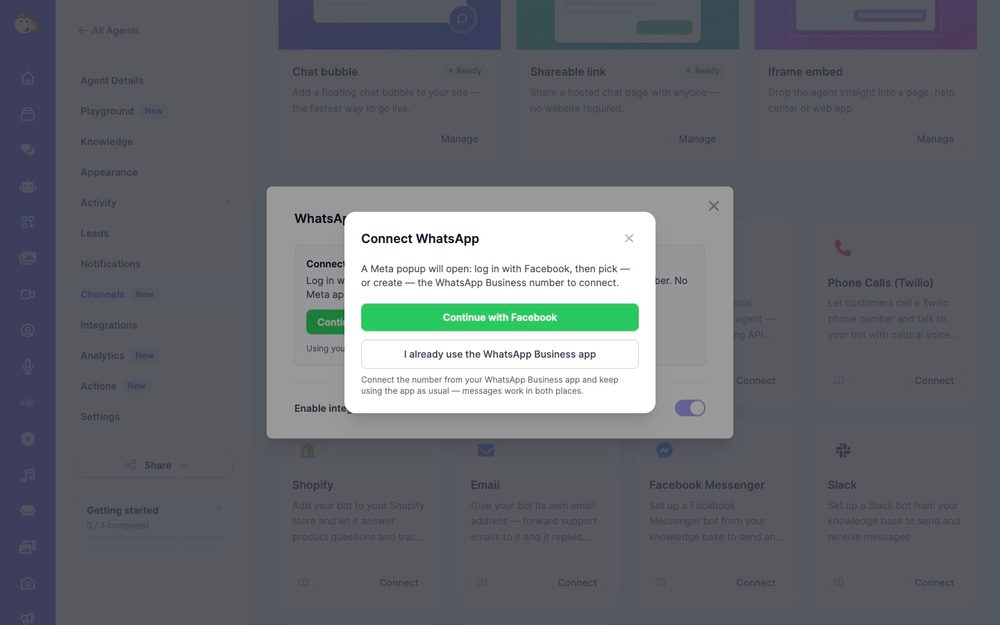
Route 1: a fresh number
If the number is not currently in use in the WhatsApp Business app, choose Continue with Facebook. A Meta popup walks you through picking or creating a WhatsApp Business number, and the connection completes on its own — no Meta developer app, no access tokens, no webhook configuration.
Route 2: keep using the WhatsApp Business app (coexistence)
If you already run your business from the WhatsApp Business app and want to keep doing so, choose I already use the WhatsApp Business app. This uses Meta’s coexistence feature: your agent answers through the API while you carry on replying from your phone, on the same number, with your chat history intact. Messages sent from the app show up alongside the agent’s, in both places.
Coexistence has real prerequisites, and this is where most attempts fail:
- It must be the WhatsApp Business app, not regular WhatsApp.
- You need to have been using that number in the Business app for about a week.
- The number must not already be registered on your WhatsApp Business Account as an API number. If you previously added it through the ordinary API flow, coexistence will not link it — you have to remove it from your account in WhatsApp Manager first.
- Coexistence is not available in every region yet.
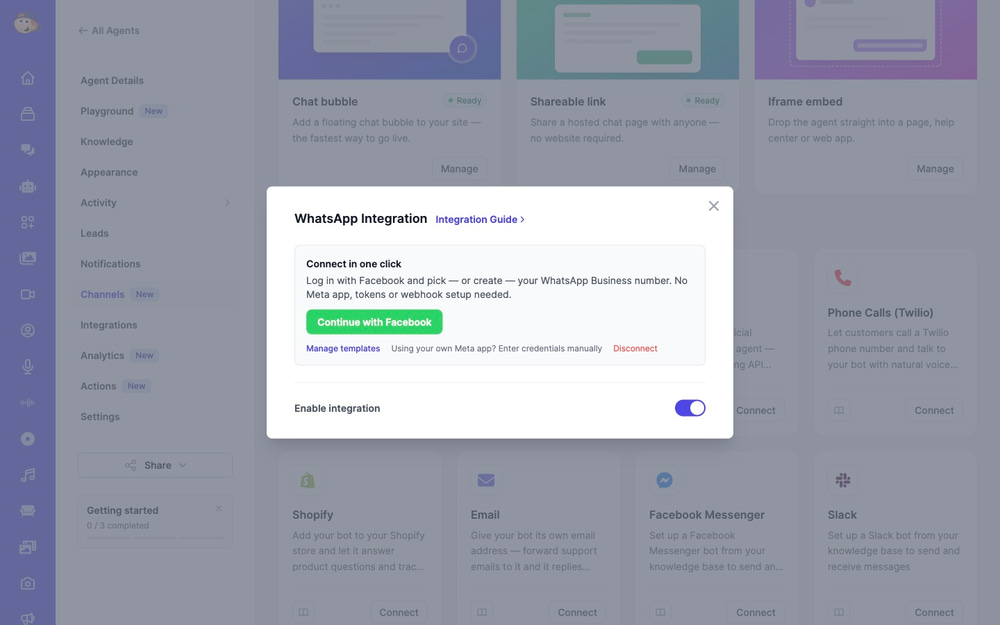
For the full click-by-click version, including the manual route with your own Meta app credentials, see the WhatsApp integration guide.
Three errors worth recognising
These come up constantly, and Meta’s messages for them are not self-explanatory.
“This number is still in use in the WhatsApp app on a phone.” You tried the standard connection on a number that is signed in on a device. Either use the coexistence button instead, or delete the WhatsApp account on that phone and try again.
Coexistence finishes but nothing links. Almost always the third prerequisite above: the number is already sitting on your WhatsApp Business Account as an API number. Remove it in WhatsApp Manager, wait, and run the app flow again.
A PIN is requested. The number carries a two-step verification PIN from a previous registration. Enter it when prompted, or turn two-step verification off for that number in WhatsApp Manager and reconnect.
The 24-hour rule applies either way
Whichever agent you choose, WhatsApp’s messaging rules do not change. Your agent can reply freely for 24 hours after a customer’s last message. Outside that window you cannot send free-form text — you need an approved message template. This catches out almost everybody who is new to business messaging, and it is not something a chatbot platform can opt out of.
Frequently asked questions
Can I run Meta Business Agent and my own chatbot on the same number?
No. Meta’s documentation states that a single number cannot run more than one messaging product. Enabling one displaces the other.
Is Meta Business Agent free?
On the app path there is a free allowance, after which continuous coverage needs a paid Meta subscription. The developer platform path is billed per token. Meta has not published a complete public price list for either.
Why can I not find the AI agent option in my WhatsApp Business app?
The most likely reasons are that your country is not yet supported, your business is in an excluded vertical, or your account does not meet Meta’s eligibility requirements. Availability is still rolling out market by market.
Will I lose my chat history if I connect my own agent?
Not with the coexistence route — that is the point of it. Your history stays on the phone and you keep replying from the app. The standard connection route is for numbers that are not active in the Business app.
Can I still reply personally?
Yes. With coexistence you answer from your phone exactly as before. You can also switch the agent off entirely with one toggle whenever you want to take over.
Does my agent work on other channels too?
Yes. The same agent, with the same knowledge base, can serve a website chat bubble, Facebook Messenger, Telegram, Slack, email and phone calls.
Which one should you pick?
If your customers ask simple, repetitive questions that your website already answers, and you are not in a regulated industry, use Meta’s agent. It is free to start, it is built in, and it will take you ten minutes.
If your knowledge lives in documents rather than web pages, if the agent needs to look things up in your systems, if you serve customers on more than one channel, or if your industry is on Meta’s excluded list — then you need an agent you control. And thanks to coexistence, choosing that no longer means giving up the WhatsApp Business app on your phone.
Build your AI agent free — train it on your own documents, test it, and connect it to WhatsApp in a couple of clicks.