Most AI website builders produce the same result: a purple gradient hero, glowing orbs, and a layout that screams ‘generated.’ Easy-Peasy.AI is different. Describe exactly what you want — colors, fonts, vibe — and Marky builds it from scratch. No recycled templates, no generic AI aesthetic, no frustration.
Building a website used to mean hiring a developer, learning to code, or wrestling with clunky drag-and-drop builders for hours. Not anymore. With Easy-Peasy.AI’s Website Builder, you can describe what you want in plain English and watch a fully functional website appear in front of you — no coding, no templates, no frustration.
What Is an AI Website Builder?
An AI website builder is a tool that creates websites from natural language descriptions. Instead of dragging blocks around or writing HTML and CSS by hand, you simply tell the AI what kind of website you want — and it generates the complete code, design, and layout for you.
Think of it like having a conversation with a web developer. You say “build me a portfolio site with a dark theme and purple accents,” and the AI handles everything: structure, styling, responsive design, and even interactive elements like contact forms and animations.
Unlike traditional website builders that limit you to pre-made templates, an AI website builder creates something unique every time based on your specific description. The result is a custom website that looks and feels professionally designed — built in seconds instead of days.
How to Build a Website with AI Using Easy-Peasy.AI (Step-by-Step)
Here’s how to go from an idea to a live website in four simple steps.
Step 1: Open the Website Builder
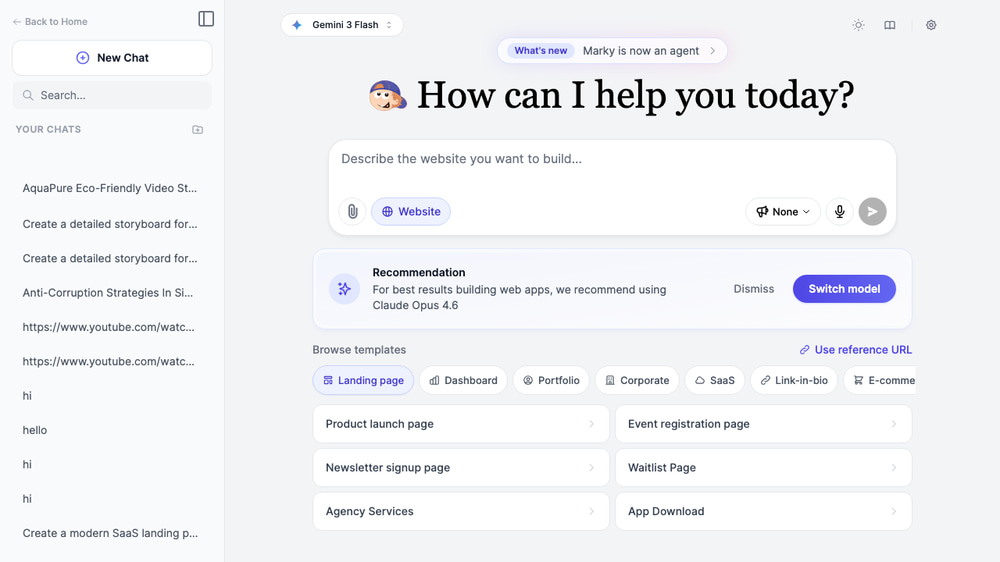
Go to Easy-Peasy.AI’s Website Builder and you’ll see the build-website mode with a prompt input and 10 template categories to browse. For the best results, the platform recommends using Claude Opus 4.6 — you’ll see a recommendation banner if you’re on a different model.
Step 2: Describe Your Website or Pick a Template
You have three ways to get started:
- Type a description — Write what you want in the prompt box. Be as specific or as vague as you like. “Build a modern SaaS landing page for a project management tool” works great.
- Browse templates — Click any of the 10 categories (Landing page, Dashboard, Portfolio, Corporate, SaaS, Link-in-bio, E-commerce, Blog, Mini Games, Productivity) to see pre-built prompt ideas. Each category has 6 ready-to-use templates you can launch with one click.
- Use a reference URL — Click “Use reference URL” to clone the design of any existing website. Just paste the URL and the AI will create a similar layout with your content.
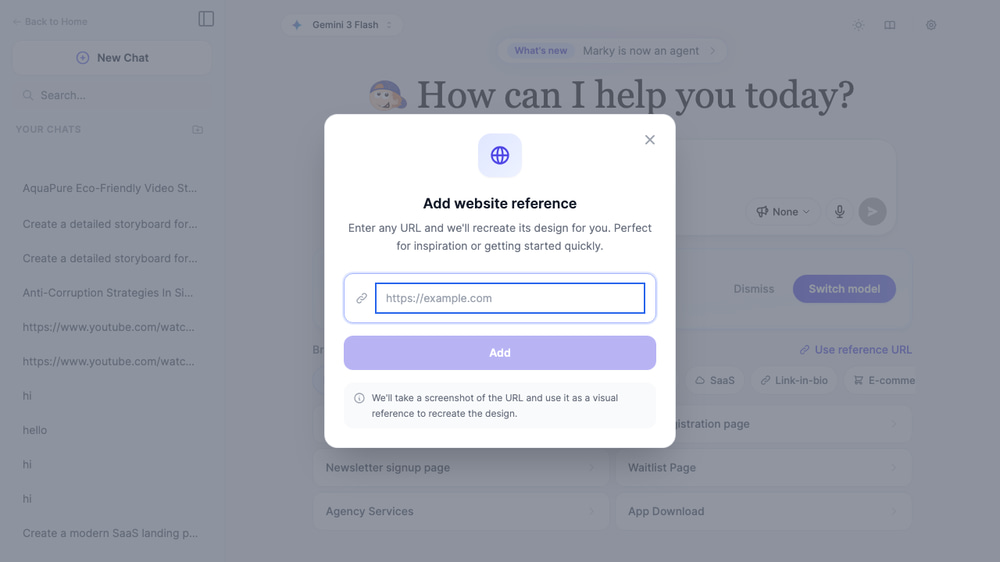
The reference URL feature is especially powerful for recreating a design you admire. The AI analyzes the structure, layout, and style of any website and generates a fresh version you can customize.
Step 3: Watch the AI Build Your Website
After you send your prompt, the AI starts generating your website in real time. You’ll see a split-screen view with the chat conversation on the left and a live browser preview on the right. The website renders as the AI writes the code — you can watch it come together piece by piece.
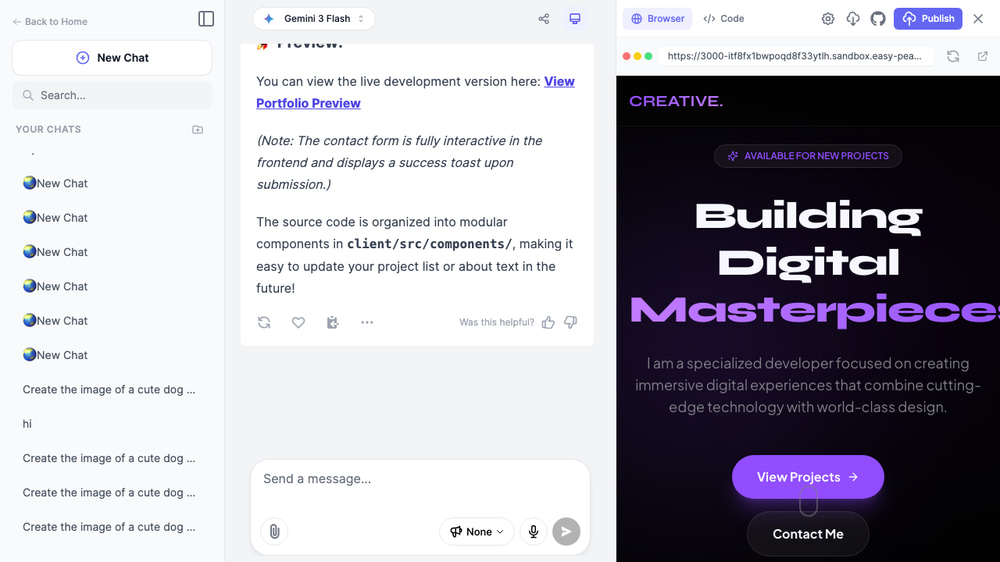
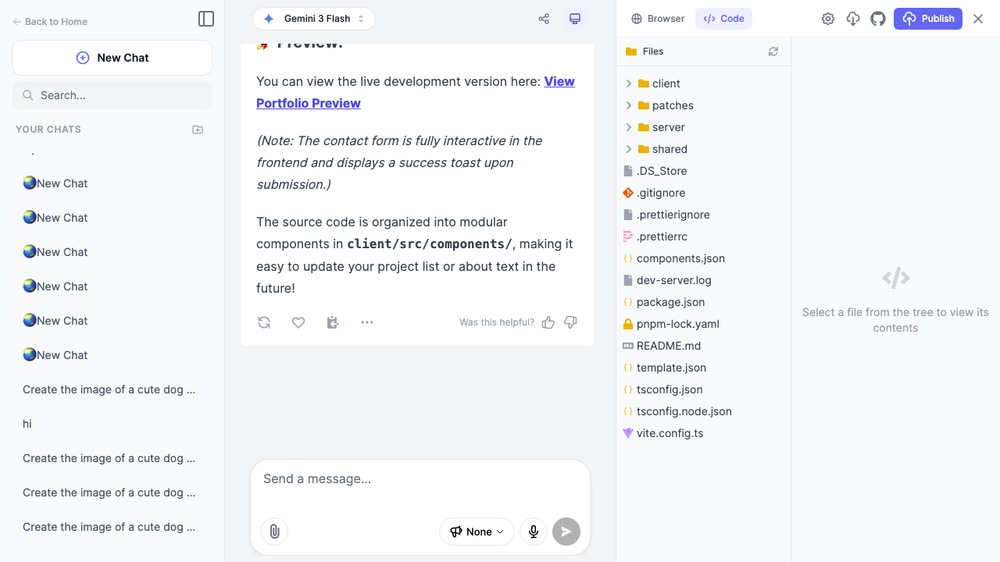
You can also switch to the Code tab to see the full source code, including the file structure, components, and styling. This is useful if you want to understand how the website is built or make manual edits later.
Step 4: Refine and Publish
Once the initial build is complete, you can iterate on your website by chatting with the AI. Ask it to change colors, add sections, update copy, or rearrange the layout — just like giving feedback to a real developer. When you’re happy with the result, click Publish to deploy your website to a live URL instantly.
Build a Landing Page with AI
Landing pages are one of the most popular uses for the AI website builder. Whether you need a product launch page, event registration, newsletter signup, or waitlist page, the AI can generate a conversion-optimized landing page in under a minute.
The Landing page category includes 6 ready-to-use templates:
- Product launch page — Hero section, features grid, product teaser, testimonial carousel, and early-access signup form
- Event registration page — Speaker profiles, agenda timeline, and registration form
- Newsletter signup page — Email capture, sample issue previews, and subscriber testimonials
- Waitlist page — Countdown timer, referral tracker, and social proof counter
- Agency services page — Services grid, client logos, and case study previews
- App download page — App store badges, feature highlights, and device mockups
Or just describe your own: “Build a landing page for a coffee subscription service called BeanBox. Include a hero with pricing plans, a ‘How it works’ section with 3 steps, customer reviews, and a footer with Instagram feed.”
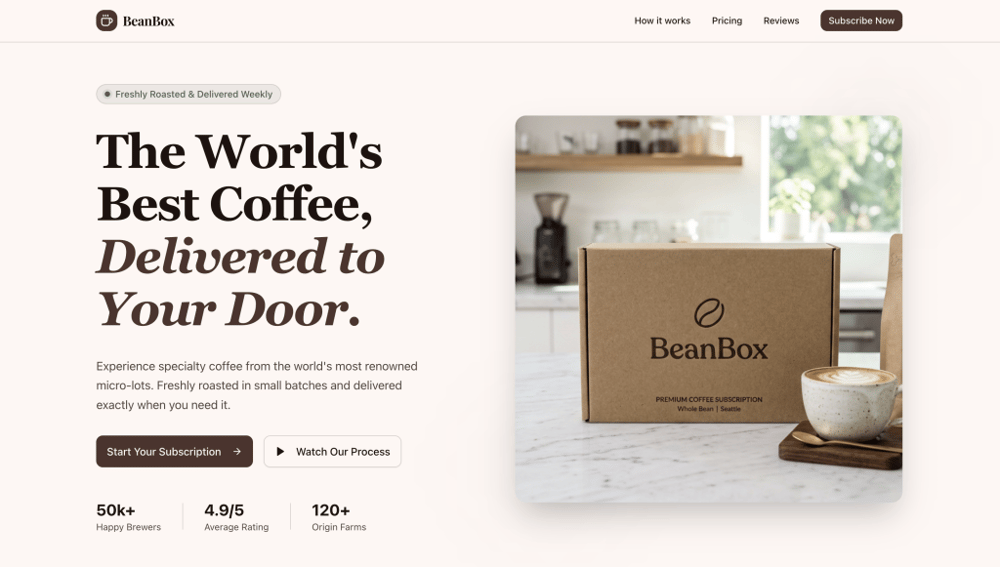
Try the AI Landing Page Builder and create a high-converting page in seconds.
Create a Portfolio Website with AI
A portfolio website is essential for designers, developers, photographers, freelancers, and creatives. The AI website builder makes it easy to showcase your work without spending days on design.
The Portfolio category templates include:
- Photographer portfolio — Full-bleed image gallery with masonry grid, lightbox previews, and booking form
- Developer portfolio — Project showcase with tech stack tags, GitHub links, and terminal-inspired design
- Illustrator portfolio — Art gallery with category filters and commission request form
- Filmmaker portfolio — Video reel section, project cards, and production credits
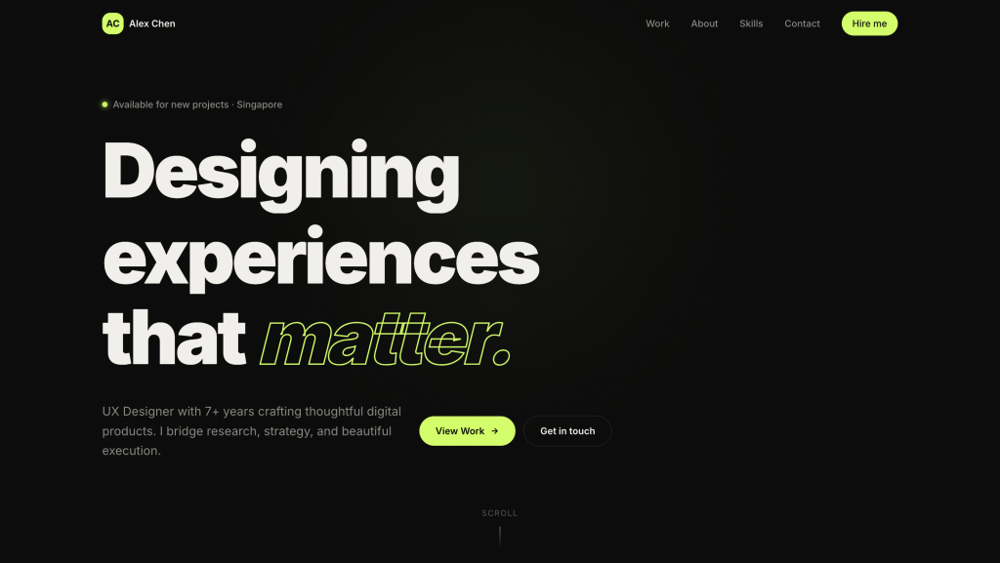
Try describing your own: “Build a minimalist portfolio for a UX designer. Dark background, large project thumbnails in a grid, an about section with my photo, skills list, and a contact form. Use Inter font and subtle hover animations.”
The AI generates responsive portfolios that look great on desktop and mobile. You can iterate on the design through chat — change the color scheme, add a blog section, or tweak the layout until it’s perfect.
AI Ecommerce Website Builder
Need an online store? The AI can build complete e-commerce websites with product grids, shopping carts, category pages, and checkout flows. While the generated sites are front-end focused (you’ll need to connect a payment processor separately), they give you a polished starting point that would take days to build manually.
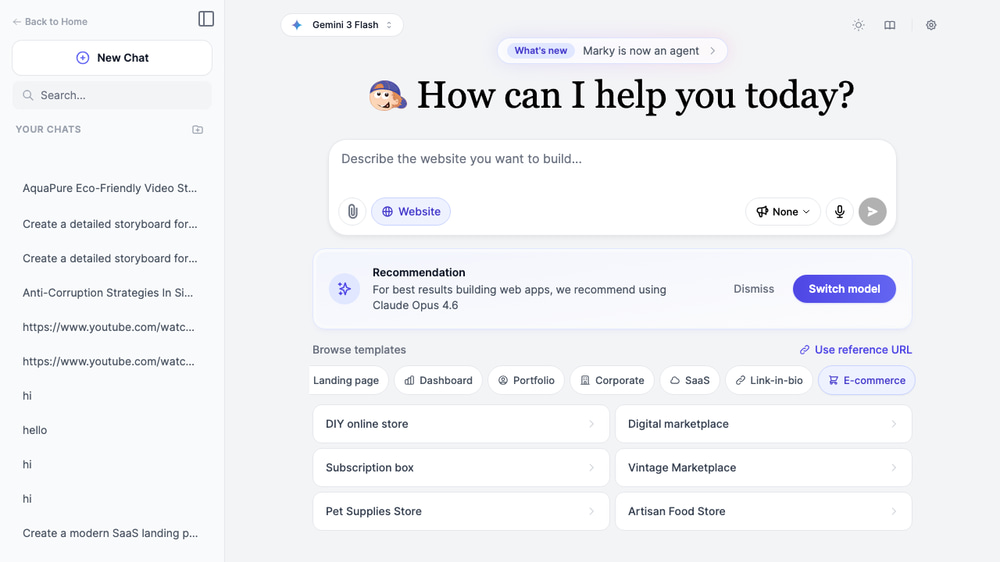
The E-commerce category includes templates for:
- DIY online store — Product catalog with filters, shopping cart, and checkout page
- Digital marketplace — Template/asset marketplace with download functionality
- Subscription box site — Plan selection, product previews, and subscriber testimonials
- Fashion boutique — Lookbook-style gallery with size guides and wishlist
The AI handles responsive product grids, hover effects, category filtering, and clean checkout layouts — all from a simple text description.
AI Blog Website Builder
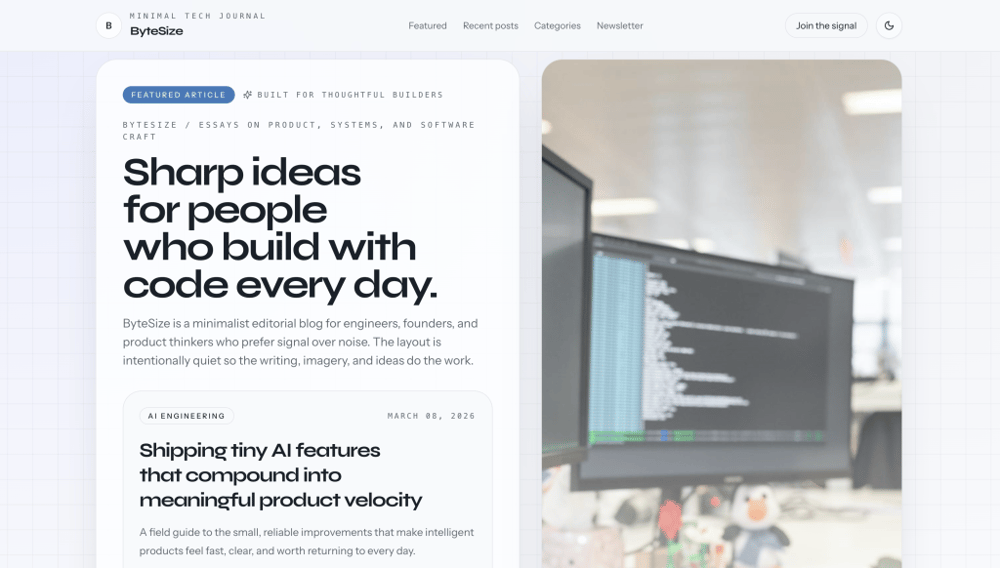
Starting a blog no longer requires setting up WordPress or learning a CMS. The AI can generate a complete blog website with article listings, individual post layouts, category navigation, and author profiles.
The Blog templates cover different niches:
- Personal blog — Clean reading experience with featured posts, categories, and an about page
- Tech blog — Code-friendly layout with syntax highlighting and tag-based navigation
- Food blog — Recipe cards with ingredient lists, cook times, and photo galleries
- Travel blog — Full-width imagery, destination guides, and interactive maps
Build Mini Games and Productivity Apps with AI
This is where the AI website builder really shines. Beyond static websites, it can generate fully interactive web applications — from mini games to productivity tools — complete with game logic, state management, and animations.
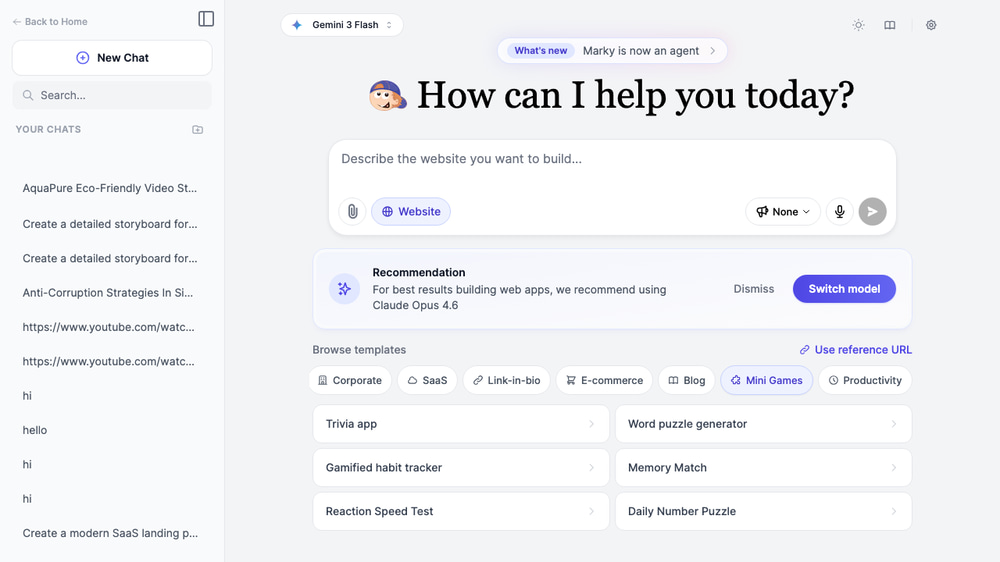
The Mini Games category includes:
- Trivia app — Multiple-choice quiz with scoring, timer, and category selection
- Word puzzle generator — Interactive word search or crossword with difficulty levels
- Memory Match — Card-flipping game with move counter and best score tracking
- Reaction Speed Test — Reflex-testing game with leaderboard
- Daily Number Puzzle — Sudoku-style number logic game
The Productivity category includes:
- Pomodoro timer — Focus timer with session tracking and break reminders
- Habit tracker — Daily habit logging with streak counters and progress charts
- Kanban board — Drag-and-drop task management with columns and cards
- Expense tracker — Budget management with categories and visual charts
These aren’t mockups — the AI generates working applications with real interactivity. You can play the games, track habits, and manage tasks right in the preview window.
AI Dashboard Builder
Dashboards are notoriously complex to build from scratch. The AI website builder simplifies this by generating complete dashboard interfaces with charts, data tables, KPI cards, and navigation — all from a text description.
The Dashboard templates include:
- Analytics dashboard — KPI cards, line charts, bar graphs, and data tables with filtering
- Project management dashboard — Task overview, team activity feed, and deadline timeline
- Sales CRM dashboard — Pipeline visualization, deal tracking, and revenue charts
- Social media dashboard — Platform analytics, engagement metrics, and content calendar
Try: “Build an analytics dashboard for a SaaS product. Include a sidebar navigation, top KPI cards (MRR, active users, churn rate, NPS), a revenue line chart, user growth bar chart, recent activity table, and dark theme.”
The AI generates professional-looking dashboards with placeholder data that you can easily replace with real data by connecting your APIs.
AI Website Builder vs Traditional Website Builders
How does building websites with AI compare to traditional tools like Wix, Squarespace, or WordPress? Here’s a quick comparison:
| Feature | Easy-Peasy.AI | Traditional Builders | Custom Development |
|---|---|---|---|
| Time to first result | 30-60 seconds | 1-4 hours | Days to weeks |
| Coding required | None | Minimal | Extensive |
| Design uniqueness | High (AI-generated) | Low (template-based) | High (custom) |
| Interactive apps & games | Yes | Limited | Yes |
| Code access | Full source code | Limited or none | Full source code |
| Iteration speed | Instant (chat-based) | Manual editing | Manual editing |
| Cost | Included with Easy-Peasy.AI plan | $12-40/month | $2,000+ |
The biggest advantage of using AI is the feedback loop. With traditional builders, you drag and drop elements one by one. With Easy-Peasy.AI, you describe what you want, see the result instantly, and refine through conversation. It’s like pair programming with an expert web developer who works at the speed of thought.
Another key differentiator: you get the full source code. Unlike Wix or Squarespace where your site lives on their platform, Easy-Peasy.AI generates real React/HTML/CSS code that you can download, modify, and host anywhere.
Tips for Getting the Best Results
Be Specific About Your Design Vision
The more detail you include in your prompt, the better the result.
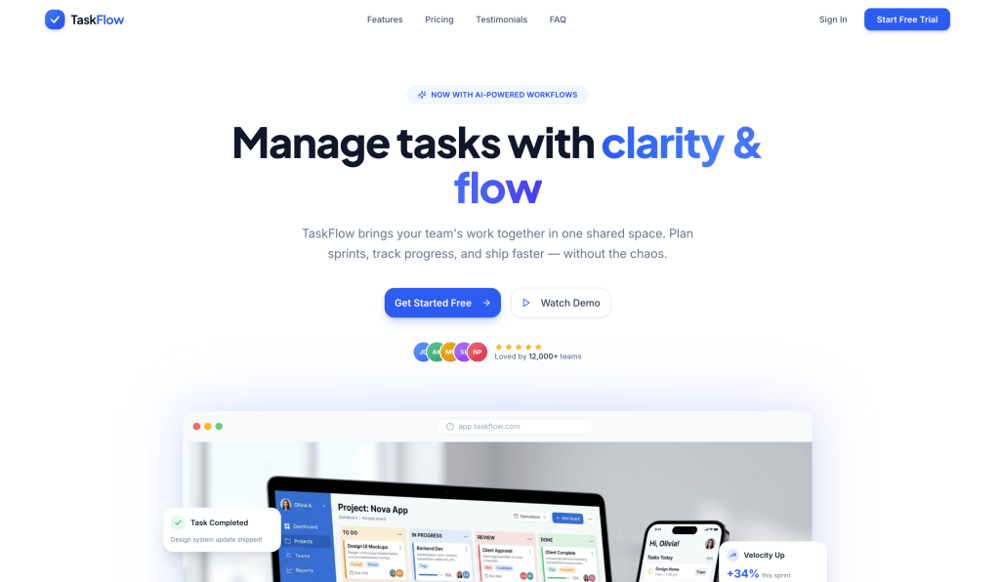
Instead of “build me a landing page,” try: “Build a SaaS landing page for a task management app called TaskFlow. Use a clean white background, blue accent colors, Inter font, and include a hero section with app mockup, features grid with icons, pricing table with 3 tiers, and customer testimonials.”
Use the Template Categories as Starting Points
Browse the 10 template categories to see 60+ pre-written prompts. Even if you don’t use them directly, they’ll give you ideas for how to structure your own descriptions. Each template includes specific sections, visual styles, and interactive elements.
Iterate Through Chat
Don’t try to get everything perfect in the first prompt. Start with the basics, review the preview, then refine: “Make the hero section taller,” “Change the color scheme to dark mode,” “Add a testimonials section below the pricing.” The AI remembers the context and builds on what’s already there.
Clone Existing Designs with Reference URL
If you see a website you love, use the “Use reference URL” feature. Paste the URL and the AI will analyze the layout, spacing, and structure to create something similar with your own content. This is the fastest way to get a professional-looking result.
Frequently Asked Questions
Is the AI website builder free to use?
The website builder is included with your Easy-Peasy.AI subscription plan. It uses your plan’s word credits to generate websites. Free tier users can try it with limited credits.
Can I download the source code?
Yes. Every website generated includes full source code that you can view in the Code tab. The AI generates real React, TypeScript, and Tailwind CSS code that you can download and host anywhere.
Can I connect my website to GitHub?
Yes. Easy-Peasy.AI has built-in GitHub integration. You can connect your generated website to a GitHub repository, push your code, and manage version control — all without leaving the platform.
Can I use my own custom domain?
Yes. After publishing your website, you can connect a custom domain. The platform handles SSL certificate provisioning automatically, so your site will be served securely on your own domain.
Can the AI build websites with a database and user authentication?
Yes. When your project needs backend functionality, the AI can scaffold a full-stack application with a Neon PostgreSQL database and Better Auth for user authentication. It handles database provisioning, migrations, and session management automatically.
How do I edit my website after it’s built?
Just keep chatting. The AI remembers your entire project, so you can ask it to change anything — update the color scheme, add new pages, rearrange sections, fix copy, or add new features. You can also switch to the Code tab and edit the source files directly.
What types of websites can the AI build?
Almost anything — landing pages, portfolios, dashboards, e-commerce storefronts, blogs, corporate sites, SaaS pages, link-in-bio pages, mini games, and productivity apps. The platform includes 10 template categories with 60+ pre-built prompt ideas.
Can I publish my website directly?
Yes. Click the “Publish” button in the workspace to deploy your website to a live URL instantly. You can share this URL with anyone or connect a custom domain later.
Do I need any coding skills?
No. Just describe what you want in plain English and the AI handles all the coding. You can refine the design through conversation — no technical knowledge required.
Which AI model should I use?
The platform recommends Claude Opus 4.6 for the best website building results. You’ll see a recommendation banner if you’re using a different model. Claude Opus 4.6 produces the most detailed, well-structured, and visually polished websites.
Can I clone an existing website’s design?
Yes. Use the “Use reference URL” feature to paste any website URL. The AI will analyze its layout and style, then generate a similar design that you can customize with your own content.
Start Building Your Website with AI Today
Whether you need a landing page that converts, a portfolio that impresses, or a mini game that entertains, Easy-Peasy.AI’s website builder turns your ideas into reality in seconds. No coding. No templates. Just describe what you want. Try the AI Website Builder and build your first website in under a minute.