AI for Real Estate Agents: 12 Ways to Win More Listings

Between showings, open houses, listing presentations, and a phone that never stops buzzing, the average agent’s day leaves little room for marketing. That’s exactly where AI for real estate agents pays off — not by replacing your local expertise, but by handling the repetitive work around it. In this guide, we’ll walk through 12 practical ways realtors and estate agents use Easy-Peasy.AI every day: from writing listing descriptions and virtually staging empty rooms to answering property inquiries at 2 a.m. Every example below was created with the actual tools, so you can see real inputs and real outputs — no mockups.
Here’s the full list at a glance:
| # | Use case | Tool | Time saved |
|---|---|---|---|
| 1 | Listing descriptions | Listing Description Generator (free) | 30–45 min per listing |
| 2 | Virtual staging | AI Interior Design Generator | $500–$2,000 per home vs. physical staging |
| 3 | Listing videos & property tours | AI Video Generator | Days of videographer turnaround |
| 4 | 24/7 lead capture & inquiries | AI Agents | Hours of repetitive Q&A weekly |
| 5 | Digital twin videos | AI Talking Videos | Reshoots for every new listing |
| 6 | Meeting & showing notes | AI Note Taker | Manual note-writing after every call |
| 7 | Follow-ups & objection handling | Marky Agent | 15–20 min per client touchpoint |
| 8 | Market research & neighborhood guides | Marky Agent | Hours of manual research |
| 9 | Professional headshots | AI Realtor Headshots | A $200+ photo session |
| 10 | Listing photo cleanup | AI Image Editor | Per-photo retouching fees |
| 11 | Social media content | Carousel & Post Generators | 2–3 hours of content work weekly |
| 12 | Your agent website | Marky Website Builder | Weeks of web development |
1. Write Listing Descriptions in Seconds (Free Tool)
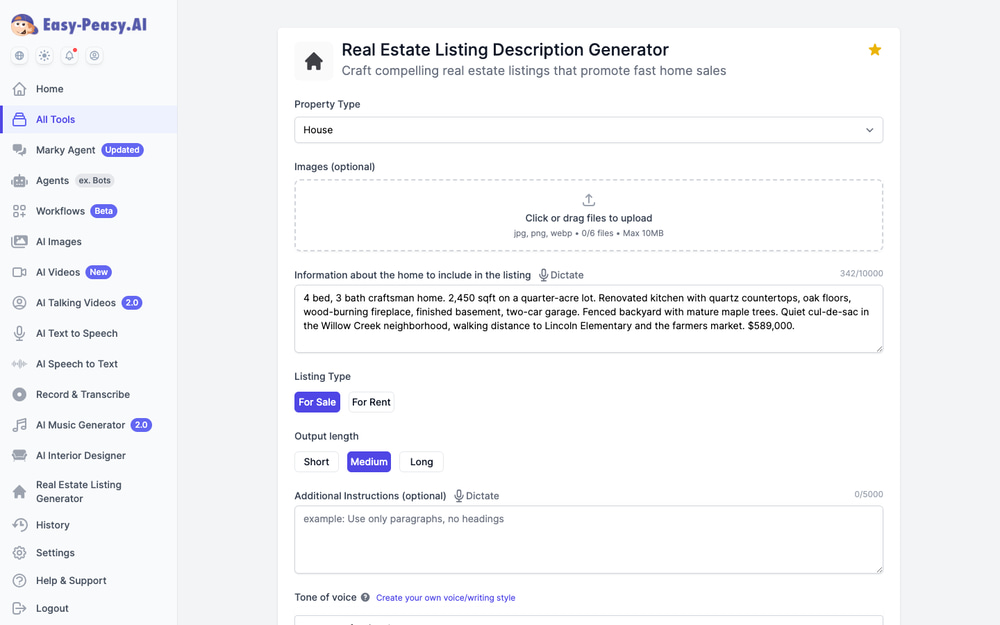
The listing description is the first thing buyers read — and the last thing most agents want to write at 9 p.m. after a full day of showings. The Real Estate Listing Description Generator turns your raw property notes into polished, MLS-ready copy. It’s free to use, and you can even upload up to 6 listing photos so the AI can mention details it actually sees in the images.
Just pick the property type, paste your bullet points, and choose For Sale or For Rent:
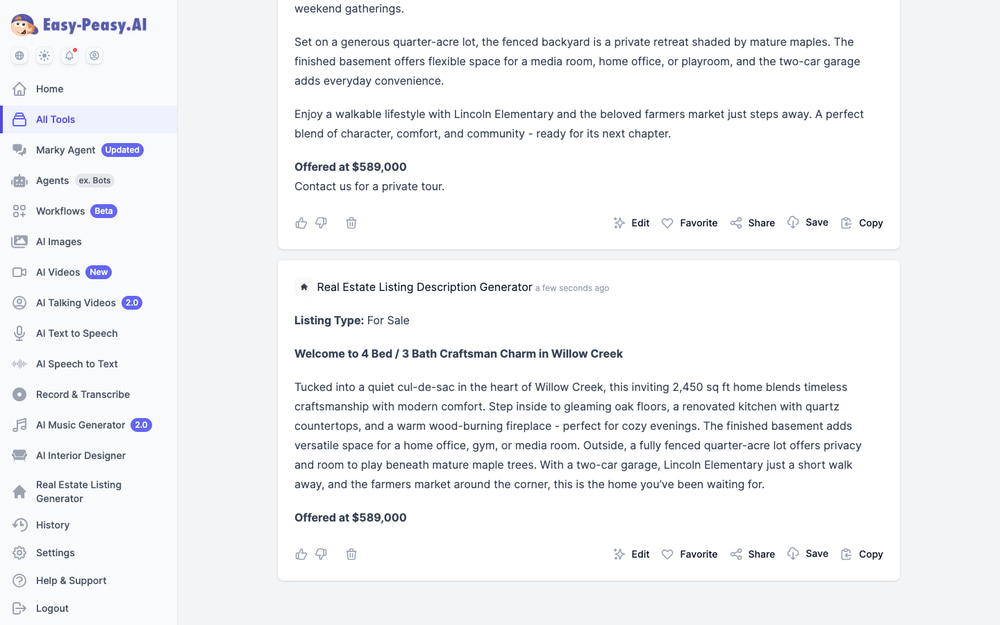
Here’s what it produced from those rough notes — a warm, structured description with a headline, feature highlights, and a closing call to action:
A few tips for the best results:
- Include specifics — square footage, lot size, school names, and price give the AI concrete details to work with
- Set the tone — try
warm, professionalfor family homes orsophisticated, upscalefor luxury listings - Generate multiple versions — one for the MLS, a shorter one for Zillow or Rightmove, and a punchy one for Facebook Marketplace
2. Virtual Staging: Turn Empty Rooms into Sold Homes
Staged homes sell faster and photograph better — but physical staging costs hundreds to thousands of dollars per listing. Virtual staging AI does the same job in about a minute. Upload a photo of an empty room to the AI Interior Design Generator, choose the Virtual Staging mode, and describe the look you want.
We tested it with this vacant living room — the kind of bare MLS photo every agent knows:
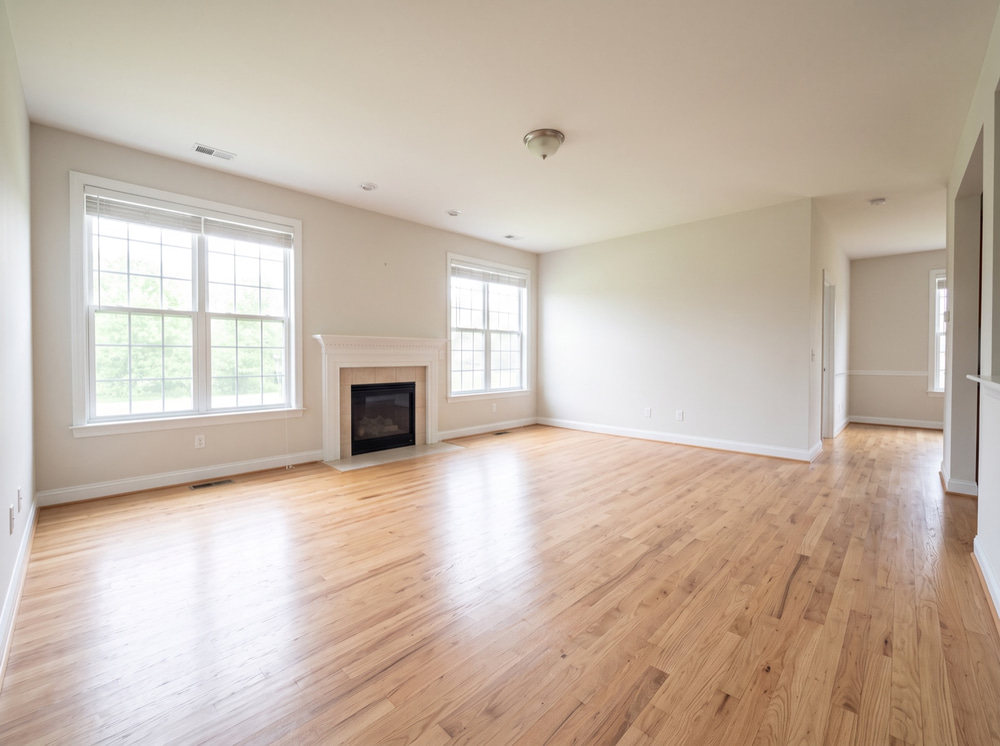
One prompt later (“stage as a warm modern farmhouse living room”), the AI furnished the space with a sectional sofa, area rug, wall art, and plants — while keeping the windows, fireplace, and floors exactly as they are in the original photo:

Here’s the full workflow inside the tool — original photo on the left, staged result on the right, with one-click options to compare with the original, upscale, or even animate the result into a video:
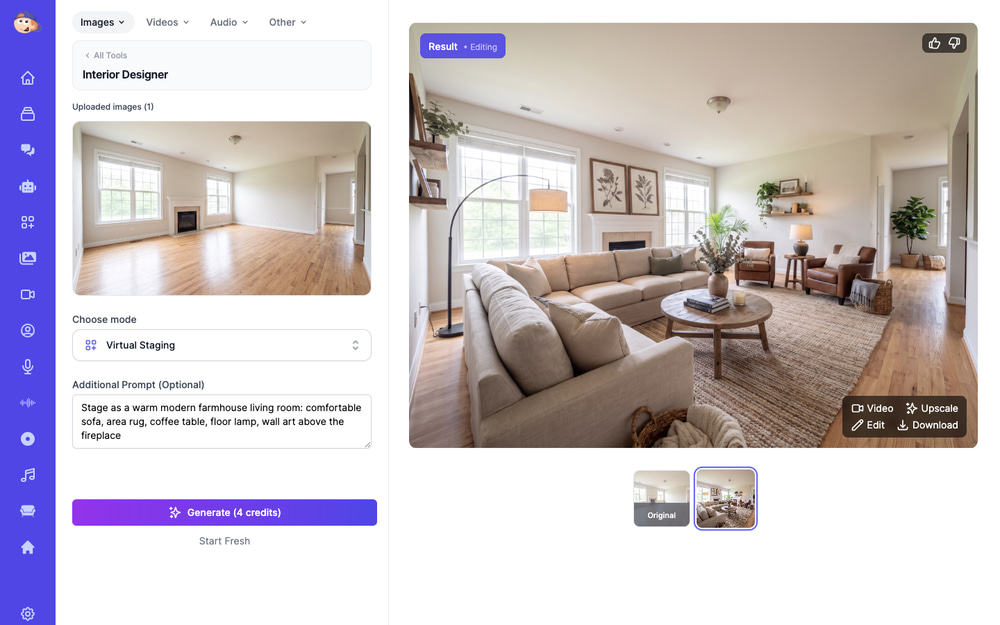
The tool goes well beyond staging. Its other modes are just as useful for listings:
- Empty Room — the reverse: remove all furniture from an occupied home so buyers see the space, not the seller’s belongings
- Declutter — clean up a lived-in room without emptying it
- Restyle — show the same living room in Scandinavian, Mid-Century, or Japandi style for different buyer profiles (there are 40+ styles)
- Color / Paint Changer — help buyers see past that lime-green accent wall
- 360° Panorama — generate an immersive panorama view of a room
Disclosure tip: most MLS boards require you to label virtually staged photos. Always caption them “virtually staged” and include the original — it builds trust rather than hurting it.
3. Create Listing Videos and Property Tours from Photos
Listings with video get significantly more inquiries, yet most agents skip video because filming and editing take too long. With the AI Video Generator, your existing listing photos are enough. Upload them, and the AI animates each one with cinematic camera movement, adds a voiceover and music, and cuts everything into a ready-to-post tour.
Here’s a 30-second property tour we generated entirely from five still photos — script, narration, and motion included:
There are a few ways to get there, depending on how much control you want:
- The fastest: the Real Estate Marketing Video preset — upload photos and a few facts, get a finished narrated tour
- The most eye-catching: the Realtor Property Tour template, which animates a still room photo into a walking, talking virtual presenter who introduces the unit
- The full pipeline: the Virtual Staging & Cinematic Tour workflow, which chains everything together — empty the room, stage it, then animate it into a cinematic walkthrough
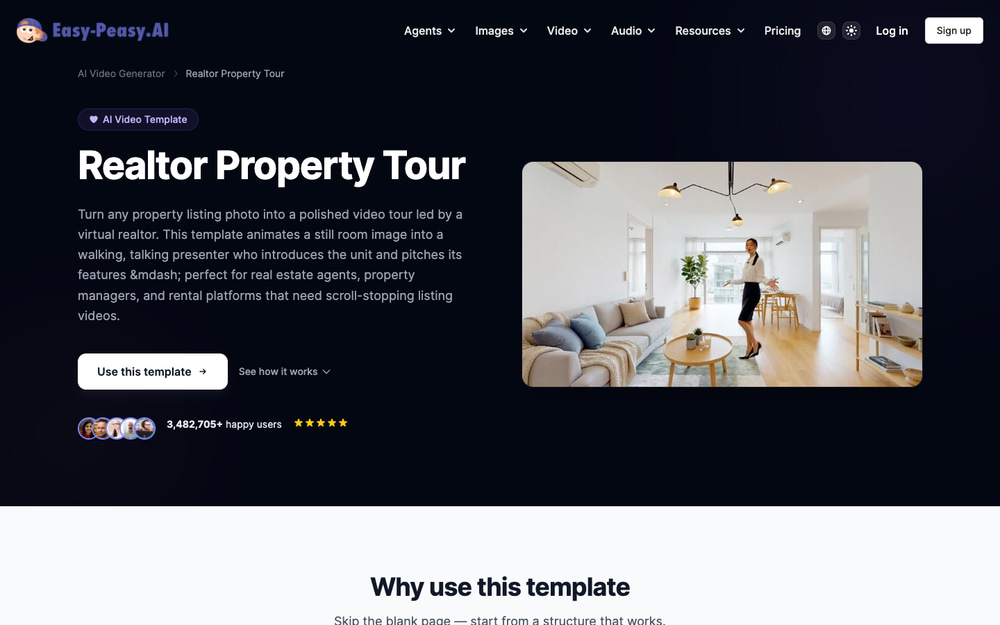
Video is also the answer for pre-construction and off-plan sales: generate photorealistic renders and animated tours of developments that are still months from completion, so you can build a buyer waitlist before the paint is dry. For a full step-by-step tutorial, see our guide on how to make real estate videos with AI.
4. Answer Property Inquiries 24/7 with an AI Agent
Buyers browse listings at night and on weekends — exactly when you can’t answer. A custom AI agent trained on your listings, your FAQ, and your process responds instantly, qualifies the lead, and books the viewing into your calendar while you sleep.
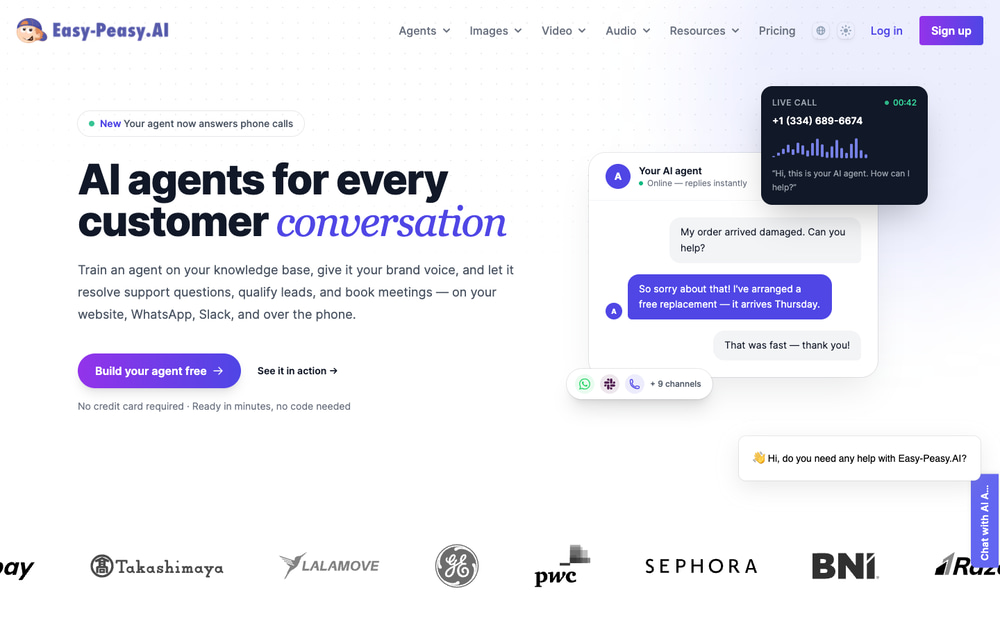
Setup takes minutes, not weeks:
- Train it on your content — paste your website URL, upload listing sheets or PDFs, and the agent learns your inventory and policies
- Give it your voice — set the tone and rules (e.g., always collect a phone number before sharing the address)
- Deploy everywhere — embed it on your website and connect Facebook Messenger, WhatsApp, Slack, or even a phone number your agent answers with a natural voice
Every conversation captures a lead with contact details, and the built-in Google Calendar integration means qualified buyers can book a viewing slot directly in the chat. For an estate agency, that turns your website from a brochure into a receptionist who never takes a day off.
5. Build a Digital Twin That Presents Your Listings
Top-producing agents are the brand — their face and voice sell. But nobody has time to film a talking-head video for every new listing. With AI Talking Videos, you record yourself once, clone your voice, and from then on your digital twin can present any script you type.
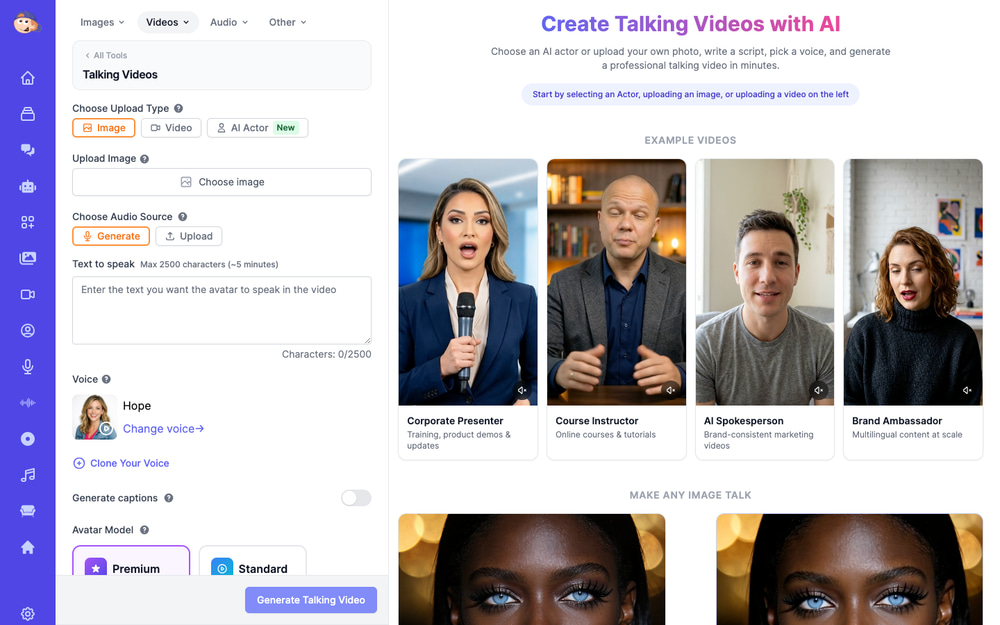
How agents use it:
- New listing announcements — type the property details, get a video of “you” introducing it, post it the same hour the listing goes live
- Multilingual marketing — the same video in Spanish, Mandarin, or French for international buyers, still in your cloned voice
- Personalized follow-ups — a 20-second video greeting for a buyer by name after a showing beats any templated email
- No face on camera? Pick a ready-made AI actor instead — there’s even a dedicated real estate presenter persona with a calm, professional delivery
6. Never Lose a Detail from Showings and Buyer Calls
After five showings in one afternoon, the buyer who wanted “the one with the big garage but a smaller yard” blurs together with everyone else. The AI Note Taker records your buyer consultations, listing appointments, and phone calls, then turns them into transcripts, summaries, and action items automatically.
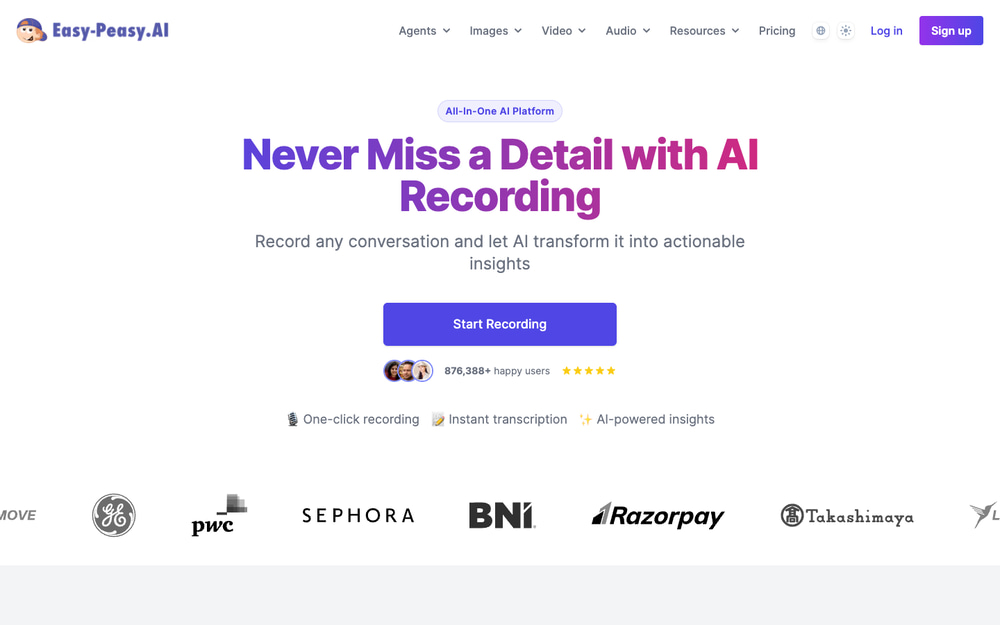
Practical ways to use it as an agent:
- Buyer intake calls — capture must-haves, dealbreakers, and budget without breaking eye contact to type
- Listing presentations — record the seller’s exact words about pricing expectations and timing, then generate a follow-up summary email from the transcript
- Walkthroughs — dictate condition notes room by room as you walk; the AI structures them afterward
- Compliance — a written record of what was discussed and agreed protects both sides
7. Follow-Up Texts, Emails, and Objection-Handling Scripts
The fortune is in the follow-up — and the follow-up is exactly what slips when you’re busy. Marky, Easy-Peasy.AI’s AI agent, drafts them in seconds. We asked it for three post-showing texts — one for an excited buyer, one worried about price, and one who wants to keep looking:
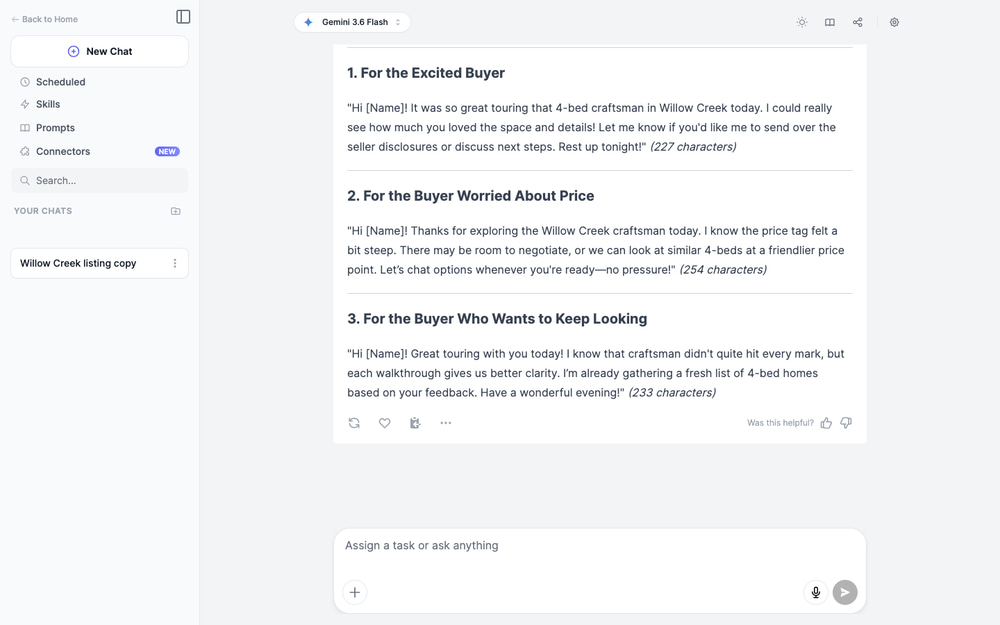
Notice how each message matches the buyer’s state of mind instead of sending everyone the same “just checking in.” The same approach works for the conversations agents dread most. Try prompts like:
Write a script for responding to “we want to wait until interest rates come down” that acknowledges the concern and reframes it with the cost of waitingDraft a listing presentation script for a seller who thinks their home is worth 10% more than comps supportWrite a 5-email nurture sequence for open house sign-ins who are 6+ months from buyingCreate a “just sold” letter for the neighborhood around 128 Willow Creek Lane
There are also ready-made templates for follow-up emails, cold outreach, and testimonial requests — the unglamorous emails that keep a pipeline alive.
8. Market Analysis and Neighborhood Guides in Minutes
Marky can also browse the web, run research, and turn what it finds into client-ready documents. Instead of assembling a neighborhood guide by hand, ask for one:
Research the housing market in [your city] and summarize the last 12 months: median price trends, days on market, and inventory. Format it as a one-page market update for my newsletterCreate a first-time buyer’s guide to [neighborhood]: schools, commute options, parks, and typical price rangesBuild a comparison table of these 3 suburbs for a family relocating with two kids
Because Marky works like an agent — searching, reading, and writing in one flow — the output is a document you can send, not a wall of chat text you still have to format. Pair it with the Lead Magnet Generator to turn a neighborhood guide into a downloadable PDF that captures emails from your website.
9. A Professional Headshot Without the Photo Session
Your headshot is on every listing, sign, and business card — and if it’s ten years old, buyers notice at the first showing. The AI Real Estate Agent Headshots generator creates polished, professional portraits from photos you already have, with backgrounds that fit the job: office settings, property exteriors at golden hour, or an upscale listing interior.
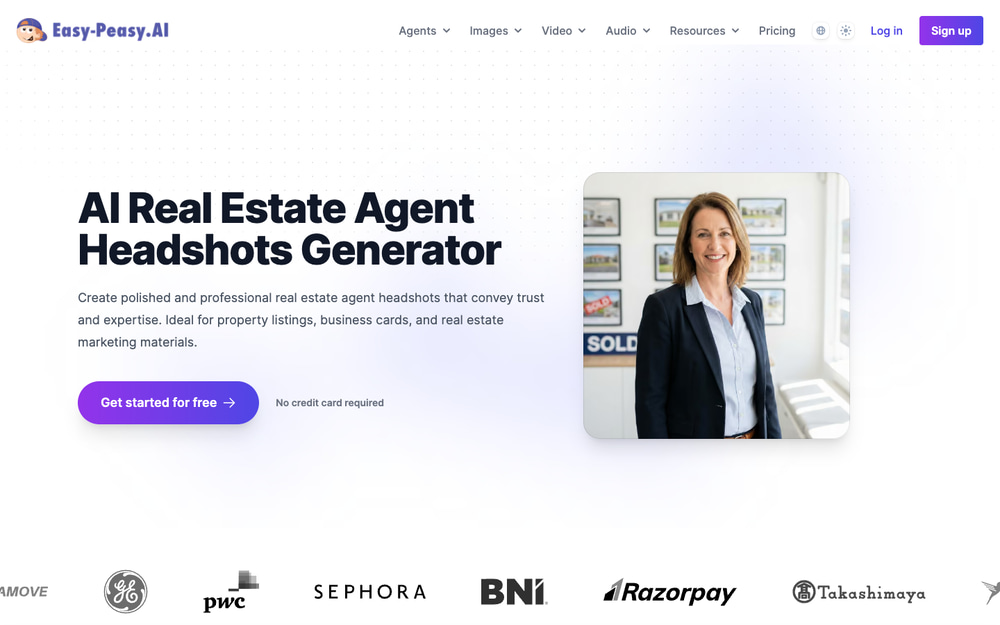
For a full personal-brand kit, the AI Headshot Generator trains on 10–15 selfies and produces a whole pack of consistent shots — the dedicated Real Estate Agent pack includes poses with keys, tablets, and sold signs. Use them across your website, social profiles, yard signs, and email signature so your brand looks consistent everywhere.
10. Clean Up Listing Photos Like a Pro Retoucher
Great photos sell homes, but real listing photos come with trash bins in the driveway, gray skies, and the seller’s clutter. The AI Image Generator and its editing templates handle the cleanup that used to go to a retoucher:
- Remove Object — erase cars, bins, cords, and personal items from photos
- Change Background — swap a gloomy sky for golden hour on exterior shots
- Creative Upscale — rescue a low-resolution photo the seller took on an old phone
- Add elements — furniture, decor, or landscaping touches; see our guide on how to add anything to a photo with AI
The same rule as virtual staging applies: enhance presentation, never misrepresent condition. Removing a trash bin is fine; removing a crack in the foundation is not.
11. Social Media Content on Autopilot
Consistent social presence wins listings — sellers check your Instagram before they call. But posting daily is a part-time job. Easy-Peasy.AI’s template library covers the entire real estate content calendar:
- Instagram Carousel Generator — turn “5 mistakes first-time buyers make” into a designed, swipeable carousel with images included
- LinkedIn Carousel Generator — market updates and expertise posts for the referral network
- Reel ideas, captions, and hashtags — a month of short-form video ideas in one generation
- Facebook and Google ad copy — headlines and primary text for listing promotion campaigns
- Newsletter Generator — your monthly market update, written in minutes
A practical rhythm: batch one hour on Monday — generate a carousel, three post captions, and a reel script from the week’s new listing and one market stat. That’s a full week of content from a single session.
12. Launch Your Agent Website with a Prompt
Need a landing page for a listing, an open house, or your personal brand? Tell Marky’s website builder what you want — “a single-property website for a 4-bed craftsman at 128 Willow Creek Lane with a photo gallery, video tour, and a viewing-request form” — and it designs, builds, and deploys the site for you, no developer required. Combine it with your AI agent from use case #4 embedded on the page, and every visitor gets an instant answer and a booking link.
How to Get Started (Without Boiling the Ocean)
Don’t try all twelve at once. Here’s a realistic first week:
- Day 1: Run your current listing through the Listing Description Generator — it’s free and takes two minutes
- Day 2: Virtually stage your emptiest listing photo and A/B it against the bare version in your next post
- Day 3: Turn one listing’s photos into a video tour and post it
- Day 4: Ask Marky for follow-up scripts for the three buyer types you meet most
- Day 5: Set up an AI agent on your website with your current listings
By Friday you’ll know which of these moves the needle for your market — and you’ll have spent less time than one open house takes.
Frequently Asked Questions
What is the best AI tool for real estate agents?
It depends on the bottleneck. If writing is your time sink, start with the free Real Estate Listing Description Generator. If your listings are photo-heavy, virtual staging and AI video tours deliver the most visible results. Easy-Peasy.AI bundles all of them — text, images, video, voice, agents, and automation — in one subscription, so you don’t need five separate tools.
Is AI-generated listing content allowed on the MLS?
Yes — AI-written descriptions are treated like any other marketing copy, and you remain responsible for accuracy. For images, most MLS boards require virtually staged photos to be labeled as such. Always review AI output before publishing, and never use AI edits to hide property defects.
Is virtual staging with AI as good as physical staging?
For online listings — where 100% of buyers first see the home — virtually staged photos serve the same purpose at a fraction of the cost, and you can restyle the same room for different buyer profiles in minutes. Physical staging still helps at in-person showings, so many agents use AI staging for photos and light physical staging (or none) on site.
Can the AI chatbot really handle property inquiries?
Yes. You train the agent on your own listings, FAQ, and policies, so it answers from your data rather than making things up. It captures each visitor’s contact details as a lead, hands off to you when a question needs a human, and can book viewings directly into your Google Calendar. It works on your website, Facebook Messenger, WhatsApp, and even over the phone.
How much does it cost?
The Listing Description Generator is free to try, and a free Easy-Peasy.AI account includes welcome credits you can spend on staging, images, or video. Paid plans unlock higher volumes and premium models — still far less per month than a single professional staging, video, or photography invoice. See pricing for details.
Will AI replace real estate agents?
No — but agents who use AI will outpace agents who don’t. Everything above automates the production work around the job: writing, editing, formatting, responding. The parts clients actually pay for — negotiation, local knowledge, judgment, and trust — stay firmly human.
Give Your Business an Unfair Advantage
Every use case in this guide came from questions real agents ask us. The pattern is always the same: the marketing work that used to consume evenings now takes minutes, and the agent spends the difference with clients. Start with the free Real Estate Listing Description Generator, or jump straight into virtual staging and video tours — and see how much of your week you get back.