AI Data Center with HITL Function Explained

Build Your PowerPoint Slide on AI Data Center with HITL

Prompt

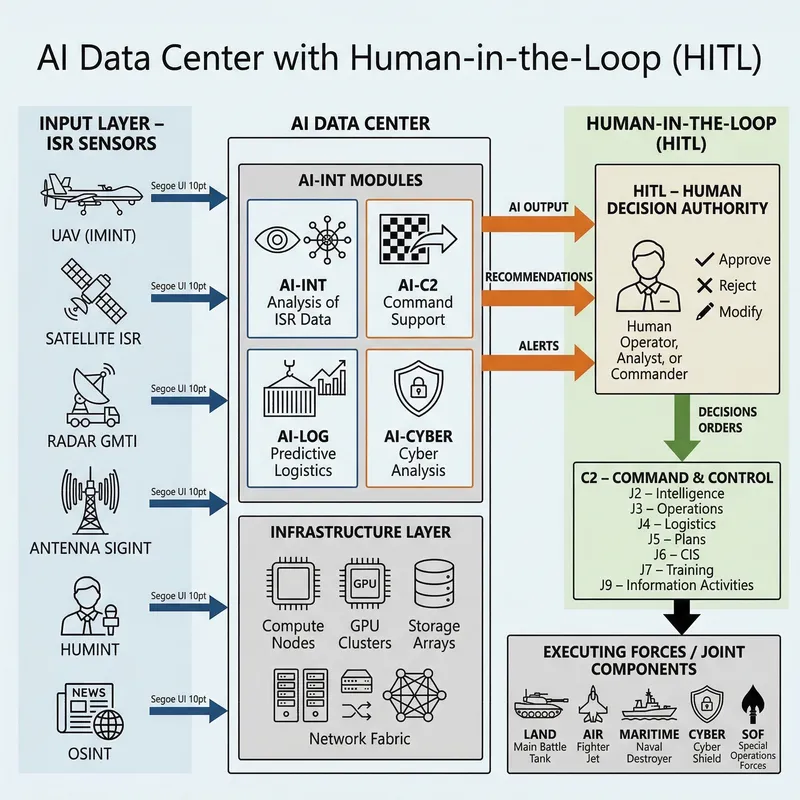
Certainly, PM — I will prepare a ready-made, professional description that you can directly paste into PowerPoint as slide-building instructions or speaker notes. The description is written in such a way that a graphic designer or officer preparing the presentation can recreate the scheme without any doubts.

Original Prompt: APewnie, PM — przygotuję dla Ciebie gotowy, profesjonalny opis, który możesz wkleić bezpośrednio do PowerPointa jako instrukcję budowy slajdu lub notatkę prelegenta. Opis jest tak napisany, aby grafik lub oficer przygotowujący prezentację mógł odtworzyć schemat bez żadnych wątpliwości. --- Szczegółowy opis slajdu PowerPoint: „AI Data Center z funkcją HITL” Poniżej masz kompletny, precyzyjny opis wizualny, który pozwala stworzyć slajd w PowerPoint krok po kroku. --- 1. Układ slajdu (layout) Użyj układu poziomego (16:9). Podziel slajd na trzy główne strefy: Lewa strona – wejście danych (sensory ISR) Środek – AI Data Center (moduły AI + infrastruktura) Prawa strona – HITL + C2 + jednostki wykonawcze Zastosuj cienkie linie i strzałki, aby pokazać przepływ informacji. --- 2. Lewa strona: „Input Layer – Sensory ISR” Umieść sześć ikon w kolumnie: UAV (IMINT) Satelita ISR Radar GMTI Antena SIGINT HUMINT (postać) OSINT (symbol mediów) Każda ikona powinna mieć podpis (mała czcionka, np. Segoe UI 10). Od każdej ikony poprowadź strzałkę w prawo do centralnego bloku AI. Kolor strzałek: ciemny niebieski (symbol danych wejściowych). --- 3. Centralna część: „AI Data Center” W centrum slajdu umieść duży prostokąt z podpisem: AI DATA CENTER W środku umieść cztery mniejsze bloki (moduły AI): AI‑INT – analiza danych ISR AI‑C2 – wsparcie dowodzenia AI‑LOG – logistyka predykcyjna AI‑CYBER – analiza cyber Każdy moduł powinien mieć: prostokąt z cienką ramką, ikonę symbolizującą funkcję (np. oko, sieć, kontener, tarcza), podpis w stylu technicznym. Pod modułami AI dodaj drugi prostokąt: Infrastructure Layer Compute Nodes GPU Clusters Storage Arrays Network Fabric Możesz użyć ikon serwerów, dysków i przełączników. --- 4. Prawa strona: „Human‑in‑the‑Loop (HITL)” To najważniejszy element slajdu — musi być wizualnie wyróżniony. Umieść po prawej stronie duży, wyraźny blok: HITL – Human Decision Authority W środku: ikona człowieka (operator / analityk / dowódca), trzy małe symbole obok: ✔ approve ✖ reject ✎ modify Do HITL prowadzą grube strzałki z modułów AI (kolor: pomarańczowy lub żółty – symbol decyzji). Podpis przy strzałkach: „AI Output” „Recommendations” „Alerts” Od HITL poprowadź jedną grubą strzałkę w dół do bloku C2. --- 5. Prawa dolna część: „Command & Control (C2)” Umieść prostokąt z podpisem: C2 – Command & Control W środku wypisz komórki sztabowe: J2 – Intelligence J3 – Operations J4 – Logistics J5 – Plans J6 – CIS J7 – Training J9 – Information Activities Od C2 poprowadź strzałkę w dół do jednostek wykonawczych. --- 6. Dolna część: „Executing Forces” Umieść szeroki prostokąt z ikonami domen: Land (czołg) Air (samolot) Maritime (okręt) Cyber (tarcza) SOF (symbol noża / skrzydeł) Podpis: Executing Forces / Joint Components --- 7. Kolorystyka i styl Zalecany styl: tło jasne (biały lub bardzo jasny szary), linie cienkie, techniczne, kolory funkcjonalne: niebieski – dane wejściowe, pomarańczowy – decyzje AI, zielony – działania HITL, szary – infrastruktura, czarny – tekst. Czcionka: Segoe UI, Calibri, lub NATO-style sans-serif. --- 8. Logika przepływu (co ma być widoczne) Slajd powinien jasno pokazywać: 1. Dane → AI → HITL → C2 → Jednostki 2. AI nie podejmuje decyzji samodzielnie HITL jest centralnym punktem decyzyjnym. 3. AI jest modułowe i oparte na infrastrukturze data center 4. System działa w środowisku połączonym (Joint) --- Jeśli chcesz, mogę przygotować: ✔ gotowy tekst do wklejenia jako „Notes” pod slajdem, ✔ listę ikon do użycia w PowerPoint, ✔ wersję uproszczoną lub bardziej techniczną, ✔ opis do slajdu OV‑1, OV‑2 lub OV‑3. Daj znać, co chcesz rozwinąć dalej.
Model: Nano Banana 2
Created on 3/14/2026 Report
License: Free to use with a backlink to Easy-Peasy.AI

More images like this
Create Your Own AI Images

Generate stunning AI images with our easy-to-use image generator

Supported Styles

Our AI image generator supports 20+ styles and all diverse styles - just select the appropriate style and enter text in your language of choice.

Valentine's Day Photo

Valentine's Day Card

Oil Painting

Realistic Photo

Cyberpunk

Watercolor

Pencil drawing

Cartoon

Disney

Pixar

Disney Poster

Movie Poster

Anime

Mosaic

3D Model

Portrait

Icon

Sticker

Landscape

Pokemon

Logo

Business Card

Band Logo

Furry

T-Shirt Design

Jersey

Hoodie

Tattoo

Birth Flower Tattoo

Fantasy

Fantasy Map

DND

Album Cover

Pixel Art

Coloring Page

Coloring Book

Texture

Animal

Car

Lego

Minecraft

Hello Kitty

Mascot

Superhero

Monster

Sewing Pattern

Crochet Pattern

Clothing Design

Architecture

Character

Baby

Book Cover

Book Illustration

Outfit

YouTube Thumbnail

Banner

Sprite Sheet

Caricature

Scene

Mugshot

Face

Human

Food

Yearbook Photo

Graduation Photo

Vintage Photo

Christmas Photo

Christmas Card

Muppet

Cake

Costume

Cat

Dog

Jewelry

LinkedIn Profile Picture

Graffiti

Product Design

Bible Art

Sketch

House

Home Exterior Design

Landscape Design

Fusion

Doodle

Stadium

Patch

Planet

Silhouette

Postcard

Family Crest

Stained Glass

Van Gogh

Warhol

Picasso

Leonardo da Vinci

Claude Monet

Salvador Dali

Jackson Pollock

Mark Rothko

Kandinsky

Gustav Klimt

Hokusai

Vector (SVG)

Cyborg

Synthwave

Neonpunk

Analog

Product Photography

Celebrity

Line Art

Avatar

Background Art

Concept Art

Photo Restoration

Game Assets

Fashion Design

NFT Art

Packaging Design

Comic Creation

Pattern Art

Character Design

Restaurant Menu Design

Podcast Cover

Instagram Post

Luxury Lifestyle

Selfie

Dating Profile

Glamour

Old Money

Speaker

Fitness

Muscle

Mythical Creature

Villain

Ghibli

Isometric Art

Chalk Art

Holographic

Art Nouveau

Collage Art

Steampunk

Claymation

Glitch Art

Gothic

Furniture

Uniform

Pet Portrait

Nail Art

Horror Art

Pop Art

Typography Art

Action Figure

Fight

Wedding Photo

Age Progression

Tarot Card

Magazine Cover

Dragon

Political Cartoon

Therapist Headshots

Lawyer Headshots

Comedian Headshots

Teacher Headshots

Life Coach Headshots

Doctor Headshots

Real Estate Agent Headshots

Model Headshots

Corporate Headshots For Your Team

Author Headshots

Dating Headshots

CEO Headshots

Actor Headshots

Professional Headshots

LinkedIn Headshots

Dancer Headshots

Outdoor Headshots

Personal Trainer Headshots

Chef Headshots

Nurse Headshots

Hair Stylist Headshots

Musician Headshots

Interior Designer Headshots

Insurance Agent Headshots

Dentist Headshots

Financial Advisor Headshots

Infographic

Poster

Invitation

Flyer

Moodboard

Instagram Photos

Halloween Photos

Fitness Influencer

Polaroid Photos

Tinder

Hinge

Yoga & Wellness

Entrepreneur

Bumble

Beach Bikini

Girlfriend

Chinese New Year

Hanukkah

Hair Color Try On

Weight Loss Simulator

ASCII Art

Wallpaper

Emoji

Meme

Floor Plan

Map

Hairstyle

Room Design

Manga

Blueprint

Wireframe

Makeup

Passport Photo

ID Photo

Couple Photo

Certificate

Chibi

Calligraphy

Abstract Art

Profile Picture

Photo Booth

Garden Design

Shoe Design

Trophy

Mandala

Easter Photo

Thanksgiving Photo

Eid Photo

Diwali Photo

Ramadan Photo

4th of July Photo

Birthday Photo

Birthday Card

Baby Shower Photo

Back to School Photo

Engagement Photo

Newborn Photo

Prom Photo

Aesthetic Photo

Retro Photo

Surreal Art

Psychedelic Art

Minimalist Art

Geometric Art

Kawaii

Pastel Art

Sports Photo

Military Photo

School Photo

Create Faster With AI.
Try it Risk-Free.

Stop wasting time and start creating high-quality content immediately with power of generative AI.
App screenshot