

AI Silhouette Generator

Design captivating silhouette art with our AI. From elegant profiles to dramatic scenes, create stunning high-contrast artwork with our collection of silhouette styles.

No credit card required

Rated 4.9 on Google and CapterraJoin 3 million+ creators
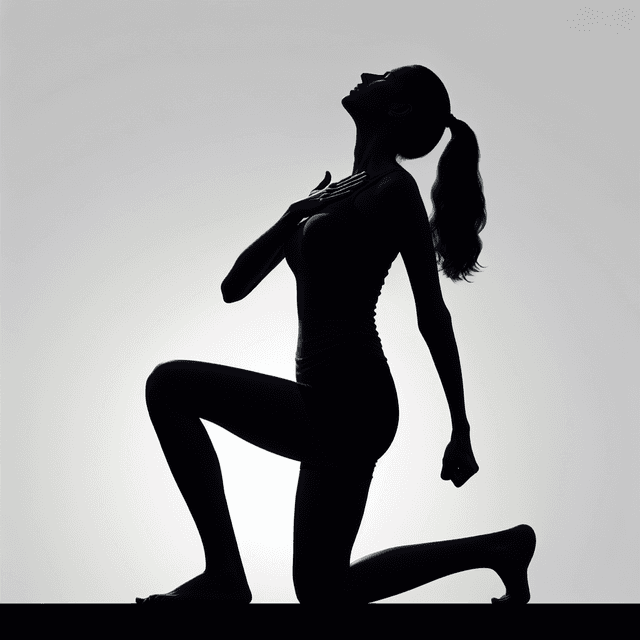
Dramatic silhouette art with strong contrast and recognizable shapes, black figure against bright background creating powerful visual impact, minimalist shadow design emphasizing form and gesture, elegant outline illustration perfect for logos and artistic statements

Examples of Generated Art & Images

Who Can Benefit

Discover how different professionals and creators can utilize this AI image style

1

Graphic Designers

Creating striking silhouette designs for logos, branding materials, and visual identity projects.

2

Marketing Teams

Developing impactful silhouette imagery for advertising campaigns, social media, and promotional materials.

3

Web Designers

Incorporating elegant silhouette elements into website designs, headers, and digital assets.

4

Event Planners

Designing sophisticated silhouette-based materials for invitations, programs, and event branding.

5

Book Publishers

Creating dramatic silhouette illustrations for book covers, chapter headers, and promotional materials.

6

Social Media Creators

Producing eye-catching silhouette content for profile images, posts, and brand storytelling.

How to Create Silhouette Images

Silhouette style creates dramatic black shapes against contrasting backgrounds, emphasizing form and composition without internal details.

How to Create Silhouette Art

  1. 1Visit Easy-Peasy.AI Image Generator
  2. 2Describe subject and pose
  3. 3Add "silhouette", "black silhouette", or "shadow art"
  4. 4Specify background type
  5. 5Focus on distinctive shapes
  6. 6Generate dramatic contrasts
  7. 7Upload a reference image or the image you want to modify (optional)

Silhouette Art Tips

  • •Specify backgrounds: "sunset", "bright sky", "gradient", "moonlight"
  • •Include subjects: "person", "tree", "cityscape", "animal"
  • •Mention style: "paper cut", "photography", "vector", "artistic"
  • •Add elements: "multiple layers", "negative space", "dramatic pose"

Best Practices

  • ✓Create recognizable shapes
  • ✓Use strong contrast
  • ✓Focus on interesting poses
  • ✓Utilize negative space

Example Prompts

"Couple silhouette at sunset, romantic pose, orange sky background, love story aesthetic"
"Tree silhouette against full moon, twisted branches, spooky atmosphere, Halloween style"
"City skyline silhouette, recognizable buildings, gradient sunset, urban photography"

Ready to create amazing silhouette images?

Create for free

Related styles

Browse all 259 styles

Testimonials

Our Trustpilot score

Read the comments that people have made on public platforms.

Jeff Wilson

By far the best compilation AI utility

By far the best compilation AI utility out there. Period. We have tried multiple platforms that would work for us - a small business - and it was a bit overwhelming two years ago. Easy-Peasy has been a godsend. So many freaking tools and no fewer than 10 (of the 200) are ones we use at least on a weekly basis. Ironically, their human support is one of the most appreciated elements.

Vivian Daze avatar

Vivian Daze

Great services

Great services, and lovely and attentive customer service. Would reccommend

Cody Crabb

Great service, Best AI tool

Kia Tiow | COGUE avatar

Kia Tiow | COGUE

Easy-peasy is an easy to pick up and awesome AI software. I love it.

Easy-Peasy AI

Dezign121 avatar

Dezign121

Easy-Peasy.AI is very user friendly & a lot more to explore not only in the lesson, very helpful assistant in both work & personal

Blanca Marin avatar

Blanca Marin

Very Good AI…

I really liked the easy-peasy AI service. It's a great tool, but I also had to ask them for a refund because I chose the wrong plan, and they were very quick to respond to my request. They looked into my case and I got my money back without any problems. Of course, I will continue to use it for my projects.

Easy-Peasy AI

Muhammad Md Rahim avatar

Muhammad Md Rahim

Very awesome and practical AI tool that can help improve our productivity and the quality of our work!

Ken Poon avatar

Ken Poon

Very useful and true to “Easy Peasy” on using AI. One platform on all the tools required for business needs. Marianna sharing is super informative on how to use easy-peasy.ai

Dennis Cambronero avatar

Dennis Cambronero

I have been using the tool for +1 year…

I have been using the tool for +1 year and I have to say it is amazing. I use it to create images, bots and access every LLM in one single place. I highly recommend it.

Yeah Likes avatar

Yeah Likes

Practical and Powerful Software which is all In one and versatile. Just finished their workshop and got practical and valuable tips and tricks.

AI Silhouette Generator

Free to try. No credit card required.

Create for free
Dramatic silhouette art with strong contrast and recognizable shapes, black figure against bright background creating powerful visual impact, minimalist shadow design emphasizing form and gesture, elegant outline illustration perfect for logos and artistic statements

Create Your Own Silhouette images

Create for free