Telegram is where a billion people already chat every day — and with Easy-Peasy.AI Bots, your business can be there too, answering questions automatically around the clock. In this guide you’ll create a Telegram AI chatbot trained on your own content, without writing a single line of code. The whole setup takes about three minutes: create a bot with Telegram’s @BotFather, paste one token into Easy-Peasy.AI, and start chatting.

What Is the Telegram Integration?
The Telegram integration connects your Easy-Peasy.AI bot to a Telegram bot account. Anyone who messages your bot on Telegram gets an instant answer generated from your knowledge base — your website content, documents, and FAQs — in your bot’s voice and personality. It’s the same AI agent that powers your website chat widget, now living in your customers’ favorite messaging app.
Why Put Your AI Chatbot on Telegram?
- Meet customers where they are. Telegram has over a billion users, and for many audiences it’s the primary support channel.
- Instant, 24/7 answers. Questions get answered in seconds, whatever the time zone.
- No app or website needed. Customers just search for your bot’s username and start typing.
- Conversation memory. The bot remembers the chat history with each user, so follow-up questions work naturally.
- Available on every plan. Telegram is one of the channels included on the free plan.
What You’ll Need
- An Easy-Peasy.AI account with a bot created and trained on your content
- A Telegram account (the free app on any device)
How to Create Your Telegram AI Chatbot (Step-by-Step)
Step 1: Create a bot with @BotFather
In Telegram, search for @BotFather — Telegram’s official bot for creating bots — and start a chat. Then:
- Send the command
/newbot - Choose a display name for your bot (e.g.
Acme Support) - Choose a username — it must be unique and end in
bot(e.g.AcmeSupportBot)
BotFather replies with your bot token — a long string like 1234567890:AAF.... Copy it, and treat it like a password: anyone with the token can control your bot.
Step 2: Connect the token in Easy-Peasy.AI
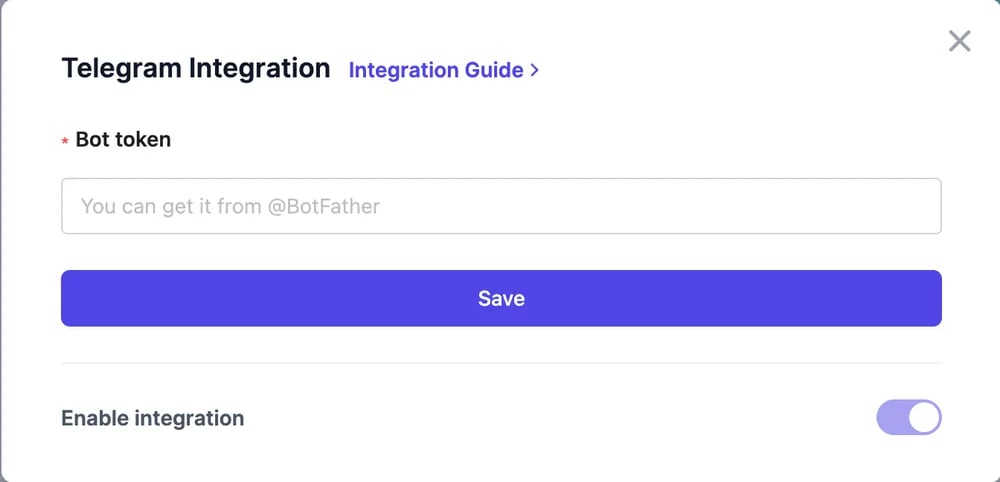
Open your bot in Easy-Peasy.AI, go to Integrations, and click Connect on the Telegram card. Paste the token from BotFather into the Bot token field and click Save. The token is validated on the spot — if you pasted it right, your Telegram bot connects immediately.

Step 3: Say hello
Open your bot’s chat in Telegram (search for the username you created) and send /start. Then ask it anything your knowledge base covers — the answer arrives in seconds. That’s the entire setup.
Commands Your Telegram Bot Understands
/start— begins the conversation with a greeting/clear— wipes the conversation history, giving the user a fresh start/ping— a quick health check (the bot replies “pong”)
Everything else the user types is treated as a question and answered from your knowledge base.
Tips for a Great Telegram Bot
Give your bot a face
Back in @BotFather, use /setuserpic to add a profile photo and /setdescription to write the short intro users see before they tap Start. A branded bot gets far more engagement than a gray placeholder.
Share the link everywhere
Your bot lives at t.me/YourBotUsername — put that link in your email signature, website footer, and social profiles so customers can find it.
Keep the token secret
Never post the BotFather token publicly. If it ever leaks, revoke it in @BotFather with /revoke and reconnect with the new one.
Retrain as your content changes
The bot answers only as well as its knowledge base. When your pricing or policies change, update the bot’s knowledge and it starts answering with the new information immediately.
Frequently Asked Questions
Is the Telegram integration free?
Yes — Telegram is one of the integrations available on every Easy-Peasy.AI plan, including the free plan. Conversations count toward your plan’s usage.
Can I connect the same Telegram bot to two Easy-Peasy.AI bots?
No — each Telegram bot token can be connected to exactly one agent. Create a second bot in @BotFather if you need a second agent on Telegram.
Does the bot remember previous messages?
Yes. Each user’s conversation history is kept, so follow-up questions are answered in context. Users can reset their own history anytime with /clear.
How do I pause or disconnect the bot?
Open the Telegram card in your bot’s Integrations page and flip the Enable integration toggle off. The bot stops answering immediately; flip it back on to resume.
Can it answer in other languages?
Yes — the bot replies in the language the user writes in, as long as your bot’s instructions don’t restrict it.
Launch Your Telegram Bot Today
Three minutes, one token, and your business has a support agent inside Telegram. Create your AI agent, grab a token from @BotFather, and paste it into the Telegram card — then send your new bot its first /start. Want the same agent on more channels? It also works on email, phone calls, and your website.