
Workflows are in beta, and the editor works on desktop screens only.
Open Workflows
Click Workflows in the sidebar, or find it in All Tools > AI Agents.
- My Workflows lists your workflows. Search finds them by name.
- Shared with me lists workflows other people shared with you. It appears once someone does.
- Templates has ready-made workflows for images and videos, such as virtual try-on, virtual staging, a product commercial, and an animated short film.
Create a workflow
- From scratch
- From a template
- From a file
Click Create Workflow. An empty canvas opens, named with today’s date. Click the name at the top to rename it. See Build and run a workflow.
Manage your workflows
Click the ⋯ menu on a workflow’s card: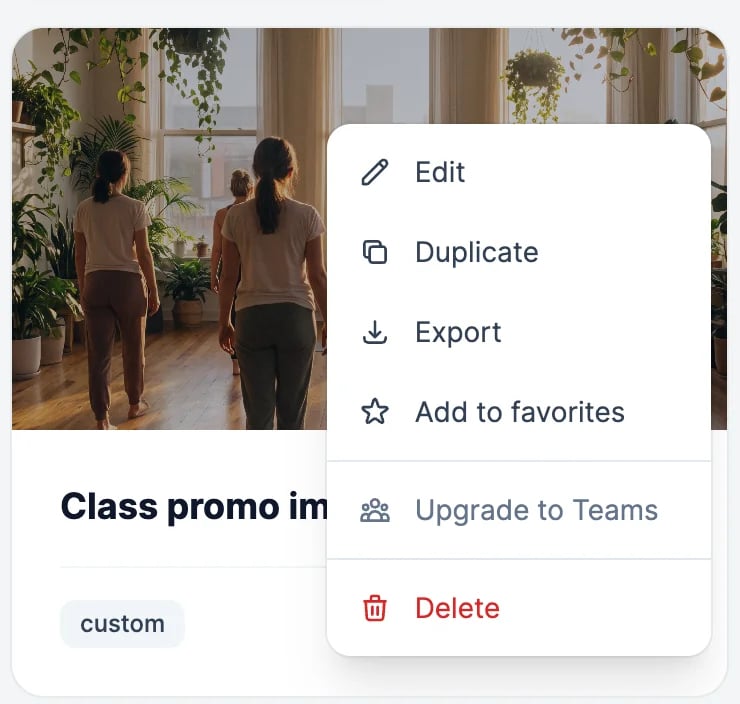
Workflows save automatically as you edit.
What workflows cost
Workflows have no charge of their own, and there’s no limit on how many you make. Each node uses the same allowance as the feature it runs: image and video nodes use image & video credits, text nodes use words, and speech and music use text-to-speech characters. Moving data between nodes, splitting images, and merging videos are free. See Build and run a workflow.Build and run a workflow
Add nodes, connect them, and run them.
Share and collaborate
Work on a workflow with other people.