
Import your ChatGPT history
Move your ChatGPT conversations into Marky Agent, so you can search them and continue them with any model.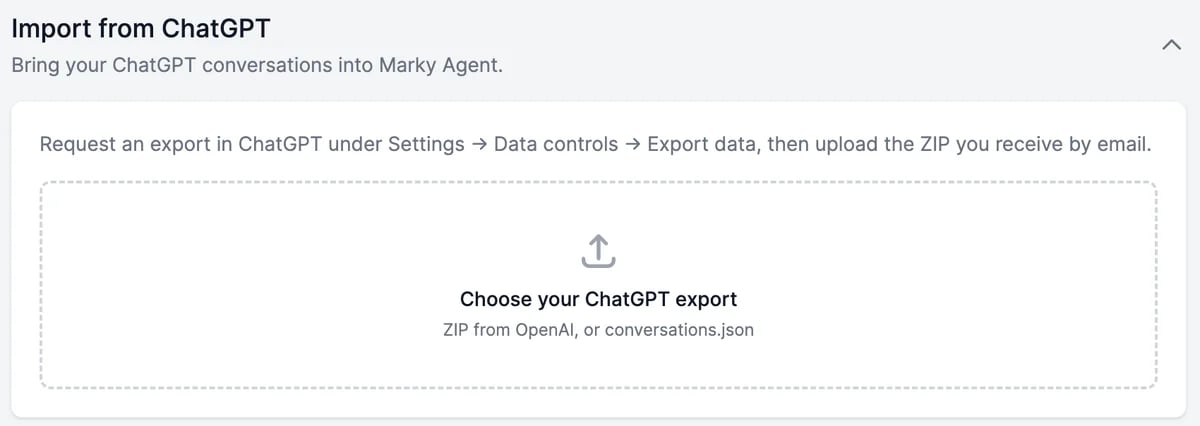
1
Export your data from ChatGPT
In ChatGPT, go to Settings > Data controls > Export data. OpenAI emails you a link to a ZIP file, usually within a few minutes to a few hours. Download it.
2
Choose the file
Click Import from ChatGPT, then Choose your ChatGPT export, and pick the ZIP, up to 2 GB. The file is read in your browser, and you see how many conversations, messages, and images were found.
3
Choose the options
- Also teach Marky about me, on by default, adds what your ChatGPT history says about you, such as your job, projects, and preferences, to Marky’s memory.
- Replace conversations I already imported: turn it on to import again conversations you imported before. Otherwise they’re skipped.
4
Click Import
Keep the tab open until it finishes. Your conversations appear in Marky Agent in a ChatGPT folder, with their original dates.
- Images you uploaded to ChatGPT come along. Images ChatGPT generated aren’t in OpenAI’s export, so they can’t be imported.
- Voice conversations are imported as text.
- Importing is free and doesn’t use words. Continuing a conversation in Marky uses words as usual.
- Imported conversations are private to you, even on a Teams plan.
Your websites, apps, and domains
My Websites and My Apps list what Marky built for you, with the link, whether it’s Public or a Draft, and when it last changed. The ⋯ menu on each has:
My Domains lists the domains you bought through Marky, with their status, registration and expiry dates, and whether they renew automatically.
Websites and apps
Build and publish with Marky.
Profile and preferences
Your details, or delete your account.