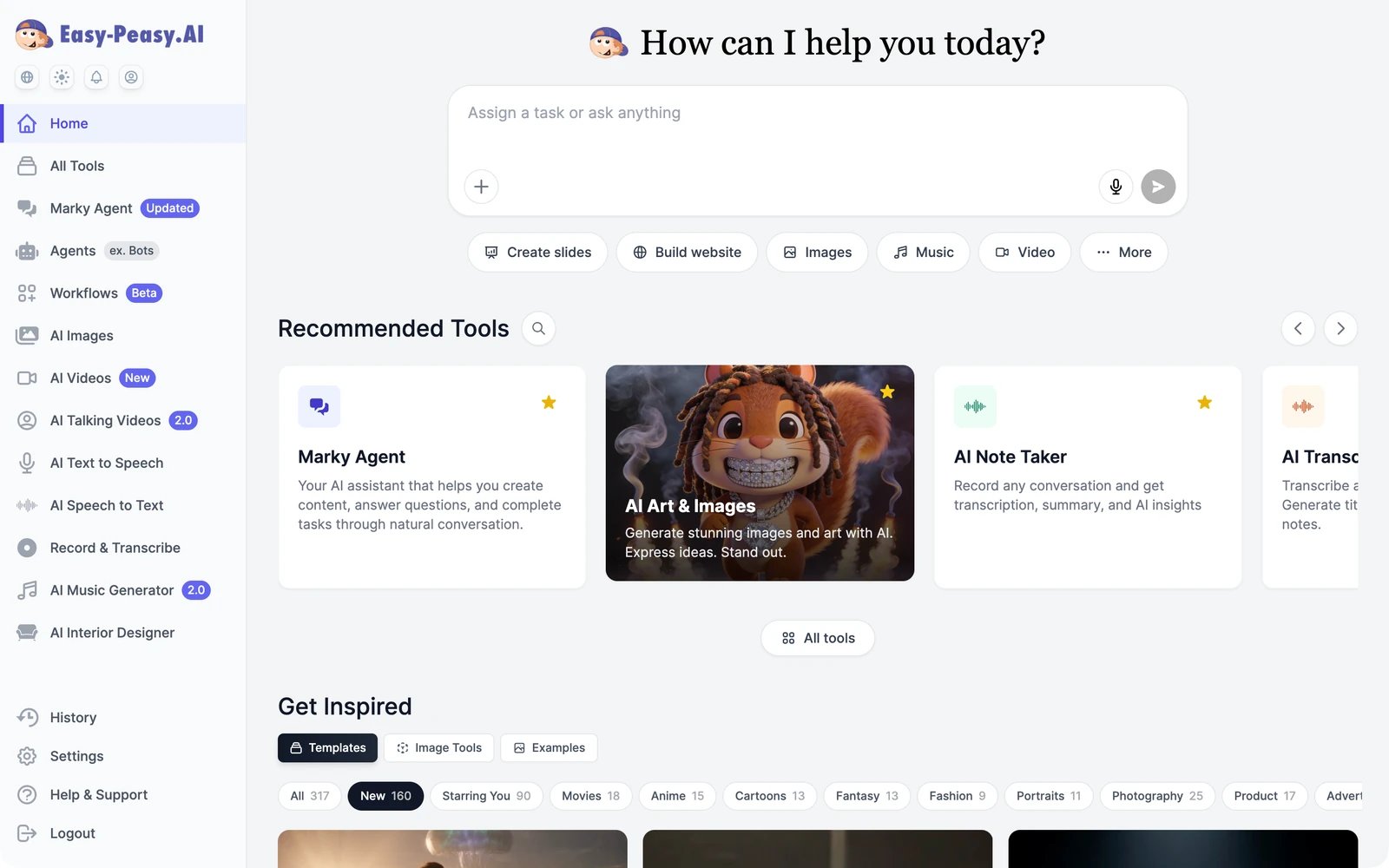
The dashboard is where you’ll spend most of your time. Here’s what each part does.
The dashboard: sidebar on the left, the Home prompt box, Recommended Tools, and Get Inspired templates

Home

The Home screen has three parts:
  • The prompt box. Anything you type here goes to Marky Agent, which opens a chat with the result. The buttons below it (Create slides, Build website, Images, Music, Video, More) start those jobs directly.
  • Recommended Tools. Popular tools, one click away. Use the arrows to browse, or the magnifier to search every tool.
  • Get Inspired. Starting points for your own work. Templates are ready-made image and video templates you can reuse with your own photos or text, filtered by category. Image Tools are one-click image jobs such as Replace Background, Style Transfer, and Headshot Generator. Examples shows images other people chose to share publicly.

The sidebar

The dashboard sidebar with Home, All Tools, favourite tools, History, Settings, Help & Support, and Logout
Home and All Tools are always at the top. Below them are your favourite tools. New accounts start with the main products (Marky Agent, Agents, Workflows, AI Images, AI Videos, and more) already there.
  • To add a tool to the sidebar, click the star on its card in All Tools or on the Home screen.
  • To remove one, hover over it in the sidebar and click its star.
History, Settings, Help & Support, and Logout are always at the bottom.
The account menu: My Profile, My Team, Subscription, Usage, History, Favourites, Refer a friend, Help & Support, and Logout

History

History keeps everything you create. It’s split into tabs: Text (tool results and Marky conversations), Favorites, Images, Videos, AI Text-to-Speech, AI Audio Generator, Sound Effects, Music, and Trash. Use the search box to find something by its text. Deleted text results go to Trash first, so you can restore them. Deleted images and videos can’t be restored. See History and trash.

Settings

Getting help

Help & Support in the sidebar has answers to common questions, a live chat, and our email address, [email protected].