
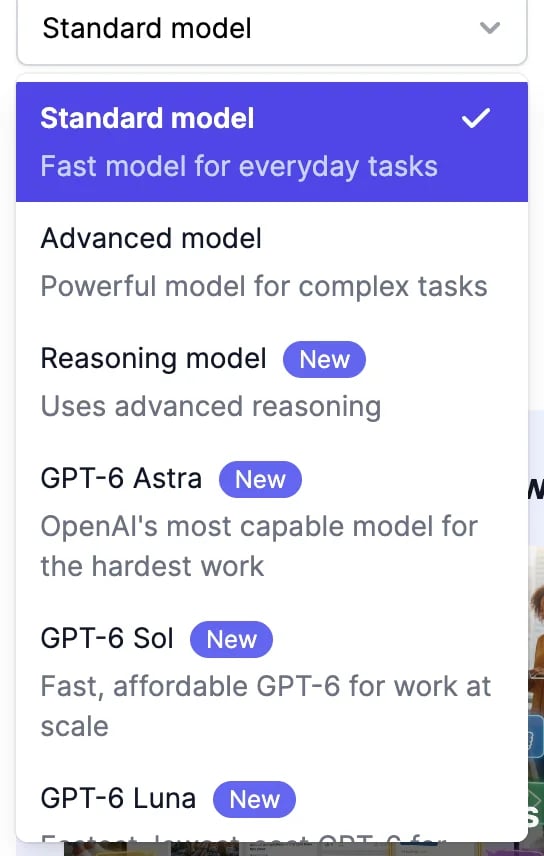
Which model to pick
- Standard model is the default: fast and good for most everyday writing, such as posts, emails, and descriptions.
- Advanced model writes more carefully. Try it for longer or more demanding work, such as reports and proposals.
- Reasoning model thinks before it writes. Use it for maths, logic, planning, and step-by-step answers.
- GPT-6, GPT-5.6, GPT-5.5, and GPT-5 mini are OpenAI’s models, and Claude Fable, Claude Opus, and Claude Sonnet are Anthropic’s, for when you prefer a particular model. The Claude options aren’t available in a few older tools.
How many words a result uses
A result uses the words it contains, multiplied by the model’s rate.
On the Free, Basic, and Starter plans, every model counts at 1x, and GPT-6 Astra and Claude Fable at 2x. On the clinical note tools, the Advanced model is free on Unlimited and Teams plans, like Standard.
A few things add to the count:
- Claude models and GPT-6 Astra also count what they read, such as long inputs and uploaded documents, after the first 1,000 tokens (about 750 words).
- Reading an uploaded file adds 150 words per result.
- More results use more words: each one counts on its own.
When you run out of words
When your plan’s words are used up, tools stop and offer to upgrade. On the Unlimited and Teams plans, the Standard and Reasoning models keep working. See Plans and credits and buy more words.On the Free plan
Only the Standard model is available. The others show Upgrade to unlock.Run a tool
Fill in the form and work with the results.
Check your usage
See how many words you’ve used.